Penso Notes
What Penso Notes is
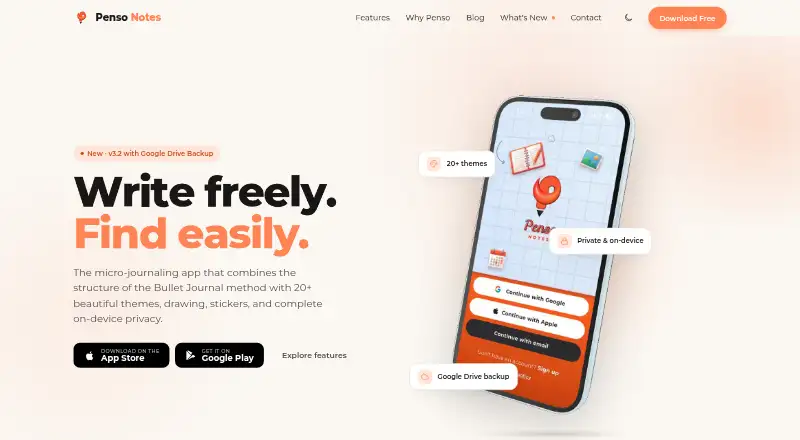
Penso Notes is a micro-journaling app for collecting short entries in a daily stream. Its Bullet Journal structure lets users log tasks, events, notes, and custom bullets, then search entries by tag, bullet type, or date. The app is designed for quick thought capture and rediscovery, including for people who prefer separate fragments to long-form journal writing. It includes more than 20 themes, such as light, dark, photographic, minimal, and seasonal styles, plus freehand drawing with pressure-sensitive brushes and more than 200 stickers. Media attachments and offline access are supported.
The maker says journals stay on the device and that its servers do not see journal text. A four-digit PIN can lock the journal when the app is backgrounded or after a timer. Users can back up to their own Google Drive, with encryption applied on the device before upload. Google Calendar sync and recurring reminders are also available. The maker says it collects anonymous crash analytics and offers an opt-out; its privacy policy also describes diagnostics and usage activity tracking. Penso Notes runs on Android and iOS. The Free plan costs nothing and includes 20+ themes, Google Drive backup, PIN lock, and no ads. There is no free trial. The privacy policy names Suchitra Enterprise as the developer.
Who it suits
Penso Notes suits journalers who want to capture brief thoughts, tasks, or events and find them later using tags, bullet types, or dates. It also fits people who value on-device journal storage, offline access, and a PIN lock.
What it does well
- Daily stream accepts tasks, events, notes, and custom bullets.
- Search works by tag, bullet type, or date.
- Includes more than 20 themes and over 200 stickers.
- Google Drive backups are encrypted on-device before upload.
- Supports offline access and a four-digit PIN lock.
What to know first
- Available platforms are limited to Android and iOS.
- The free trial option is unavailable.
- The maker describes diagnostics and usage activity tracking.
Limits
The Free plan costs nothing and includes 20+ themes, Google Drive backup, PIN lock, and no ads. No free trial is offered.
Plans
| Plan | Billed and limits | Price |
|---|---|---|
| Free | Free · No Ads | Free |
As penso-notes.com lists them, read 30 Sept 2026. The maker's own page has the final word.
Getting started
- Visit the Penso Notes website.
- Install the app on Android or iOS.
- Start a journal and add tasks, events, notes, or custom bullets to the daily stream.
- Choose a theme and use search to find entries by tag, bullet type, or date.
- Optionally set a PIN, connect Google Calendar, or back up to your own Google Drive.
Verdict
Choose Penso Notes if you want a free mobile journal for quick entries, organization, drawing, and rediscovery. It offers on-device storage and PIN protection; readers who need a desktop platform or a trial period may want to look elsewhere.
Questions
How much does Penso Notes cost?
The Free plan is listed as free.
Is there a free trial?
No. The product facts say there is no free trial.
Which platforms does it support?
Penso Notes is available on Android and iOS.
Are journals end-to-end encrypted?
The listed end-to-end encryption field is yes. For Google Drive backups, encryption happens on-device before upload.
Who develops Penso Notes?
Its privacy policy identifies Suchitra Enterprise as the developer.
Can I search journal entries?
Yes. Entries can be searched by tag, bullet type, or date.
Facts from Penso Notes's own pages
- Analytics
- The maker says it collects anonymous crash analytics and offers an opt-out; the privacy policy also describes diagnostics and usage activity tracking. · penso-notes.com, 30 Sept 2026
- Calendar
- The app supports Google Calendar sync and recurring reminders. · penso-notes.com, 30 Sept 2026
- Company
- The privacy policy identifies Suchitra Enterprise as the developer and does not state a headquarters or founding year. · penso-notes.com, 30 Sept 2026
- Drawing and stickers
- It includes freehand drawing, pressure-sensitive brush support, and more than 200 stickers. · penso-notes.com, 30 Sept 2026
- End-to-end encryption
- Yes · penso-notes.com, 20 Sept 2026
- Export formats
- basic · penso-notes.com, 20 Sept 2026
- Free plan
- Yes · penso-notes.com, 20 Sept 2026
- Google Drive backup
- Users can back up their journal to their own Google Drive, with encryption on-device before upload. · penso-notes.com, 30 Sept 2026
- PIN lock
- A four-digit PIN can lock the journal, with options to lock when the app is backgrounded or after a timer. · penso-notes.com, 30 Sept 2026
- Privacy
- The maker says journals are stored on-device and that it has no server seeing journal text; its privacy policy says notes are stored locally and not transmitted to its servers. · penso-notes.com, 30 Sept 2026
- Product
- Penso Notes describes itself as a micro-journaling app combining Bullet Journal structure with themes, drawing, stickers, and on-device privacy. · penso-notes.com, 30 Sept 2026
- Rapid logging
- Users can capture tasks, events, notes, and custom bullets in a daily stream. · penso-notes.com, 30 Sept 2026
- Search
- Entries can be searched by tag, bullet type, or date. · penso-notes.com, 30 Sept 2026
- Support
- The maker lists [email protected] for questions and support. · penso-notes.com, 30 Sept 2026
- Themes
- The app offers more than 20 themes, including light, dark, photographic, minimal, and seasonal options. · penso-notes.com, 30 Sept 2026
- Who it is for
- The maker positions Penso Notes for journalers who want quick thought capture, organization, and rediscovery, including people who prefer fragmented entries to long-form journaling. · penso-notes.com, 30 Sept 2026
Where Penso Notes stands on Freedom251
- Journaling apps#20 of 37
- Journal Apps#26 of 35
- Journaling Software#28 of 37