Freedom251 › Online Proctoring Software
Pearson OnVUE
What Pearson OnVUE is
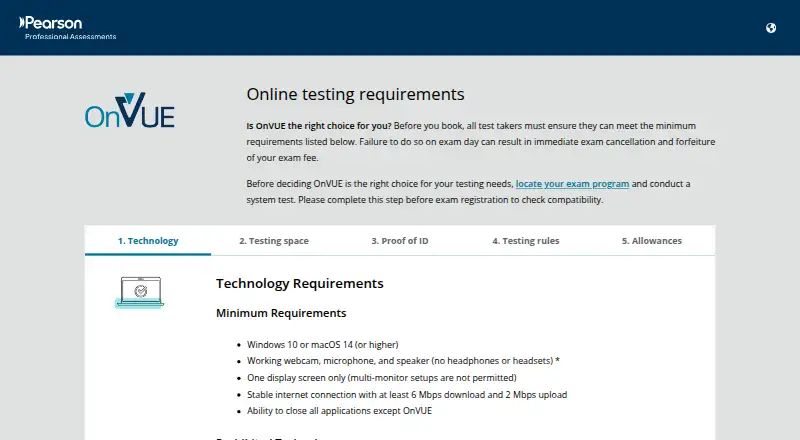
Pearson OnVUE lets candidates take participating exams remotely under live human proctoring and assistive AI monitoring. Whether an exam is available online depends on its program and is shown during registration. Before testing, candidates complete technology checks, submit photos of themselves and their ID, and scan the room through a 360-degree check-in. Pearson says sessions are recorded for security, quality, and training, and identity verification may include biometric facial comparison. The process captures a candidate’s face, voice, desk, and workspace. Candidates need Windows 10 or macOS 14 or later, a webcam, microphone, speaker, one display, and internet speeds of at least 6 Mbps download and 2 Mbps upload. Testing must take place alone in a quiet, private space. VPNs, corporate, public, or shared networks, and virtual machines are prohibited. Candidates can contact a proctor through in-exam chat, but the proctor cannot pause or extend the exam or troubleshoot a device or network. Pearson says OnVUE supports exam content such as videos and labs.
Who it suits
OnVUE is for candidates taking exams whose programs allow remote proctoring, including certification and licensure assessments. It also serves exam providers that offer online testing.
What it does well
- Supports remote exams from home
- Includes live human proctoring and AI monitoring
- Check-in includes identity and room checks
- Supports exam content such as videos and labs
What to know first
- Online testing is not available for every exam
- Requires Windows 10 or macOS 14 or later
- Candidates must test alone in a private space
- Proctors cannot pause exams or troubleshoot devices
Limits
Online testing depends on the exam program. Candidates must meet the stated system and network minimums and follow the private-space and network restrictions; a proctor cannot pause or extend the exam or troubleshoot the device or network.
Getting started
- Check during exam registration whether your program offers online testing.
- Use a computer running Windows 10 or macOS 14 or higher.
- Prepare a webcam, microphone, speaker, one display, and a connection meeting the minimum speeds.
- Arrange a quiet, private space where you can test alone without a prohibited network or virtual machine.
- Complete the technology checks, submit photos of yourself and your ID, and scan the room at check-in.
Verdict
OnVUE offers a remote route only when a candidate’s exam program permits it. Review the eligibility, system requirements, network restrictions, and recording practices before booking.
Questions
Which exams can I take through OnVUE?
Only exam programs that offer online testing are eligible. Availability is shown during registration.
What does OnVUE cost?
Pricing is on request.
What are the computer and internet requirements?
The minimum operating systems are Windows 10 and macOS 14 or higher. Candidates need a webcam, microphone, speaker, one display, and internet of at least 6 Mbps download and 2 Mbps upload.
How does proctoring work?
Candidates are monitored by human proctors and assistive AI tools, and sessions are recorded. Identity checks may use biometric facial comparison.
Can I contact a proctor during the exam?
Yes. In-exam chat connects candidates with a proctor, but proctors cannot pause or extend the exam or troubleshoot devices or networks.
What environment restrictions apply?
Candidates must test alone in a quiet, private space. VPNs, corporate networks, public or shared networks, and virtual machines are prohibited.
Facts from Pearson OnVUE's own pages
- At-home testing
- OnVUE lets exam providers offer online proctored exams so candidates can test from home, including candidates in rural areas. · pearsonvue.com, 7 Oct 2026
- Availability
- Whether an exam can be taken online depends on the test program and is shown during registration. · pearsonvue.com, 7 Oct 2026
- Candidate record integration
- Pearson says it integrates candidate data into one record across test locations, delivery modes, and exams. · pearsonvue.com, 7 Oct 2026
- Check-in
- Candidates take technology checks, submit photos of themselves and their ID, and complete a 360° room scan during check-in. · pearsonvue.com, 7 Oct 2026
- Company history
- Pearson says Virtual University Enterprises launched in 1994 and Pearson acquired it in 2000. · pearsonvue.com, 7 Oct 2026
- Data integration
- Pearson says its platform integrates candidate data into one record across online and test-center delivery. · pearsonvue.com, 7 Oct 2026
- Founded
- 1994 · pearsonvue.com, 28 Sept 2026
- Headquarters
- Pearson VUE lists its corporate headquarters in Bloomington, Minnesota, USA. · pearsonvue.com, 7 Oct 2026
- Human and AI monitoring
- Candidates consent to monitoring by human proctors and assistive AI tools throughout the test. · pearsonvue.com, 7 Oct 2026
- Identity and room checks
- Check-in includes photos of the candidate and their ID, technology checks, and a 360-degree room scan. · pearsonvue.com, 7 Oct 2026
- Identity verification
- Pearson may use ID authentication protocols and biometric facial comparison technology to verify a candidate’s identity. · pearsonvue.com, 7 Oct 2026
- Not all exams qualify
- Candidates must check whether their exam program offers online testing before booking. · pearsonvue.com, 7 Oct 2026
- Privacy
- Online proctoring captures and records a candidate’s face, voice, desk, and workspace for test security and integrity purposes. · pearsonvue.com, 7 Oct 2026
- Proctoring
- Exam sessions are recorded, and candidates are monitored by human proctors and assistive AI tools. · pearsonvue.com, 7 Oct 2026
- Purpose
- OnVUE is Pearson VUE’s online testing system for taking participating exams remotely. · pearsonvue.com, 7 Oct 2026
- Security
- Pearson describes OnVUE as combining AI with live human proctoring and identity authentication technology. · pearsonvue.com, 7 Oct 2026
- Session recording
- Pearson states that exam sessions are recorded for security, quality, and training purposes. · pearsonvue.com, 7 Oct 2026
- Strict environment rules
- Candidates must test alone in a quiet private space and may not use VPNs, corporate networks, or public or shared networks. · pearsonvue.com, 7 Oct 2026
- Support
- Candidates can use in-exam chat to reach a proctor, who cannot pause or extend the exam or troubleshoot the device or network. · pearsonvue.com, 7 Oct 2026
- Support limits
- Candidates can contact a proctor by in-exam chat, but proctors cannot pause or extend the exam or troubleshoot the device or network. · pearsonvue.com, 7 Oct 2026
- System requirements
- The minimum operating systems are Windows 10 or macOS 14 or higher, with a webcam, microphone, speaker, one display, and internet speeds of at least 6 Mbps download and 2 Mbps upload. · pearsonvue.com, 7 Oct 2026
- Technical requirements
- The listed minimum operating systems are Windows 10 and macOS 14 or higher; candidates also need a webcam, microphone, speaker, one display, and internet meeting the stated speed requirements. · pearsonvue.com, 7 Oct 2026
- Testing restrictions
- Candidates must test alone in a quiet, private space, and VPNs, corporate networks, public or shared networks, and virtual machines are prohibited. · pearsonvue.com, 7 Oct 2026
- Test owner features
- Pearson says OnVUE supports exams with diverse item types, videos, and labs through its test drivers. · pearsonvue.com, 7 Oct 2026
Where Pearson OnVUE stands on Freedom251
- Online Proctoring Software#19 of 27