Freedom251 › API Documentation Tools

pdoc
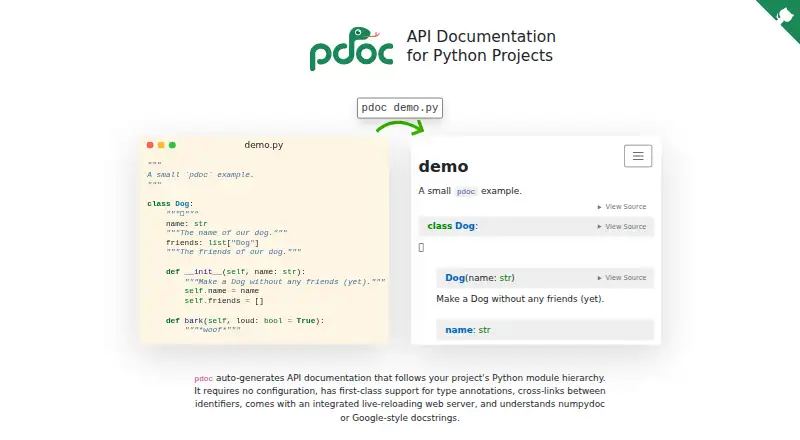
What pdoc is
pdoc creates API documentation from Python code and docstrings, arranging pages to reflect a project's module hierarchy. Its setup requires no configuration to get started, and generated documentation is standalone HTML that can be saved as files. A built-in web server reloads the preview when source files change. The tool supports Python type annotations and Markdown, numpydoc, and Google-style docstrings, with limited reStructuredText support. Developers can customize HTML templates; documentation search runs in the browser without third-party services. Deployment guidance includes GitHub Pages, and custom HTML fragments can be embedded in CMSs or static site generators. pdoc is free and open source, compatible with Python 3.10 and newer, and available for Linux, macOS, Windows, web, and self-hosted use. It can also be used as a Python library. Its focus is API documentation, and HTML is its only output. Because pdoc imports or executes documented modules to extract docstrings, that runtime behavior is worth considering. For substantially more complex documentation, its documentation points to Sphinx.
Who it suits
pdoc suits Python project developers who want to build API documentation from code and docstrings. It is a fit when HTML output meets the need and the modules can be imported or executed during generation.
What it does well
- Starts without configuration.
- Supports Python type annotations.
- Search works client-side without third-party services.
- Can customize generated HTML templates.
- Free and open source.
What to know first
- HTML is the only output format.
- Imports or executes documented Python modules.
- Focused on API documentation; complex needs may call for Sphinx.
Limits
pdoc outputs HTML only. Its documentation identifies API documentation as the main use case and recommends Sphinx for substantially more complex documentation.
Getting started
- Install or access pdoc for a Python 3.10-or-newer project
- Point pdoc at the Python project and its docstrings
- Use the built-in web server for a live preview
- Customize the generated HTML templates if needed
- Export the standalone HTML or deploy it with GitHub Pages
- Embed HTML fragments in a CMS or static site generator
Verdict
pdoc offers a direct route from Python modules and docstrings to navigable HTML API documentation. Consider its HTML-only output and dynamic analysis behavior before using it for a project.
Questions
Is pdoc free and open source?
Yes. pdoc is free and open source, and its repository lists the MIT-0 license.
Which platforms are listed?
Linux, macOS, Windows, web, and self-hosted platforms are listed.
What Python versions are supported?
The project states compatibility with Python 3.10 and newer.
What docstring formats does pdoc understand?
It understands Markdown, numpydoc, and Google-style docstrings, with limited reStructuredText support.
Can generated documentation be deployed elsewhere?
Deployment guidance covers GitHub Pages, and custom HTML fragments can be embedded in CMSs or static site generators.
How does pdoc inspect project code?
pdoc imports or executes Python modules while extracting docstrings.
Facts from pdoc's own pages
- Customization
- Users can customize pdoc's HTML templates. · pdoc.dev, 11 Oct 2026
- Docstring formats
- pdoc understands Markdown, numpydoc, and Google-style docstrings, with limited reStructuredText support. · pdoc.dev, 4 Oct 2026
- Docstrings
- pdoc understands numpydoc and Google-style docstrings. · pdoc.dev, 11 Oct 2026
- Dynamic analysis
- pdoc imports or executes Python modules while extracting docstrings. · pdoc.dev, 4 Oct 2026
- Integrations
- The documentation says pdoc can be integrated with almost any CMS or static site generator, and gives GitHub Pages as an example. · pdoc.dev, 11 Oct 2026
- Intended users
- The product is for Python project developers who want to generate API documentation from their code and docstrings. · pdoc.dev, 4 Oct 2026
- Library use
- pdoc provides a high-level interface and can also be used as a Python library. · pdoc.dev, 11 Oct 2026
- License
- The project repository lists the MIT-0 license. · github.com, 11 Oct 2026
- Limit
- pdoc supports HTML output only and recommends Sphinx for substantially more complex documentation needs. · pdoc.dev, 11 Oct 2026
- Live preview
- pdoc includes a web server with live reloading. · pdoc.dev, 11 Oct 2026
- Maintenance
- The repository says pdoc was originally created by Andrew Gallant and is currently maintained by Maximilian Hils. · github.com, 11 Oct 2026
- Output
- pdoc produces standalone HTML documentation files. · pdoc.dev, 11 Oct 2026
- Output limitation
- pdoc supports HTML output only. · pdoc.dev, 4 Oct 2026
- Purpose
- pdoc automatically generates API documentation that follows a Python project's module hierarchy. · pdoc.dev, 11 Oct 2026
- Python requirement
- The project states that pdoc is compatible with Python 3.10 and newer. · github.com, 11 Oct 2026
- Runtime behavior
- pdoc uses dynamic analysis, so it executes or imports the Python modules being documented. · pdoc.dev, 11 Oct 2026
- Scope
- The documentation identifies API documentation as pdoc's main use case and recommends Sphinx for substantially more complex documentation needs. · pdoc.dev, 4 Oct 2026
- Search
- Generated documentation search runs client-side and does not require third-party services. · pdoc.dev, 4 Oct 2026
- Setup
- pdoc says it requires no configuration for basic use. · pdoc.dev, 11 Oct 2026
- Type annotations
- pdoc has first-class support for Python type annotations and automatically links documented identifiers. · pdoc.dev, 11 Oct 2026
Where pdoc stands on Freedom251
- API Documentation Tools#11 of 27