PDFill PDF Tools
What PDFill PDF Tools is
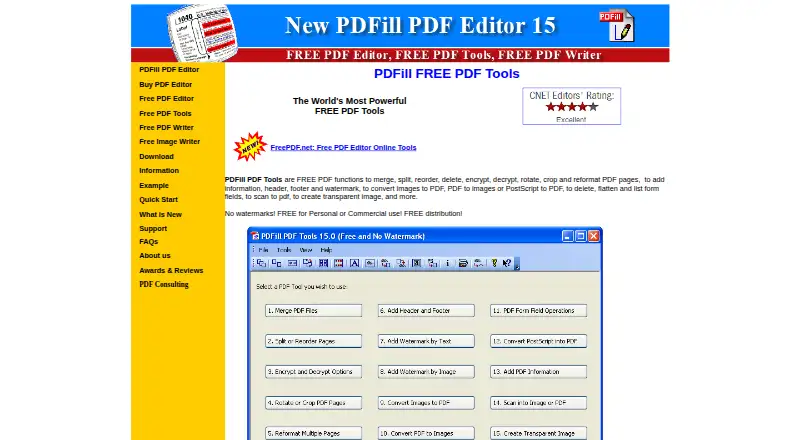
PDFill PDF Tools is a free Windows utility for managing PDF pages, converting files, and handling document security. Its page tools merge, split, reorder, delete, rotate, crop, and reformat pages. It can encrypt and decrypt PDFs, though a master or user password may be required. For document presentation, it adds headers, footers, watermarks, and document information. Conversion options cover images to PDF, PDF pages to images, and PostScript files to PDF; the free tools also include scanning to PDF.
PDFill PDF Tools can delete, flatten, and list PDF form fields, but it does not create forms or edit text. The maker says the tools are free for personal or commercial use and may be distributed freely. The listed plan costs nothing and includes free PDF functions with no watermarks. The download page lists Windows XP through Windows 10, in 32-bit and 64-bit versions, and requires GhostScript 8.63. The maker identifies PlotSoft L.L.C. as the maker, offers online technical support usually processed within 0–2 business days, and does not offer telephone support. The tools are accessible from PDFill PDF Editor; PDFill PDF Writer can create PDFs from printable Windows applications.
Who it suits
PDFill PDF Tools suits Windows users who need free PDF page management, conversion, scanning, or basic document security for personal or commercial use. It may also suit people who need to manage existing form fields, rather than create forms or edit PDF text.
What it does well
- Free for personal or commercial use, with no watermarks.
- Merges, splits, reorders, deletes, rotates, crops, and reformats PDF pages.
- Converts images, PDF pages, and PostScript files.
- Includes a scan-to-PDF function.
- Encrypts and decrypts PDF documents.
- Online support requests are usually processed within 0–2 business days.
What to know first
- Does not edit PDF text or create forms.
- Does not support Mac, Linux, Android, or Windows RT.
- Requires GhostScript 8.63.
- No telephone support is offered.
Plans
| Plan | Billed and limits | Price |
|---|---|---|
| PDFill PDF Tools | Free PDF functions · personal or commercial use · no watermarks | Free |
As pdfill.com lists them, read 9 Oct 2026. The maker's own page has the final word.
Getting started
- Visit https://www.pdfill.com/pdf_tools_free.html.
- Choose the download that matches your Windows version and 32-bit or 64-bit system.
- Install GhostScript 8.63, which the download page lists as a requirement.
- Use the free PDF tools for personal or commercial work.
Verdict
Choose PDFill PDF Tools if you need free Windows tools for PDF page changes, conversion, scanning, or security. Look elsewhere if you need text editing, form creation, or support on Mac, Linux, Android, or Windows RT.
Questions
How much does PDFill PDF Tools cost?
The listed plan is free. The maker says the tools are free for personal or commercial use and may be freely distributed.
What can I do with PDFill PDF Tools?
It can manage PDF pages, encrypt or decrypt PDFs, add headers, footers, watermarks, and document information, convert files, and scan to PDF. It can also delete, flatten, and list PDF form fields.
Does it edit text or create forms?
No. Text editing and form creation are not supported.
Which platforms does it support?
The download page lists Windows XP through Windows 10, including 32-bit and 64-bit versions. The maker says it does not support Mac, Linux, Android, or Windows RT.
Who makes PDFill PDF Tools?
The site identifies PlotSoft L.L.C. as the maker in its copyright notice.
Does PDFill integrate with other tools?
PDFill PDF Tools is accessible from within PDFill PDF Editor. PDFill PDF Writer can create PDFs from printable Windows applications.
Facts from PDFill PDF Tools's own pages
- Dependency
- The download page lists GhostScript 8.63 as a requirement. · pdfill.com, 9 Oct 2026
- Distribution
- The maker says PDFill PDF Tools are free for personal or commercial use and may be freely distributed. · pdfill.com, 9 Oct 2026
- File conversion
- Convert images to PDF, PDF pages to images, and PostScript files to PDF. · pdfill.com, 9 Oct 2026
- Form creation
- No · pdfill.com, 20 Sept 2026
- Forms
- Delete, flatten, and list PDF form fields. · pdfill.com, 9 Oct 2026
- Free plan
- Yes · pdfill.com, 20 Sept 2026
- Integrations
- The maker describes PDFill PDF Tools as accessible from within PDFill PDF Editor and says its PDF Writer can create PDFs from printable Windows applications. · pdfill.com, 9 Oct 2026
- Maker
- The site identifies PlotSoft L.L.C. as the maker in its copyright notice. · pdfill.com, 9 Oct 2026
- OCR
- No · pdfill.com, 20 Sept 2026
- Other platforms
- The maker says PDFill does not support Mac, Linux, Android, or Windows RT. · pdfill.com, 9 Oct 2026
- PDF conversion
- Yes · pdfill.com, 20 Sept 2026
- PDF page tools
- Merge, split, reorder, delete, rotate, crop, and reformat PDF pages. · pdfill.com, 9 Oct 2026
- Scanning
- The free tools include a function to scan to PDF. · pdfill.com, 9 Oct 2026
- Security claim
- The maker says the PDFill package contains no spyware, adware, or virus. · pdfill.com, 9 Oct 2026
- Security options
- Encrypt and decrypt PDF documents; a master or user password may be required. · pdfill.com, 9 Oct 2026
- Support
- The maker offers online technical support and says requests are usually processed within 0–2 business days; it does not offer telephone support. · pdfill.com, 9 Oct 2026
- Supported platforms
- Windows · pdfill.com, 20 Sept 2026
- Text editing
- No · pdfill.com, 20 Sept 2026
- Watermarks and metadata
- Add headers, footers, watermarks, and document information to PDFs. · pdfill.com, 9 Oct 2026
- Windows support
- The download page lists Windows XP through Windows 10, including 32-bit and 64-bit versions. · pdfill.com, 9 Oct 2026
Where PDFill PDF Tools stands on Freedom251
- PDF splitters#9 of 17
- PDF Form Software#16 of 27
- PDF editors#80 of 102