Freedom251 › Password Managers
Passwordstate
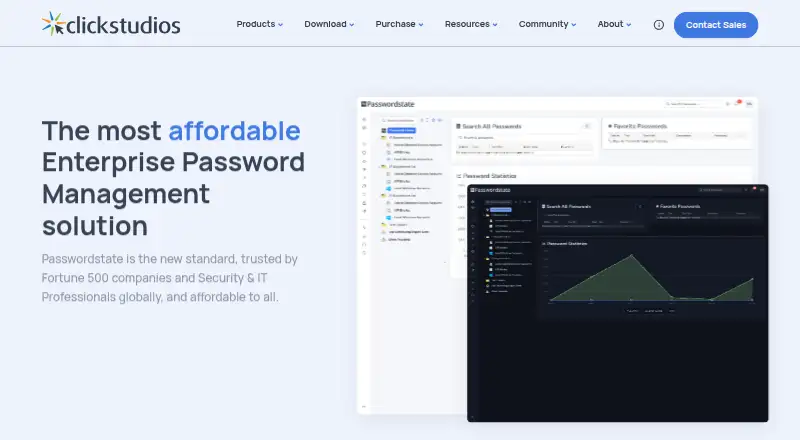
What Passwordstate is
Passwordstate is a password management product from Passwordstate, a maker based in Adelaide, South Australia, Australia. It supports web, Windows, iOS, Android, and a Chrome extension, with passkey support and secure sharing. Teams can use team sharing, business administration controls, single sign-on, multifactor authentication, and audit logs. Passwordstate offers a free plan at no cost to eligible organizations, limited to five users. Paid choices include named user licenses, client access licenses, and enterprise or global licenses. The Named User License is $73.60, paid once, with a minimum of five users in the 1–9 user band. Client Access License plans are listed monthly by user band: $73.60 a month for 1–9 users, $68.20 a month for 10–19, $62.90 a month for 20–49, $53.50 a month for 50–74, and $48.20 a month for 75–99. These are described as perpetual licenses, with annual support and upgrade protection separate. Named User License with Maintenance is $88.32, paid once. A 30-day trial is available. Passwordstate was founded in 2004, and it has no family plan.
Who it suits
Passwordstate suits eligible organizations that need a shared password manager with controls for administrators and support for SSO, MFA, and audit logs. Its five-user free plan offers an entry point for smaller eligible groups, while paid licenses cover larger user bands and installations.
What it does well
- Free plan covers five users at eligible organizations.
- Supports passkeys and secure sharing.
- Team sharing and business admin controls are available.
- Supports SSO, MFA, and audit logs.
- Works on web, Windows, iOS, Android, and Chrome extension.
What to know first
- The free plan is limited to five users.
- The 1–9 user Named User License has a five-user minimum.
- No family plan is offered.
- Annual support and upgrade protection for client access licenses is separate.
Limits
The free plan is provided at no cost to eligible organizations and covers five users. Named User License pricing for the 1–9 user band has a five-user minimum; client access licenses are perpetual, with annual support and upgrade protection separate.
Plans
| Plan | Billed and limits | Price |
|---|---|---|
| Free for 5 Users | Provided at no cost to eligible organizations · 5 users | Free |
| Named User License | Client Access Licenses are perpetual · 1–9 users · Minimum 5 users | $73.60, paid once |
| Client Access License (1–9 users) | Perpetual license; annual support and upgrade protection is separate · 1–9 users | $73.60 a month |
| Named User License with Maintenance | Price per user with maintenance · 1–9 users · Minimum 5 users | $88.32, paid once |
| Client Access License (10–19 users) | Perpetual license; annual support and upgrade protection is separate · 10–19 users | $68.20 a month |
| Enterprise License | Unlimited users · 1 production installation | On request |
| Client Access License (20–49 users) | Perpetual license; annual support and upgrade protection is separate · 20–49 users | $62.90 a month |
| Enterprise License with Maintenance | Unlimited users · 1 production installation | On request |
The first 8 of 15 plans, as clickstudios.com.au lists them, read 20 Sept 2026. The maker's own page has the final word. Every plan
Getting started
- Visit the Passwordstate website.
- Choose the free plan if your organization is eligible and has up to five users.
- For a paid deployment, select a named user, client access, enterprise, or global license.
- Use the 30-day trial to get started.
Verdict
Choose Passwordstate if your organization needs password sharing, administrative controls, and SSO, MFA, or audit logs across its supported platforms. Eligible organizations of up to five users can start with the free plan. Groups needing larger deployments should compare the user-band licenses and account for separate annual support and upgrade protection on client access licenses.
Questions
Is Passwordstate free?
Yes. The Free for 5 Users plan is provided at no cost to eligible organizations and covers five users.
How much do paid plans cost?
Named User License is $73.60, paid once, with a five-user minimum. Client Access License plans range from $73.60 a month for 1–9 users to $48.20 a month for 75–99 users; annual support and upgrade protection is separate.
What platforms does Passwordstate support?
It supports web, Windows, iOS, Android, and a Chrome extension.
Does Passwordstate support passkeys and team sharing?
Yes. Listed capabilities include passkey support, secure sharing, and team sharing.
Who makes Passwordstate?
The maker is Passwordstate, headquartered in Adelaide, South Australia, Australia. It was founded in 2004.
Is there a family plan or trial?
There is no family plan. A 30-day trial is available.
Facts from Passwordstate's own pages
- Business admin controls
- Yes · clickstudios.com.au, 20 Sept 2026
- Family plan
- No · clickstudios.com.au, 20 Sept 2026
- Founded
- 2004 · clickstudios.com.au, 28 Sept 2026
- Free plan
- Yes · clickstudios.com.au, 20 Sept 2026
- Headquarters
- Adelaide, South Australia, Australia · clickstudios.com.au, 28 Sept 2026
- Passkey support
- Yes · clickstudios.com.au, 20 Sept 2026
- Secure sharing
- Yes · clickstudios.com.au, 20 Sept 2026
- Supported platforms
- web,Windows,iOS,Android,Chrome extension · clickstudios.com.au, 20 Sept 2026
Where Passwordstate stands on Freedom251
- Password Managers#20 of 104
- Password Management Software#10 of 38