Freedom251 › AI Coloring Page Generators
Paperkin
What Paperkin is
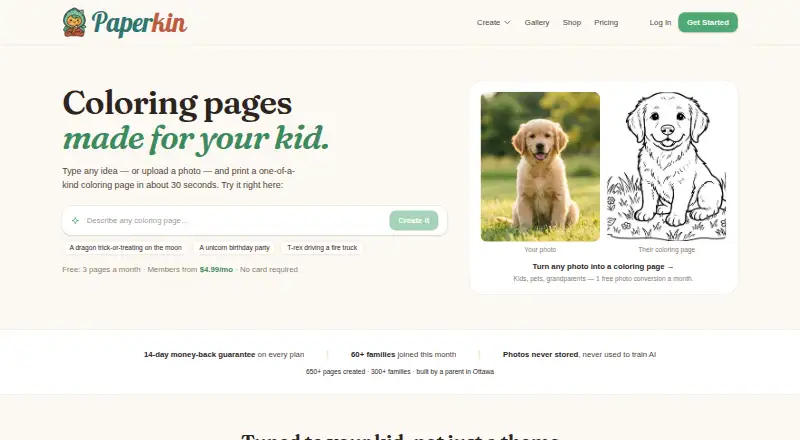
Paperkin is a web app for adults to create personalized coloring pages and books for children. Its AI generates a single page in about 30 seconds, with a detail slider offering ten age-calibrated levels from toddlers through ages 8+. Creators can choose from seven themed categories and eight art styles, and add a child’s name in any of 16 languages. Single pages download as 300 DPI PNG files; multi-page books export as KDP-ready PDFs, with multiple paper sizes available. Paperkin also creates word searches, sudoku, and crosswords using the same credits, while sudoku is free for everyone. Uploaded photos are processed temporarily and are not retained after conversion. Paperkin uses HTTPS in transit, encryption at rest through Google Cloud, and access controls. Generation inputs and uploaded photos are not used to train third-party AI models without explicit consent. The free plan gives three pages each month, one photo-to-coloring page monthly, the General theme, and a small Paperkin mark. Annual plans add page capacity and features, while one-time credit packs provide credits that do not expire. Commercial includes a commercial and resale license.
Who it suits
Paperkin suits adults aged 18 and over who want to make coloring activities for children, including personalized pages or books. Its different plans also serve people creating occasionally, building mini-books, or needing commercial and resale rights. Children should not use the generator directly.
What it does well
- Ten detail levels cover toddlers through ages 8+.
- Names can be added in 16 languages.
- Single pages download as 300 DPI PNGs.
- Multi-page books export as KDP-ready PDFs.
- Uploaded photos are not retained after conversion.
- Commercial includes commercial and resale rights.
What to know first
- The free plan is limited to three pages monthly.
- The free plan includes only the General theme.
- A small Paperkin mark appears on free-plan output.
- The generator is intended for adults, not children.
Limits
The free plan allows three pages per month, one photo-to-coloring page per month, and the General theme, and its output carries a small Paperkin mark. The Personal annual plan allows 40 pages per month; higher annual plans offer larger monthly allowances.
Plans
| Plan | Billed and limits | Price |
|---|---|---|
| Free | 3 pages every month · General theme · 1 photo-to-coloring page/month · small paperkin.app mark | Free |
| Commercial | $179/year · 300 credits/month · everything in Creator · commercial and resale license | $179 a year |
| 100-page credit pack | 100 pages · credits never expire | $17.99, paid once |
| Personal | $39/year · 40 pages/month · all 7 themes + custom themes · no watermark · name personalization · saved library · credits never expire | $39 a year |
| 25-page credit pack | 25 pages · credits never expire | $5.99, paid once |
| 500-page credit pack | 500 pages · credits never expire | $69.99, paid once |
| Creator | $71/year · 100 pages/month · everything in Personal · mini-book builder · full-color covers · priority generation | $71 a year |
As paperkin.app lists them, read 1 Oct 2026. The maker's own page has the final word.
Getting started
- Open the Paperkin website in a web browser.
- Choose the Free plan or a paid annual plan or credit pack.
- Create pages using the age detail levels, themes, styles, or name personalization available on your plan.
- Download single pages as PNG files or export multi-page books as PDFs.
Verdict
Choose Paperkin if you want age-tuned, personalized coloring pages or books, with puzzle generation as an additional use. The free plan is suitable for a small monthly volume; creators needing more pages, all themes, or commercial rights can consider paid plans. Children should not operate the generator directly.
Questions
Is Paperkin free?
Yes. Its Free plan costs nothing and includes three pages each month, the General theme, one photo-to-coloring page monthly, and a small Paperkin mark.
What do paid plans cost?
The 25-page credit pack is $5.99, paid once, and the 100-page pack is $17.99, paid once. Annual plans include Personal at $39 a year, Creator at $71 a year, and Commercial at $179 a year.
Which platforms does Paperkin support?
Paperkin is a web app.
Can I use the output commercially?
The Commercial plan includes a commercial and resale license.
What files can I download?
Single pages download as 300 DPI PNG files, while multi-page books export as KDP-ready PDFs.
Does Paperkin offer a free trial?
No. Paperkin has a free plan and no free trial.
Facts from Paperkin's own pages
- Age controls
- The detail slider provides ten age-calibrated levels covering toddlers through ages 8+. · paperkin.app, 1 Oct 2026
- AI training policy
- Generation inputs and uploaded photos are not used to train third-party AI models without explicit consent. · paperkin.app, 1 Oct 2026
- Generation speed
- A single coloring page generates in about 30 seconds. · paperkin.app, 1 Oct 2026
- Headquarters
- Ottawa, Ontario, Canada · paperkin.app, 28 Sept 2026
- Integrations
- Paperkin uses Google Firebase for authentication and Firestore, Google Cloud Platform for hosting, Google Gemini for image generation, and Stripe for payments. · paperkin.app, 1 Oct 2026
- Intended users
- Paperkin is intended for adults aged 18 and over creating content for children; children should not use the generator directly. · paperkin.app, 1 Oct 2026
- Output formats
- Single pages download as 300 DPI PNG files, while multi-page books export as KDP-ready PDFs. · paperkin.app, 1 Oct 2026
- Personalization
- Children's names can be embedded into pages in 16 languages. · paperkin.app, 1 Oct 2026
- Photo privacy
- Uploaded photos are processed transiently and are not retained after conversion. · paperkin.app, 1 Oct 2026
- Product
- Paperkin is an AI-powered web app that generates personalized, age-tuned coloring pages and full coloring books for children. · paperkin.app, 1 Oct 2026
- Puzzles
- The service also provides word searches, sudoku, and crosswords using the same credits; sudoku is free for everyone. · paperkin.app, 1 Oct 2026
- Security
- Paperkin uses HTTPS in transit, encryption at rest via Google Cloud, and access controls. · paperkin.app, 1 Oct 2026
- Support
- Support is available at [email protected] with stated responses within 1–2 business days. · paperkin.app, 1 Oct 2026
- Themes and styles
- Paperkin offers seven themed categories and eight art styles. · paperkin.app, 1 Oct 2026
Where Paperkin stands on Freedom251
- AI Coloring Page Generators#32 of 37