Freedom251 › AI Coloring Page Generators
KawaiiDraw
What KawaiiDraw is
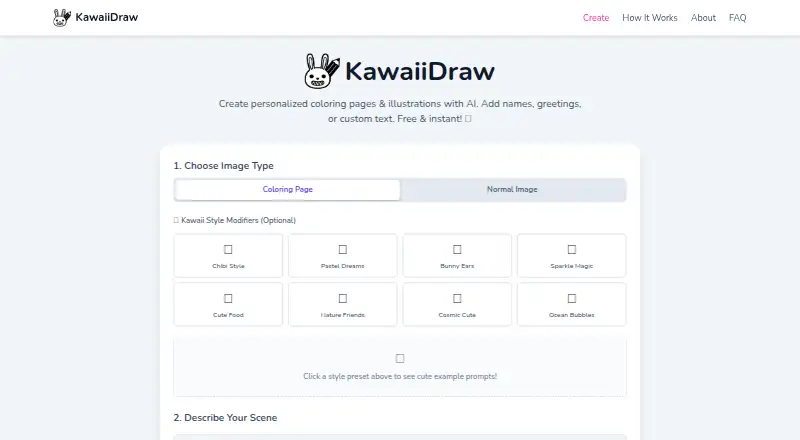
KawaiiDraw is a web service for creating kawaii coloring pages and cute characters from prompts. It offers black-and-white pages for coloring and full-color illustrations. You can personalize an image with text in different languages or emojis; a Canvas-based overlay adds that text in your browser. KawaiiDraw says its image generation uses Hugging Face’s FLUX.1-schnell model, with requests sent to Hugging Face’s Inference API. The privacy policy says prompts and generated images are not kept on KawaiiDraw’s servers, and personalized text stays in the browser rather than being sent to the service. Generated images are not saved by KawaiiDraw, so download any you want to keep. No account is required. The policy also describes HTTPS encryption for API communications and rate limiting. KawaiiDraw uses Google Analytics and Google AdSense. Its maker, pommesbude, describes the service as intended for parents, teachers, and artists. The Free plan costs nothing, with no subscriptions, credits, or hidden fees.
Who it suits
KawaiiDraw is intended for parents, teachers, and artists who want to create printable coloring pages or full-color kawaii illustrations. It suits people who want to add custom text without creating an account.
What it does well
- Offers both coloring pages and full-color illustrations
- Adds multilingual text and emojis in-browser
- No account required
- Print-ready files and commercial use are supported
- Free plan costs nothing
What to know first
- Images must be downloaded to keep them
- Uses Google Analytics and Google AdSense
Plans
| Plan | Billed and limits | Price |
|---|---|---|
| Free | No subscriptions · no credits · no hidden fees | Free |
As kawaiidraw.com lists them, read 11 Oct 2026. The maker's own page has the final word.
Getting started
- Open KawaiiDraw in a web browser
- Enter a prompt
- Choose a coloring page or full-color illustration
- Add personalized text or emojis
- Generate the image
- Download the result
Verdict
KawaiiDraw combines prompt-based kawaii art generation with browser-based text personalization. Keep in mind that generated images are not stored for later access, so download them when you want to retain a copy.
Questions
How much does KawaiiDraw cost?
The Free plan is listed as free, with no subscriptions, credits, or hidden fees.
Do I need an account?
No. The privacy policy says KawaiiDraw does not require user accounts.
What can it create?
It creates black-and-white kawaii coloring pages and full-color cute character illustrations from prompts.
Are prompts and images stored?
KawaiiDraw says prompts and generated images are not stored on its servers. Download images you want to keep.
Can I use the images commercially?
Commercial use is listed as available, and print-ready files are listed.
Which model and service generate images?
The service says it uses Hugging Face’s FLUX.1-schnell model through Hugging Face’s Inference API.
Facts from KawaiiDraw's own pages
- Accounts
- The service does not require user accounts, according to its privacy policy. · kawaiidraw.com, 11 Oct 2026
- Analytics and ads
- The privacy policy says KawaiiDraw uses Google Analytics and Google AdSense. · kawaiidraw.com, 11 Oct 2026
- Art modes
- It offers black-and-white coloring pages and full-color kawaii illustrations. · kawaiidraw.com, 11 Oct 2026
- Custom text
- Users can add personalized text, including text in different languages and emojis. · kawaiidraw.com, 11 Oct 2026
- Headquarters
- Germany · kawaiidraw.com, 28 Sept 2026
- Image model
- The service says it uses Hugging Face’s FLUX.1-schnell model to generate images. · kawaiidraw.com, 11 Oct 2026
- Integrations
- Image generation requests are sent to Hugging Face’s Inference API. · kawaiidraw.com, 11 Oct 2026
- Intended users
- The maker describes parents, teachers, and artists as people the service is intended to help. · kawaiidraw.com, 11 Oct 2026
- Maker
- KawaiiDraw is created and maintained by pommesbude, described as a solo developer. · kawaiidraw.com, 11 Oct 2026
- Personalization privacy
- Personalization text is processed in the browser and is not sent to or stored on KawaiiDraw’s servers. · kawaiidraw.com, 11 Oct 2026
- Privacy
- The privacy policy says prompts and generated images are not stored on KawaiiDraw’s servers. · kawaiidraw.com, 11 Oct 2026
- Purpose
- KawaiiDraw creates kawaii coloring pages and cute characters with AI. · kawaiidraw.com, 11 Oct 2026
- Save images
- Generated images are not stored on the service, so users must download them if they want to keep them. · kawaiidraw.com, 11 Oct 2026
- Security
- The privacy policy says API communications use HTTPS encryption and the service implements rate limiting. · kawaiidraw.com, 11 Oct 2026
- Text rendering
- A Canvas-based text overlay renders personalized text client-side in the browser. · kawaiidraw.com, 11 Oct 2026
Where KawaiiDraw stands on Freedom251
- AI Coloring Page Generators#29 of 35