Freedom251 › PC Overclocking Software
overclockSPD
What overclockSPD is
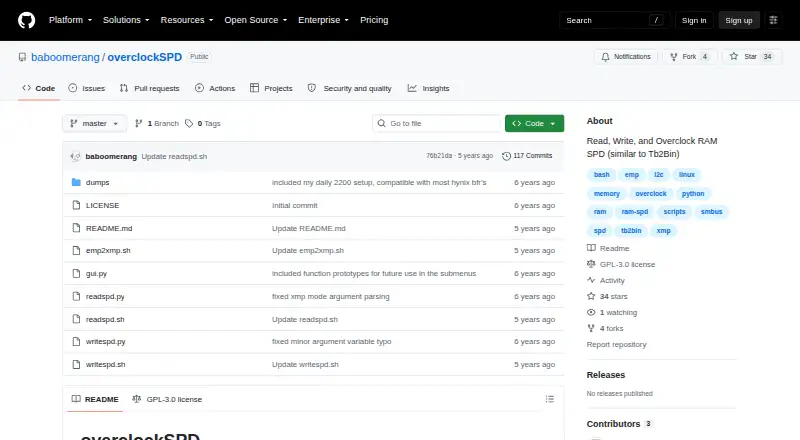
overclockSPD is a free Linux software project made up of shell and Python scripts for reading and writing RAM SPD data and changing memory timings, voltages, and configuration. Each command works on a single target, chosen by bus and DIMM address. The scripts can also convert .emp files made with Thaiphoon Burner into .xmp files. Setup requires the i2c_dev, i2c_i801, and eeprom modules, as well as the i2c-tools package. Read results go to the current working directory, which must be writable. The project warns that writing through SMBus to locations other than DIMMs may damage or brick hardware. Its author provides the software as is and places responsibility for compatibility, equipment protection, and backups on users. The repository identifies GPL-3.0 as its license. A graphical interface for RAM overclocking is described as planned, not as a current feature. For a busy-device error at address 0x50, the README suggests unloading the at24 module.
Who it suits
It suits Linux users who need to inspect or modify RAM SPD data using scripts. Users should be comfortable managing the required hardware modules and taking responsibility for compatibility and backups.
What it does well
- Free plan is available.
- Reads and writes RAM SPD data.
- Converts Thaiphoon Burner .emp files to .xmp.
- GPL-3.0 license is identified.
What to know first
- Linux platform only.
- Requires specified modules and i2c-tools.
- SMBus writes to non-DIMM locations can damage hardware.
- A graphical interface is only planned.
Limits
Each operation addresses one target at a time. Writes to non-DIMM SMBus locations can damage or brick hardware, and the project places compatibility, equipment protection, and backups on the user.
Getting started
- Open the project website on GitHub
- Load the i2c_dev, i2c_i801, and eeprom modules
- Install the i2c-tools package
- Choose a target by bus address and DIMM address
- Ensure the current working directory is writable
- Run the shell or Python script
Verdict
overclockSPD offers script-based RAM SPD reading and writing for Linux, with conversion from .emp to .xmp files. Its hardware-write warning and as-is disclaimer make careful target selection and user-managed backups important.
Questions
What does overclockSPD cost?
It is free, with a free plan.
Which platforms does it support?
The project is for Linux.
What can it tune?
It modifies RAM timings, voltages, and configuration. It does not provide CPU tuning, motherboard controls, or automatic overclocking.
What installation components are required?
The instructions call for the i2c_dev, i2c_i801, and eeprom modules plus the i2c-tools package.
What license does it use?
The repository identifies GPL-3.0 as its license.
How is a busy device error handled?
For a busy device at address 0x50, the README suggests unloading the at24 module.
Facts from overclockSPD's own pages
- Data safety
- The project warns that writing to non-DIMM locations through SMBus can damage or brick hardware. · github.com, 4 Oct 2026
- EMP conversion
- The project can convert .emp files created by Thaiphoon Burner into .xmp files. · github.com, 4 Oct 2026
- EMP to XMP conversion
- The project can convert .emp files created by Thaiphoon Burner into .xmp files. · github.com, 4 Oct 2026
- GUI status
- The README says a GUI for RAM overclocking will also be included, phrased as planned functionality. · github.com, 4 Oct 2026
- Hardware access
- The installation instructions require the i2c_dev, i2c_i801, and eeprom modules and the i2c-tools package. · github.com, 4 Oct 2026
- Implementation
- The repository includes shell scripts and Python scripts for reading and writing SPD data. · github.com, 4 Oct 2026
- Intended audience
- The README describes the scripts as tools for Linux users and contrasts them with similar tools that it says run only on Windows. · github.com, 4 Oct 2026
- Intended users
- The project describes its tools as being for Linux users. · github.com, 4 Oct 2026
- License
- The repository identifies its license as GPL-3.0. · github.com, 4 Oct 2026
- Output location
- Read results are saved in the current working directory, which must be writable by the user. · github.com, 4 Oct 2026
- Purpose
- overclockSPD provides scripts for Linux users to read and write RAM SPD data and modify timings, voltages, and configuration. · github.com, 4 Oct 2026
- Requirements
- The README says to load the i2c_dev, i2c_i801, and eeprom modules and install i2c-tools. · github.com, 4 Oct 2026
- SPD read and write
- The scripts read or write one target at a time, selected by bus address and DIMM address. · github.com, 4 Oct 2026
- SPD reading and writing
- The project includes shell and Python scripts for reading and writing SPD data, with commands that operate on one target at a time. · github.com, 4 Oct 2026
- Support
- The README includes a troubleshooting step for a busy device error: try unloading the at24 module. · github.com, 4 Oct 2026
- Troubleshooting
- For a device-busy error at address 0x50, the README suggests unloading the at24 module. · github.com, 4 Oct 2026
- User responsibility
- The disclaimer places responsibility for compatibility, equipment protection, and data backups on the user. · github.com, 4 Oct 2026
- Warranty
- The author provides the software as is and disclaims warranties, including claims about safety, suitability, and absence of viruses. · github.com, 4 Oct 2026
- Warranty and responsibility
- The author provides the software “as is” and says users are responsible for compatibility, equipment protection, and data backups. · github.com, 4 Oct 2026
- Write caution
- The README warns that writing to non-DIMM locations can cause damage or bricks and advises caution when writing through SMBus. · github.com, 4 Oct 2026
Where overclockSPD stands on Freedom251
- PC Overclocking Software#25 of 31