Output Messenger
What Output Messenger is
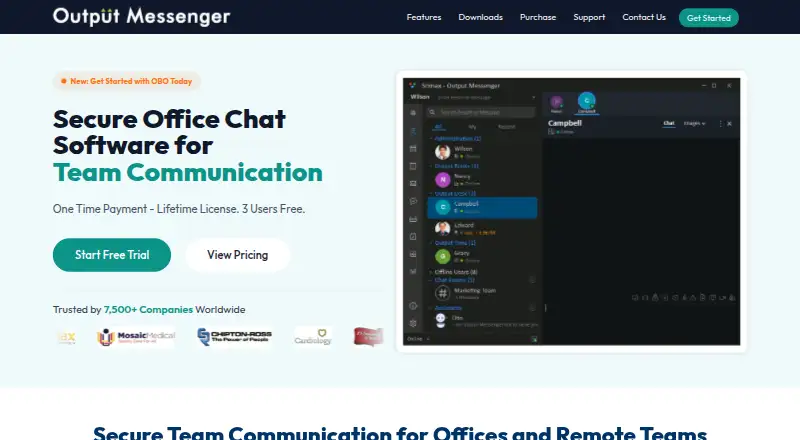
Output Messenger is office and team communication software available on the web, Windows, macOS, Linux, iOS, and Android, with API support. It offers one-to-one and group chats, chat rooms, announcements, file transfers, voice and video calls, conferencing, and controlled remote desktop sharing. Built-in work tools include tasks and to-do lists, Output Drive, calendar, meetings, leave management, internal mail, notes, and reminders. Organizations can use a self-hosted on-premises server; the maker says the product suits businesses of any size. It supports importing and managing users through LDAP and Active Directory, and its download FAQ describes SSO through Active Directory integration. Listed integrations include Output Time, Output Desk, Output Wall, Jitsi Meet, and GitHub. The maker says SSL/TLS protects conversations and that OTR messages are encrypted and excluded from server and client logs. A free lifetime license is available for three users, and the download page offers a 30-day fully functional trial. Paid options include a perpetual license for $19 a month, billed as valid for lifetime, and an annual own-server license for $9 a year.
Who it suits
Output Messenger suits teams seeking messaging, calls, file sharing, and built-in work tools across desktop, mobile, and web. Its self-hosted option and directory integrations may fit organizations managing their own server and user accounts.
What it does well
- Supports chats, calls, conferencing, and file transfers
- Includes tasks, calendar, meetings, and reminders
- Offers a self-hosted on-premises server
- Integrates with LDAP and Active Directory
- Free lifetime license available for three users
What to know first
- Free lifetime license is limited to three users
- One license key cannot be used on multiple servers
- Updates after the included first year require an optional plan
Limits
The free license covers three users. A perpetual license includes updates and fixes for one year; continued software updates require an optional update plan. A license key only allows the purchased number of users to connect and cannot be reused on multiple servers.
Plans
| Plan | Billed and limits | Price |
|---|---|---|
| Free | Free; annual license validity is shown on the pricing page · 3 users | Free |
| 3 Users — Annual License | $0; valid for one year · 3 users | Free |
| 3 Users — Perpetual License | $0; valid for life time · 3 users | Free |
| Annual License | $2000 / year; $4 per user · Displayed tier; user count selectable · Single server per license key | $2,000 a year |
| Perpetual License | $4500; $9 per user · Displayed tier; user count selectable · Single server per license key | $4,500, paid once |
As outputmessenger.com lists them, read 22 Sept 2026. The maker's own page has the final word.
Getting started
- Open the Output Messenger website.
- Choose a platform: web, Windows, macOS, Linux, iOS or Android; API guides are also available.
- Use the 30-day fully functional trial or choose a free license for three users.
- For a paid setup, select a perpetual lifetime license or an annual own-server license.
- Host the server on premises if that suits your organization.
- Import and manage users through LDAP or Active Directory if needed.
Verdict
Output Messenger combines team communication with work tools and offers several platform options, including self-hosting. Teams should check license user limits and note that continued updates after the first year require an optional plan.
Questions
Is there a free plan?
Yes. The free plan is listed at 0.00 USD and the maker describes free lifetime licenses for three users. A separate three-user annual license is valid for one year at 0.00 USD.
What does a paid license cost?
The perpetual license is listed at $19 a month as a one-time payment valid for life. The annual own-server license is $9 a year and valid for one year. The pricing note also says paid plans start at $3 per user per year.
Is there a trial?
Yes. The download page offers a 30-day fully functional trial.
Which platforms does it support?
Supported platforms are web, Windows, macOS, Linux, iOS, Android and API.
Can an organization host it itself?
Yes. Output Messenger provides a self-hosted on-premises server.
Which integrations are available?
The maker documents integrations with Output Time, Output Desk, Output Wall, Jitsi Meet and GitHub, and offers API guides.
Facts from Output Messenger's own pages
- Calls and sharing
- It offers voice and video calls, conferencing, and real-time remote desktop sharing with controlled access. · outputmessenger.com, 9 Oct 2026
- Channels
- Yes · outputmessenger.com, 22 Sept 2026
- Directory integration
- Output Messenger supports importing and managing users through LDAP and Active Directory, and its download FAQ describes SSO through Active Directory integration. · outputmessenger.com, 9 Oct 2026
- Free plan
- Yes · outputmessenger.com, 22 Sept 2026
- Headquarters
- Sivakasi, India · outputmessenger.com, 28 Sept 2026
- Hosting
- The product provides a self-hosted on-premises server, and the maker says it is suitable for businesses of any size. · outputmessenger.com, 9 Oct 2026
- Integrations
- Output Desk,Output Wall,Output Time,Jitsi Meet,GitHub · outputmessenger.com, 22 Sept 2026
- License limit
- A license key allows the number of users purchased to connect, and the same key cannot be used on multiple servers. · outputmessenger.com, 9 Oct 2026
- Messaging
- It supports one-to-one chats, group chats, chat rooms, announcements and file transfers. · outputmessenger.com, 9 Oct 2026
- Other integrations
- The maker documents integrations with Output Time, Output Desk, Output Wall, Jitsi Meet, and GitHub, and offers API guides. · support.outputmessenger.com, 9 Oct 2026
- Platforms
- The maker lists Windows, Mac, Ubuntu, Android, iOS and browser access, and offers a server download for Windows. · outputmessenger.com, 9 Oct 2026
- Product
- Output Messenger is office and team communication software for messaging and collaboration. · outputmessenger.com, 9 Oct 2026
- Security
- The maker says SSL/TLS protects conversations and describes OTR messages as encrypted and excluded from server and client logs. · outputmessenger.com, 9 Oct 2026
- Support
- The maker lists technical support, updates and fixes for one year with a perpetual license and provides a support email and help center. · outputmessenger.com, 9 Oct 2026
- Trial and free tier
- The download page offers a 30-day fully functional trial and free lifetime licenses for 3 users. · outputmessenger.com, 9 Oct 2026
- Update limit
- A perpetual license remains functional for life, while continued software updates after its included first year require an optional update plan. · outputmessenger.com, 9 Oct 2026
- Work tools
- Built-in work tools include tasks and to-do lists, Output Drive, calendar, meetings, leave management, internal mail, notes and reminders. · outputmessenger.com, 9 Oct 2026
Where Output Messenger stands on Freedom251
- Team chat apps#28 of 63