Freedom251 › Authenticator apps
OTPeer Authenticator
What OTPeer Authenticator is
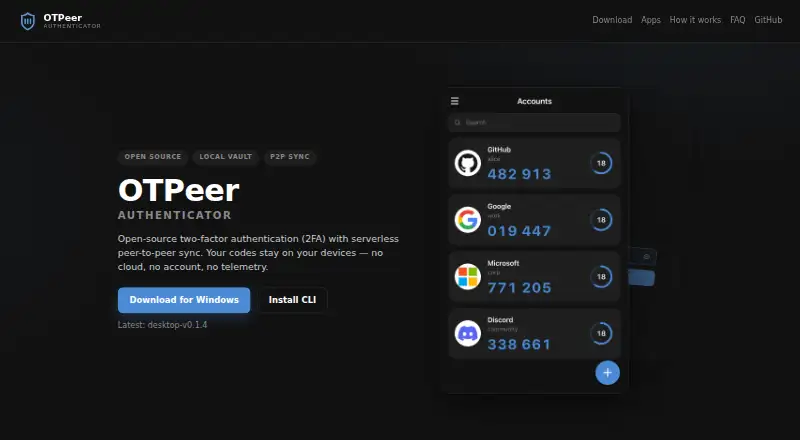
OTPeer Authenticator is a free, open-source application for generating TOTP and HOTP two-factor authentication codes on desktop computers and in a terminal. It runs on macOS, Windows, Linux, and terminal environments. Devices pair with a QR code or short pairing code, then merge encrypted vaults over the local network without a relay or backend server. Vault data stays on users’ devices, and setting a password protects the vault with AES. The product says it has no cloud, account, or telemetry and does not upload secrets. Imports include Google, Microsoft, and Facebook authenticator exports, plus backups from Aegis, 2FAS, and andOTP. Each synced device stores a complete vault copy. Desktop downloads include macOS Apple Silicon and Intel installers, Windows, and Linux AppImage or .deb packages. The CLI is distributed through npm as authenticator-clui. iOS and Android apps are described as coming soon.
Who it suits
It suits people who want desktop or terminal-based TOTP and HOTP codes with local encrypted storage. It also fits users migrating from several listed authenticator apps.
What it does well
- Free and open-source
- Supports macOS, Windows, Linux, and terminal
- Local-network vault syncing without backend server
- Imports several authenticator backup formats
- Encrypted vault copies on synced devices
What to know first
- No free trial is offered
- Mobile apps are not yet available
- macOS Phase 1 builds are unsigned
- Password is needed for AES protection
Plans
| Plan | Billed and limits | Price |
|---|---|---|
| Free | Free, open-source authenticator | Free |
As otpeer.com lists them, read 11 Oct 2026. The maker's own page has the final word.
Verdict
OTPeer Authenticator combines desktop and CLI code generation with local vault storage, syncing, and migration imports. Check the macOS signing limitation and keep a second synced device or encrypted export for recovery.
Facts from OTPeer Authenticator's own pages
- Backup and recovery
- Each synced device holds a complete vault copy; the FAQ advises keeping two devices synced or maintaining an encrypted export backup. · otpeer.com, 11 Oct 2026
- CLI
- The CLI is available via npm as authenticator-clui. · otpeer.com, 11 Oct 2026
- Code type
- totp and hotp · otpeer.com, 21 Sept 2026
- Desktop platforms
- Desktop installers are listed for macOS (Apple Silicon and Intel), Windows, and Linux (AppImage and .deb). · otpeer.com, 11 Oct 2026
- Download verification
- The download instructions recommend comparing the installer’s SHA-512 checksum with the release page manifest. · otpeer.com, 11 Oct 2026
- Encrypted backup
- Yes · otpeer.com, 21 Sept 2026
- Free plan
- Yes · otpeer.com, 21 Sept 2026
- Imports
- It imports Google, Microsoft, and Facebook authenticator export codes, plus backups from Aegis, 2FAS, and andOTP. · otpeer.com, 11 Oct 2026
- Local storage
- The encrypted vault stays on users’ devices, and vault data is AES-protected when a password is set. · otpeer.com, 11 Oct 2026
- macOS limitation
- The site says Phase 1 macOS builds are not Developer ID signed and may require clearing Gatekeeper quarantine to open. · otpeer.com, 11 Oct 2026
- Mobile availability
- iOS and Android mobile apps are described as coming soon, with App Store, Play, and F-Droid distribution planned. · otpeer.com, 11 Oct 2026
- Multi-device sync
- Yes · otpeer.com, 21 Sept 2026
- Open source
- The site describes OTPeer as open source and links to its GitHub repository. · otpeer.com, 11 Oct 2026
- Privacy
- The product says it has no cloud, account, or telemetry, and that secrets are not uploaded. · otpeer.com, 11 Oct 2026
- Purpose
- OTPeer Authenticator generates TOTP two-factor authentication codes on desktop and in the terminal via CLI. · otpeer.com, 11 Oct 2026
- Supported platforms
- macOS,Windows,Linux,terminal · otpeer.com, 21 Sept 2026
- Sync
- Devices pair with a QR code or short pairing code and merge vaults directly over the local network without a relay or backend server. · otpeer.com, 11 Oct 2026
Where OTPeer Authenticator stands on Freedom251
- Authenticator apps#42 of 111