Freedom251 › Requirements Management Software
OSRMT
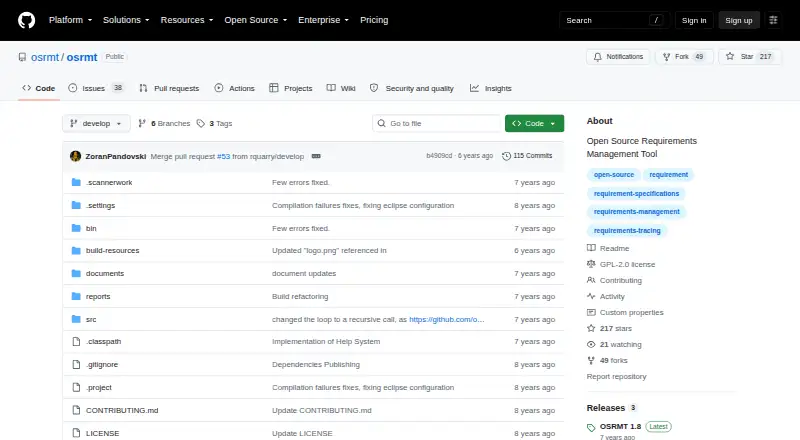
What OSRMT is
OSRMT is a free, configurable open-source tool for defining and managing software requirements. It supports work on features, requirements such as use cases, design, implementation, and test cases, while tracking links and flow between requirements. Teams can organize work by phase, configure the tool, and manage several projects at once.
The project describes two ways to use OSRMT: as a single-user desktop application or as a multiuser web application with a central server and desktop or web client. The README lists Windows, Linux (CentOS), and macOS as tested operating systems. Desktop setup requires a supported operating system, an archive utility, and JRE 1.8 or later. The web application deploys on JBoss and is accessible locally on port 8080. Oracle, MySQL, MS SQL, and PostgreSQL are listed as external database options, with no extra database setup needed for initial use. OSRMT is licensed under GNU GPL-2.0. The project points users to issue reports, a request process, an FAQ, online source and documentation, and a community support email address.
Who it suits
OSRMT suits teams that need to define requirements and trace them through design, implementation, and testing. It also fits projects that need a choice between desktop and multiuser web deployment.
What it does well
- Tracks links and flow between requirements.
- Supports multiple projects and work organized by phase.
- Offers desktop and multiuser web deployment modes.
- Free to use or distribute.
- Lists Oracle, MySQL, MS SQL, and PostgreSQL options.
What to know first
- Desktop setup requires JRE 1.8 or later.
- Web deployment uses JBoss and local port 8080.
- The project pages make no security certification or compliance claims.
Limits
The plan is free. Desktop installation requires JRE 1.8 or later, and running the software requires hardware.
Plans
| Plan | Billed and limits | Price |
|---|---|---|
| OSRMT | Free; can be used or distributed at no cost · Hardware required to run it | Free |
As github.com lists them, read 5 Oct 2026. The maker's own page has the final word.
Getting started
- Open the OSRMT project website.
- Choose a desktop setup or the multiuser web deployment.
- For desktop use, prepare Windows, Linux, or macOS, an archive utility, and JRE 1.8 or later.
- For web use, deploy the application on JBoss and access it locally on port 8080.
- Use the tool to configure projects and organize work by phase.
Overview
OSRMT is configurable, open-source software for defining requirements and following their links to later project work. It suits individuals and teams that need requirements traceability across projects and can manage their own installation. Its strongest case is a no-cost tool with desktop and multiuser deployment choices; the trade-off is the runtime and server work those choices can entail.
Key features
OSRMT supports a workflow from features and use cases through design, implementation and test cases, with traceability between requirements and related work. That is useful when teams need to see how requirements carry through project phases, rather than store specifications without their downstream connections.
Work can be organized by phase, the tool configured, and multiple projects managed simultaneously. A single-user desktop setup suits individual work; a centralized-server web application supports multiple users through desktop or web clients. The latter enables shared use, but requires deploying the web application on JBoss.
For database-backed deployment, the project names Oracle, MySQL, MS SQL and PostgreSQL as options, while initial use requires no additional database setup. The documented desktop prerequisites include Windows, Linux or macOS, an archive utility and JRE 1.8 or later. These requirements make OSRMT a better fit for users comfortable managing software installations than for those seeking a turnkey hosted service.
Pricing
The OSRMT plan costs free and may be used or distributed at no cost. There is no time-limited trial to convert into a paid plan. The free license does not eliminate the need for hardware to run the software or the effort of maintaining a desktop or server deployment.
Platforms
OSRMT supports Windows, Linux and macOS; the README says it was tested on Windows, CentOS Linux and macOS. It can be run as a desktop app or deployed on-premises as a multiuser web application. The web deployment is described for JBoss and is accessible locally on port 8080. The project provides support through existing issue reports or new requests, an FAQ, online source code and documentation, and a community email address.
Who it's for
OSRMT is best for individuals or project teams that need to connect requirements to design, implementation and testing, especially when managing several projects at once. Its free, distributable license and self-managed deployment options suit users who want control over where the tool runs. It is less suited to teams that do not want to handle installation or server operation. No security certifications or compliance claims are stated, so organizations that require those assurances should look elsewhere.
Pros and cons
- Pros: No-cost use and distribution avoid a software purchase cost.
- Pros: Traceability across requirements, design, implementation and tests helps teams follow work across project phases.
- Pros: Single-user desktop and centralized multiuser web modes accommodate individual and shared workflows.
- Cons: Desktop use requires JRE 1.8 or later, and multiuser web use requires a JBoss deployment.
- Cons: Users must provide hardware and take responsibility for running the software.
Alternatives
Requirements Management Software is the broader category to explore when comparing tools for this work.
Choose MATLAB Grader if you need a free-plan option across Linux, macOS, Windows or web and have a MATLAB license current under maintenance; LMS integration requires a qualifying academic license.
ReqView is a freemium alternative with a free trial: its FREE plan allows one document, 150 objects per document and one custom attribute, while PRO costs €440 a year per user.
Doorstop is another free, open-source option for users prepared to work with Python and a version control system.
Innoslate may suit educators or students eligible for its free Academia plan, which requires a .edu account; Enterprise pricing is custom pricing.
RequirementONE offers a free Try plan limited to one user, three sources from a shortlist, a predefined topic filter and a personalised newsletter; Expand costs $12 a month.
StrictDoc is another free option for readers comparing requirements tools.
NETVIBES is a paid alternative with a free plan and an Enterprise Data Science plan with 17 portfolio roles.
QSC QS1 is another option for readers considering requirements software.
Verdict
Choose OSRMT if you need free, configurable requirements traceability across project phases and are willing to run the software yourself. Its ability to connect requirements to design, implementation and tests is the central reason to choose it. Look elsewhere if your priority is avoiding installation and server responsibilities or if your organization needs stated security or compliance assurances.
Verdict
OSRMT provides requirement definition and traceability alongside project and deployment options. Users should review its installation requirements and select the desktop or web setup that fits their environment.
Questions
How much does OSRMT cost?
The listed OSRMT plan costs nothing and can be used or distributed at no cost.
Is OSRMT open source?
Yes. The repository identifies its license as GNU GPL-2.0.
Which operating systems are supported?
The README lists Windows, Linux (CentOS), and macOS as tested. Desktop prerequisites also call for Windows, Linux, or macOS.
Can OSRMT be used by multiple people?
Yes. The project describes a multiuser web application with a centralized server and desktop or web client, as well as a single-user desktop app.
Which databases can it use?
Oracle, MySQL, MS SQL, and PostgreSQL are listed as external database options. No additional database setup is required for initial use.
Where can I get support?
The project points users to issue reports, a request process, and an FAQ. Its wiki also provides online source code and documentation, along with a community support email address.
Facts from OSRMT's own pages
- Community support
- The project wiki says source code and documentation are available online and provides a community email address for support. · github.com, 5 Oct 2026
- Database support
- The README lists Oracle, MySQL, MS SQL, and PostgreSQL as external database options, with no additional database setup required for initial use. · github.com, 5 Oct 2026
- Deployment modes
- The project describes use as a single-user desktop app or a multiuser web application with a centralized server and desktop or web client. · github.com, 5 Oct 2026
- Installation requirement
- The documented desktop prerequisites include Windows, Linux, or macOS, an archive utility, and JRE 1.8 or later. · github.com, 5 Oct 2026
- License
- The repository identifies the project license as GNU GPL-2.0. · github.com, 5 Oct 2026
- Operating systems
- The README says OSRMT was tested on Windows, Linux (CentOS), and macOS. · github.com, 5 Oct 2026
- Projects
- It supports defining work by phase, configuring the tool, and managing multiple projects simultaneously. · github.com, 5 Oct 2026
- Purpose
- OSRMT is a configurable open source tool for defining and managing software requirements. · github.com, 5 Oct 2026
- Requirements workflow
- It supports defining features, requirements including use cases, design, implementation, and test cases. · github.com, 5 Oct 2026
- Security and compliance
- The opened project pages do not state security certifications or compliance claims. · github.com, 5 Oct 2026
- Support
- The README directs users to existing issue reports or to create a request and also links to an FAQ. · github.com, 5 Oct 2026
- Traceability
- It manages interconnections and traces the flow of requirements. · github.com, 5 Oct 2026
- Web deployment
- The README says the web application deploys on JBoss and is accessible locally on port 8080. · github.com, 5 Oct 2026
Where OSRMT stands on Freedom251
- Requirements Management Software#3 of 23