Freedom251 › Database Administration Tools
Oracle Maestro
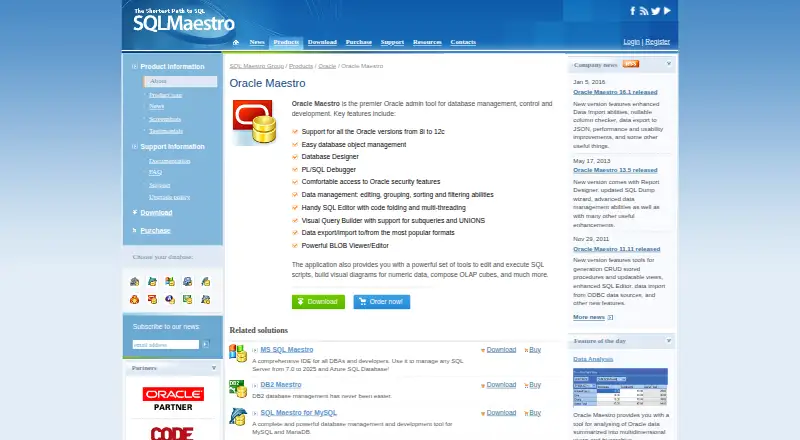
What Oracle Maestro is
Oracle Maestro is a Windows GUI tool for administering and developing Oracle databases. It provides database object management, a Database Designer, and a PL/SQL Debugger. Its SQL editor offers syntax highlighting and code completion, while the Visual Query Builder creates queries as diagrams. Users can view, edit, group, sort, and filter table and query data, including BLOB data. The tool also exports data to common formats and imports from spreadsheets, Access, DBF, XML, text, CSV, and ODBC-accessible sources. Graphical controls cover Oracle users, roles, and privileges. The maker’s FAQ says it supports Oracle database servers from version 8i onward, including Express Edition. The client environment requires Windows and Oracle client software. Oracle Maestro is self-hosted, has no free plan, and offers a fully functional 30-day trial. Paid licenses are one-time purchases, starting at 129.00 USD for a single non-commercial license; other options include business and site licenses, with upgrade terms varying by plan.
Who it suits
It suits Windows users who administer or develop Oracle databases and want visual tools for SQL, data handling, and security management. Buyers can choose single-user or site licenses for non-commercial or business use.
What it does well
- Database Designer and PL/SQL Debugger included
- SQL editor has syntax highlighting and code completion
- Imports from spreadsheets, Access, CSV, and other sources
- 30-day fully functional trial
- Free priority email support included with purchase
What to know first
- No free plan
- Client requires Windows and Oracle client software
- Single license use is limited to one computer at a time
Limits
The trial lasts 30 days. A single license installs on one computer, with desktop and portable use allowed only when they are not used simultaneously.
Plans
| Plan | Billed and limits | Price |
|---|---|---|
| Oracle Maestro (single non-commercial license) | Single non-commercial license | $129, paid once |
| Oracle Maestro (site business license) | Site business license | $1,499, paid once |
| Oracle Maestro (single non-commercial license + 3 year upgrades) | Single non-commercial license · 3 years of upgrades | $169, paid once |
| Oracle Maestro (site business license + 3 year upgrades) | Site business license · 3 years of upgrades | $1,899, paid once |
| Oracle Maestro (single business license) | Single business license · 1–3 years of upgrades depending on option | $229, paid once |
| Oracle Maestro (single business license + 3 year upgrades) | Single business license · 3 years of upgrades | $279, paid once |
| Oracle Maestro (site non-commercial license) | Site non-commercial license | $699, paid once |
| Oracle Maestro (site non-commercial license + 3 year upgrades) | Site non-commercial license · 3 years of upgrades | $899, paid once |
As sqlmaestro.com lists them, read 8 Oct 2026. The maker's own page has the final word.
Getting started
- Open the Oracle Maestro product website
- Use a Windows computer with Oracle client software installed
- Download and use the fully functional 30-day trial
- Choose a non-commercial or business license
- Select a single-computer or site license
- Purchase optional three-year upgrade coverage
Verdict
Oracle Maestro combines database administration, SQL development, data handling, and security controls in a Windows client. Its one-time license options and 30-day trial are worth weighing alongside the required Oracle client software and license-use limits.
Questions
What does Oracle Maestro cost?
One-time plans include $129.00 USD for a single non-commercial license, $229.00 USD for a single business license, and site licenses from $699.00 USD. Options with three years of upgrades cost more.
Is there a free plan or trial?
There is no free plan. A fully functional trial is available for 30 days.
Which platforms are supported?
Oracle Maestro supports Windows, and the client environment also requires Oracle client software.
Which Oracle servers does it support?
The maker says it works with Oracle database servers starting with version 8i, including Express Edition.
What support comes with purchase?
The purchase page includes free priority email support, with registered-user requests usually processed within 24 hours.
Can one license be used on multiple computers?
A single license can be installed on one computer. Desktop and portable computer use is allowed when they are not used simultaneously.
Facts from Oracle Maestro's own pages
- Client requirement
- The system requirements list Windows and Oracle client software as requirements for the client environment. · sqlmaestro.com, 8 Oct 2026
- Company
- SQL Maestro Group describes itself as a privately held software company founded in 2002. · sqlmaestro.com, 8 Oct 2026
- Database management
- It provides database object management, a Database Designer, and a PL/SQL Debugger. · sqlmaestro.com, 8 Oct 2026
- Data handling
- It can view, edit, group, sort, and filter table and query data, including BLOB data. · sqlmaestro.com, 8 Oct 2026
- Founded
- 2002 · sqlmaestro.com, 28 Sept 2026
- Headquarters
- 140 Broadway, Suite 706, New York City, New York 10005, United States · sqlmaestro.com, 28 Sept 2026
- Import and export
- The product exports data to common formats and imports from spreadsheets, Access, DBF, XML, text, CSV, and ODBC-accessible sources. · sqlmaestro.com, 8 Oct 2026
- License limit
- The FAQ says a single license can be installed on one computer, with an allowance for desktop and portable computer use if they are not used simultaneously. · sqlmaestro.com, 8 Oct 2026
- Oracle support
- The maker's FAQ says Oracle Maestro works with Oracle database servers starting with version 8i, including Express Edition. · sqlmaestro.com, 8 Oct 2026
- Purpose
- Oracle Maestro is a Windows GUI tool for Oracle database administration and development. · sqlmaestro.com, 8 Oct 2026
- Security
- The product provides graphical access to Oracle security features for managing users, roles, and privileges. · sqlmaestro.com, 8 Oct 2026
- SQL tools
- Its SQL tools include an editor with syntax highlighting and code completion and a Visual Query Builder for creating queries as diagrams. · sqlmaestro.com, 8 Oct 2026
- Support
- The purchase page includes free priority email support and says registered-user requests are usually processed within 24 hours. · sqlmaestro.com, 8 Oct 2026
- Trial
- The fully functional trial version can be used for an evaluative period of 30 days. · sqlmaestro.com, 8 Oct 2026
Where Oracle Maestro stands on Freedom251
- Database Administration Tools#20 of 34