Freedom251 › Lockdown Browser Software
OpenLock
What OpenLock is
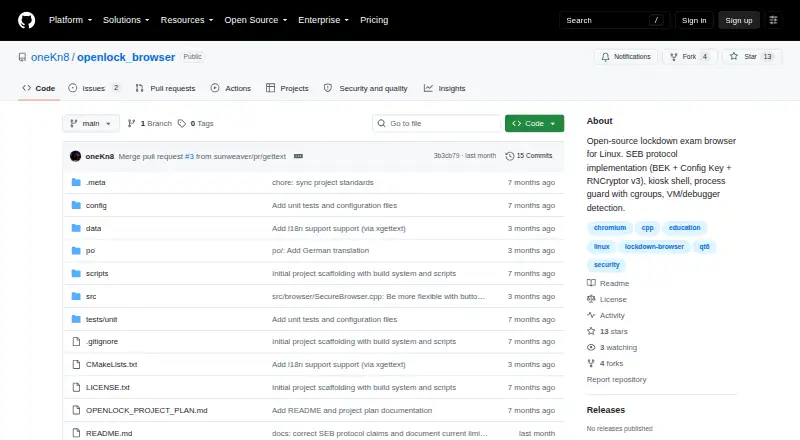
OpenLock is a free, open-source lockdown exam browser built as a native Linux application. It is intended to provide exam restrictions similar to Safe Exam Browser on Linux distributions. It reads .seb configuration files and can add Browser Exam Key and Config Key headers to requests. The project currently says it is not exam-ready: its SEB key derivation is not byte-exact, so the keys do not match an LMS handshake. It has not been validated against a live Moodle, Canvas, or Blackboard instance.
Its listed controls include fullscreen kiosk mode through X11 or a Wayland/Cage compositor, a process guard that monitors and kills prohibited software, and input restrictions that block shortcuts such as Alt+Tab, Alt+F4, Ctrl+C, and PrintScreen while restricting clipboard use. Browser limits disable developer tools, downloads, right-click, console access, view source, and drag-and-drop. OpenLock also lists URL allowlists and blocklists, VM, debugger, and hypervisor detection, optional self-hash verification, cgroups v2 process isolation, and an off-the-record browser profile with permissions denied by default. The documented prerequisites are Ubuntu 22.04 or later, Fedora 38 or later, or Arch Linux, with Qt6 and QtWebEngine. AppImage, .deb, .rpm, and Flatpak packages are planned. The repository uses the Mozilla Public License 2.0.
Who it suits
OpenLock is for Linux users and contributors interested in an open-source exam lockdown browser, including those working on its development. It is not suitable for administering real exams at present because its maker says LMS handshake keys are not yet correct and live LMS validation has not occurred.
What it does well
- Native Linux application with fullscreen kiosk mode.
- Blocks common app-switching shortcuts and clipboard use.
- Process guard monitors and kills prohibited programs.
- Browser controls restrict downloads, developer tools, right-click, and more.
- Off-the-record browser profile with permissions denied by default.
- Mozilla Public License 2.0 permits proprietary use under its stated conditions.
What to know first
- The project says OpenLock is not exam-ready because SEB key derivation is not byte-exact.
- It has not been validated against live Moodle, Canvas, or Blackboard instances.
- Documented prerequisites include Qt6 and QtWebEngine on supported Linux distributions.
- AppImage, .deb, .rpm, and Flatpak packages are listed as planned, not available.
Limits
OpenLock is not exam-ready: its SEB key derivation is not byte-exact, so its keys do not match an LMS handshake. It has not been validated against live Moodle, Canvas, or Blackboard instances; the listed packaged releases are planned rather than available.
Getting started
- Use a Linux system running Ubuntu 22.04 or later, Fedora 38 or later, or Arch Linux.
- Meet the documented Qt6 and QtWebEngine prerequisites.
- Visit the GitHub project page for OpenLock and its project materials.
- Open an issue with the maker before making contribution changes.
Verdict
OpenLock may interest Linux users who want to examine or contribute to an open-source lockdown browser project. Its listed controls cover kiosk mode, input restrictions, process monitoring, and browser limits. Anyone choosing software to administer exams should look elsewhere for now: the project says its LMS handshake fails and it has not been validated against live LMS instances.
Questions
How much does OpenLock cost?
The listed plan is free. No price beyond the free plan is provided.
Is OpenLock open source?
Yes. The repository says it follows the Mozilla Public License 2.0, which allows proprietary use if modifications to MPL-licensed files remain open.
Which operating systems does it support?
OpenLock is built natively for Linux. Documented prerequisites include Ubuntu 22.04 or later, Fedora 38 or later, or Arch Linux, plus Qt6 and QtWebEngine.
Is OpenLock ready for exams?
No. The project says its SEB key derivation is not byte-exact and its LMS handshake fails.
Does OpenLock work with Moodle, Canvas, or Blackboard?
The project lists adapters for those LMS platforms, but says it has not been tested against live instances.
Are packaged Linux releases available?
AppImage, .deb, .rpm, and Flatpak packaging are listed as planned rather than available releases.
Facts from OpenLock's own pages
- Browser hardening
- It disables developer tools, view source, downloads, right-click, console access and drag-and-drop. · github.com, 30 Sept 2026
- Browser restrictions
- Browser hardening disables DevTools, View Source, downloads, right-click, console and drag-and-drop. · github.com, 30 Sept 2026
- Contribution support
- The maker welcomes contributions and asks contributors to open an issue before making changes. · github.com, 30 Sept 2026
- Current limitation
- The repository states that OpenLock is not exam-ready because its SEB key derivation is not yet byte-exact and the LMS handshake fails. · github.com, 30 Sept 2026
- Data handling
- The security model specifies an off-the-record browser profile with no persistent storage and permissions denied by default. · github.com, 30 Sept 2026
- Distribution packaging
- AppImage, .deb, .rpm and Flatpak packaging are listed as planned rather than available releases. · github.com, 30 Sept 2026
- Exam status
- The project says it is not exam-ready because its SEB key derivation is not byte-exact and has not been validated against a live LMS. · github.com, 30 Sept 2026
- Input lockdown
- It blocks escape shortcuts including Alt+Tab, Alt+F4, Ctrl+C and PrintScreen and restricts clipboard use. · github.com, 30 Sept 2026
- Input restrictions
- Input lockdown blocks shortcuts including Alt+Tab, Alt+F4, Ctrl+C and PrintScreen, as well as clipboard use. · github.com, 30 Sept 2026
- Integrity checks
- The project lists VM, debugger and hypervisor detection, plus optional self-hash verification, as security measures. · github.com, 30 Sept 2026
- Kiosk mode
- Its kiosk mode uses fullscreen takeover via X11 override-redirect or a Wayland/Cage compositor. · github.com, 30 Sept 2026
- License
- The repository says the project follows the Mozilla Public License 2.0 and allows proprietary use if modifications to MPL-licensed files remain open. · github.com, 30 Sept 2026
- Linux requirements
- The stated prerequisites include Ubuntu 22.04 or later, Fedora 38 or later, or Arch Linux, along with Qt6 and QtWebEngine. · github.com, 30 Sept 2026
- LMS integrations
- The project lists adapters for Moodle, Canvas and Blackboard, but says it has not been tested against live instances of those LMS platforms. · github.com, 30 Sept 2026
- Native Linux app
- It is built natively for Linux rather than through a compatibility layer. · github.com, 30 Sept 2026
- Navigation controls
- OpenLock supports URL whitelist and blacklist filtering and navigation policy enforcement. · github.com, 30 Sept 2026
- Process guard
- It monitors and kills prohibited processes such as screen recorders, virtual machines and remote-desktop tools. · github.com, 30 Sept 2026
- Process protection
- A process guard monitors and kills prohibited processes such as screen recorders, virtual machines and remote desktop software. · github.com, 30 Sept 2026
- Purpose
- OpenLock is an open-source lockdown exam browser for Linux intended to bring Safe Exam Browser style exam lockdown to Linux distributions. · github.com, 30 Sept 2026
- SEB protocol
- It parses .seb configuration files and attaches Browser Exam Key and Config Key headers to requests, but the project says these keys currently will not match an LMS handshake. · github.com, 30 Sept 2026
- Security model
- Its security model uses cgroups v2 process isolation, input capture, an off-the-record browser profile, denied permissions and URL filtering. · github.com, 30 Sept 2026
- Supported distributions
- The documented prerequisites include Ubuntu 22.04 or newer, Fedora 38 or newer and Arch Linux. · github.com, 30 Sept 2026
- Validation status
- The project has not been validated against a live Moodle, Canvas or Blackboard instance. · github.com, 30 Sept 2026
Where OpenLock stands on Freedom251
- Lockdown Browser Software#7 of 22