Freedom251 › Lockdown Browser Software
Fully Exam Kiosk
What Fully Exam Kiosk is
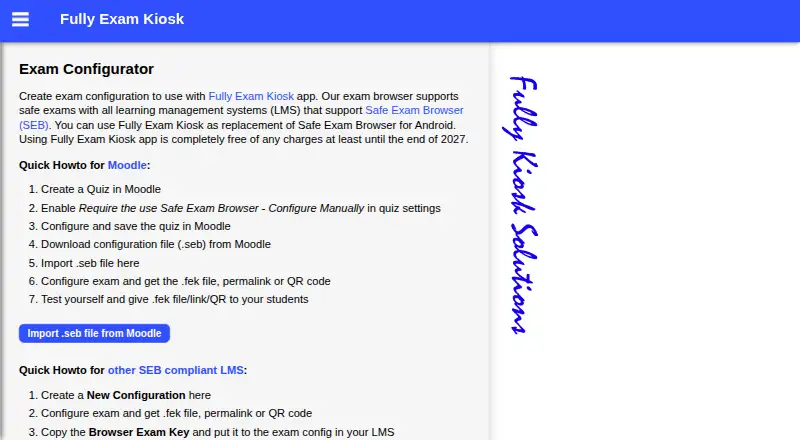
Fully Exam Kiosk keeps an Android device on a configured exam website, restricting students from using other websites, apps, or device features during an online exam. It supports learning management systems that work with Safe Exam Browser, including Moodle. Teachers can create configurations and share them as FEK files, permalinks, or QR codes; Moodle Safe Exam Browser configuration files (.seb) can also be imported. Other exam websites may be used if the URL stays secret, since students could otherwise open it in another browser. The app works on school-owned or students’ own Android devices, and blocks app switching and screen capture. Safe kiosk mode may require show-on-top and usage-data access permissions. Kiosk mode can end through a configured quit link, a password-protected quit button, or a device reboot. The free plan costs nothing, with free access stated to last at least until the end of 2027. Google Play's developer-provided data-safety information says no data is collected or shared with third parties, and data is encrypted in transit.
Who it suits
It suits teachers setting up online exams for Android devices, including schools using Moodle or other Safe Exam Browser-compatible systems. It can be used on school devices or students’ own devices.
What it does well
- Supports Moodle and Safe Exam Browser-compatible systems
- Share exam configurations by file, link, or QR code
- Blocks app switching and screen capture
- Runs on school-owned or student-owned Android devices
What to know first
- Android only
- Safe kiosk mode may need additional permissions
- Other exam URLs must stay secret
- Exam-site speed and bugs are outside maker control
Limits
The free plan is stated to remain free at least until the end of 2027. For exam websites outside the supported LMS setup, the URL must be kept secret to prevent students opening it in another browser.
Plans
| Plan | Billed and limits | Price |
|---|---|---|
| Fully Exam Kiosk | Free of charge at least until the end of 2027 | Free |
As exam.fully-kiosk.com lists them, read 4 Oct 2026. The maker's own page has the final word.
Getting started
- Open the Fully Exam Kiosk website.
- Prepare an exam configuration in the configurator, or import a Moodle .seb file.
- Share the configuration as an FEK file, permalink, or QR code.
- Use the configuration on a school-owned or student-owned Android device.
- Grant show-on-top and usage-data access permissions if safe kiosk mode requests them.
Overview
Fully Exam Kiosk is an Android app that restricts a device to a configured exam website. It is best suited to schools running web-based exams on Android, especially Moodle exams configured for Safe Exam Browser. Its price makes it an easy option to consider, but its controls depend on Android and on the exam site itself.
During an exam, students can use the configured quiz site and its features, but not other websites, apps, or device features. The app blocks app switching and screen capture. That narrow focus can help keep a school-owned or student-owned Android device on task, but it is not a general lockdown tool for schools using multiple platforms.
Fully Exam Kiosk supports learning management systems that support Safe Exam Browser, including Moodle. Other exam sites can also be used, but their URL must remain secret: if students know it, they can open it in another browser. That makes a compatible LMS a stronger choice when access control matters.
Key features
Exam setup and Moodle integration
Teachers can create an exam configuration and distribute it as an FEK file, permalink, or QR code. Moodle teachers can import a Safe Exam Browser configuration file (.seb) into the exam configurator, which can reduce the need to rebuild an existing setup.
Device restrictions and exits
Safe kiosk mode may require students to grant show-on-top and usage-data access permissions. That gives the app the access it needs to restrict the device, but it adds a setup step that schools should account for, particularly on students’ own devices. Kiosk mode can be stopped using a configured quit link, a password-protected quit button, or a device reboot, giving administrators several ways to end a session.
Data and support
Google Play’s developer-provided data-safety information says the app collects no data, shares none with third parties, and encrypts data in transit. For issues, the listing directs users to email a screenshot and short description to [email protected]. Exam-site speed, bugs, and user experience remain outside the app maker’s control, so the kiosk cannot compensate for a poorly performing exam site.
Pricing
| Plan | Price | What it includes |
|---|---|---|
| Fully Exam Kiosk | free | Free of charge at least until the end of 2027; Android support, app-switching blocking, and screen-capture blocking. |
The free plan is a straightforward fit for schools that need these controls on Android without a subscription cost. The stated free period runs at least through the end of 2027; no seat or exam quota is given for the plan.
Platforms
Fully Exam Kiosk supports Android only. That suits schools standardizing on Android devices, including student-owned devices, but schools that need exam lockdown on iOS, macOS, Windows, or web will need another option.
Who it's for
Choose Fully Exam Kiosk if you run web exams on Android, use Moodle or another Safe Exam Browser-compatible LMS, and want to keep students inside the configured quiz site. It is less suitable when you need a cross-platform deployment or must control access to an exam site whose URL cannot be kept secret.
Pros and cons
- Pro: The plan costs nothing, making the app a practical option for schools that need Android exam restrictions without a paid plan.
- Pro: FEK files, permalinks, and QR codes give teachers several ways to distribute configurations; Moodle .seb import can carry existing Safe Exam Browser settings into the configurator.
- Pro: The app blocks app switching and screen capture while restricting other sites and device features during an exam.
- Con: Android-only support rules it out for schools that need consistent controls across different platforms.
- Con: Other exam sites require a secret URL; students who know it can open the site in another browser.
- Con: Safe kiosk mode may require show-on-top and usage-data access permissions, adding a device setup step.
- Con: The app cannot address exam-site speed, bugs, or user experience, which can still affect the exam.
Alternatives
Lockdown Browser Software is a useful place to compare more options if Android-only support is too restrictive.
- Eklavvya is a better fit if you need broader platform coverage and exam quotas: its free plan includes 25 exams and 1 GB storage, while Standard includes 500 exams and 5 GB storage.
- TAO suits teams seeking a broader assessment platform: its free Starter plan is billed per month, free forever, and includes one author seat, 3,000 AI credits per month, and 50 learner test attempts per month.
- Safe Exam Browser is worth considering if you need a free exam browser for Windows, macOS, or iOS rather than an Android-only kiosk.
- ThinkExam is an option if you want a broader assessment service with Android, iOS, and web support; its Standard plan is $3,125 a month, billed annually, for 100 users and unlimited quizzes.
- Aiseptor Secure Browser is an alternative for Windows or macOS deployments that need enforcement layers, a REST API, and signed webhooks; its free offer covers up to three hours per session.
- ExamOnline is another option if you need exam software for Android, iOS, macOS, web, or Windows.
- ExamSoft is another option for exam software on iOS, macOS, web, or Windows.
- Mercer | Mettl is another option for assessment software across API, Linux, macOS, web, or Windows.
Verdict
Fully Exam Kiosk is a strong fit for schools that run Safe Exam Browser-compatible web exams on Android and want app-switching and screen-capture restrictions without a subscription fee. Its strongest reason to choose it is that focused control at no cost; look elsewhere if you need other platforms or cannot keep a non-LMS exam URL secret.
Verdict
Fully Exam Kiosk is a focused option for restricting Android devices to an exam site. Teachers should account for its permission requirements and keep other exam-site URLs secret.
Questions
How much does Fully Exam Kiosk cost?
The Fully Exam Kiosk plan costs nothing, with free access stated to last at least until the end of 2027.
Which devices does it support?
It is available for Android devices.
Does it work with Moodle?
Yes. It supports Safe Exam Browser-compatible learning systems, including Moodle, and teachers can import a Moodle .seb configuration file.
Can students use their own devices?
Yes. The app can be used on school devices or students’ own Android devices.
What does kiosk mode prevent?
It blocks other websites, apps, device features, app switching, and screen capture while students use the configured quiz website.
How can kiosk mode be ended?
A teacher can configure a quit link or password-protected quit button; rebooting the device also stops kiosk mode.
Facts from Fully Exam Kiosk's own pages
- BYOD
- The app can be used on a school's devices or on students' own Android devices. · play.google.com, 4 Oct 2026
- Device restrictions
- During the exam, students can use the configured quiz website and features but cannot use other websites, apps, or device features. · play.google.com, 4 Oct 2026
- Exam setup
- Teachers can create an exam configuration and distribute it as an FEK file, permalink, or QR code. · exam.fully-kiosk.com, 4 Oct 2026
- Exit options
- Kiosk mode can be stopped with a configured quit link, a password-protected quit button, or a device reboot. · play.google.com, 4 Oct 2026
- Headquarters
- Dormagen, Germany · exam.fully-kiosk.com, 28 Sept 2026
- LMS support
- It supports learning management systems that support Safe Exam Browser, including Moodle. · exam.fully-kiosk.com, 4 Oct 2026
- Moodle integration
- Teachers can import a Moodle Safe Exam Browser configuration file (.seb) into the exam configurator. · exam.fully-kiosk.com, 4 Oct 2026
- Notable limit
- The app's listing says exam-site speed, bugs, and user experience are outside the app makers' control. · play.google.com, 4 Oct 2026
- Other exam sites
- The maker says other exam websites can be used if the exam URL is kept secret; otherwise students can open it in another browser. · exam.fully-kiosk.com, 4 Oct 2026
- Permissions
- Students may be asked to grant show-on-top and usage-data access permissions for safe kiosk mode. · play.google.com, 4 Oct 2026
- Purpose
- Fully Exam Kiosk locks an Android device to a configured exam website during an online exam. · play.google.com, 4 Oct 2026
- Security and data
- Google Play's developer-provided data-safety information says no data is shared with third parties, no data is collected, and data is encrypted in transit. · play.google.com, 4 Oct 2026
- Support
- The listing asks users with issues to email a screenshot and short description to [email protected]. · play.google.com, 4 Oct 2026
Where Fully Exam Kiosk stands on Freedom251
- Lockdown Browser Software#4 of 22