OpenHomeKaraoke
What OpenHomeKaraoke is
OpenHomeKaraoke is a free, open-source karaoke system for running at home. It can search YouTube and other video sites, download songs, and play them from a shared queue. The player supports MP3 and CDG files, including ZIP bundles. A vocal splitter can provide instrumental, vocal, or combined playback; it uses a DNN model and requires PyTorch, with GPU support preferred. Stereo track subtraction is also described as an alternative vocal-removal method.
People on the same network can use a phone or computer browser to find songs in the local library and add them to the queue. Voice search and queueing use OpenAI’s multilingual Whisper speech recognition model. Playback controls include pause, skip, restart, seeking, volume, pitch and tempo changes, and audio and subtitle delay adjustments. Karaoke can be shown on a TV over HDMI or screen sharing, or viewed in a browser through an HTTP stream. A dual-screen lyrics mode is supported.
It works on Linux, Windows, Raspberry Pi, and macOS, and supports web and self-hosted use. Setup calls for Python dependencies, VLC, and ffmpeg. Offline, the existing library remains available, but internet search and new downloads do not. The project uses GPL-3.0. Its README cautions that concurrent downloads and browsing large libraries may suffer on some devices, and recommends multi-core Raspberry Pi models.
Who it suits
OpenHomeKaraoke suits people who want to host karaoke at home and let others on the same network browse a local library and add songs from their phones or computers. It is a fit for users comfortable installing Python dependencies, VLC, and ffmpeg, especially if they want vocal controls or TV display options.
What it does well
- Plays MP3 and CDG files, including compressed ZIP bundles.
- Searches YouTube, Youku, Bilibili, and other video sites.
- Offers instrumental, vocal, or combined playback options.
- Lets same-network users queue songs from a browser.
- Supports TV display through HDMI, screen sharing, or a browser stream.
- Includes playback controls for pitch, tempo, and subtitle delay.
What to know first
- Vocal splitting requires PyTorch; GPU support is preferred.
- Internet search and new downloads are unavailable offline.
- Concurrent downloads and large libraries may strain some devices.
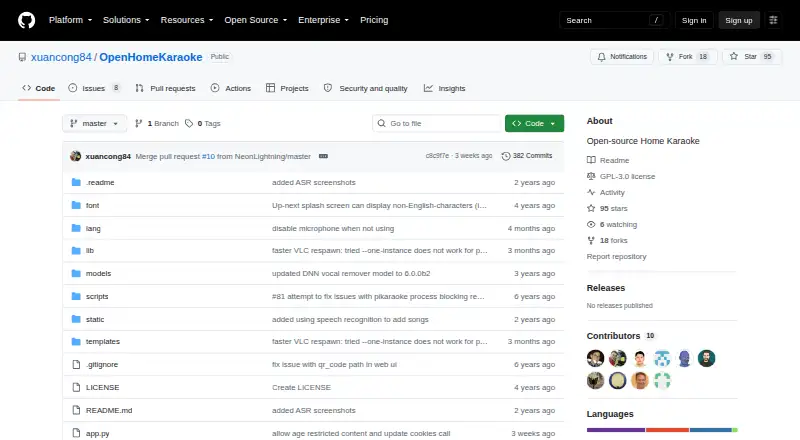
- The GitHub releases page has no releases.
Limits
Offline use allows access to the existing library but not internet searches or new downloads. The README cautions that concurrent downloads and browsing large libraries may suffer on some devices.
Getting started
- Open the project website on GitHub.
- Install the required Python dependencies, VLC, and ffmpeg.
- Set up GPU support if you want accelerated vocal splitting or speech recognition.
- Use the supported Linux, Windows, Raspberry Pi, or macOS system to run it.
- Connect users on the same network through a phone or computer browser.
Verdict
Choose OpenHomeKaraoke if you want a free, open-source home karaoke system with shared browser queueing, varied playback controls, and TV display options. Look elsewhere if you need offline song discovery or expect smooth concurrent downloads and large-library browsing on a device with limited capacity.
Questions
Is OpenHomeKaraoke free?
Yes. It is listed as free and open source, under the GPL-3.0 license.
Which systems does it support?
The README says it works on Linux, Windows, Raspberry Pi, and macOS. It also supports web and self-hosted use.
Can users queue songs from a phone?
Yes. Multiple users on the same network can use a smartphone or computer browser to search the local library and queue songs.
What file types can it play?
It supports MP3 and CDG files, including compressed ZIP bundles.
Can it separate vocals?
A DNN-based splitter can provide instrumental, vocal, or combined playback and requires PyTorch, with GPU support preferred. Stereo track subtraction is also described as an alternative.
What does it cost?
The listed pricing model is free.
Facts from OpenHomeKaraoke's own pages
- Access control
- An optional administrator password can restrict queue editing, player controls, song editing, and system shutdown; without one, everyone is an admin. · github.com, 8 Oct 2026
- Admin controls
- An optional administrator password can restrict queue editing, player controls, song editing and system shutdown; without it, everyone is an admin. · github.com, 8 Oct 2026
- Device limits
- The README says concurrent downloads and browsing large song libraries may suffer on some devices, and recommends multi-core Raspberry Pi models. · github.com, 8 Oct 2026
- Display
- The player can display on a TV via HDMI or screen sharing, and can stream its captured screen over HTTP for viewing in a browser. · github.com, 8 Oct 2026
- License
- The repository identifies its license as GPL-3.0. · github.com, 8 Oct 2026
- License and releases
- The repository identifies a GPL-3.0 license and its GitHub releases page says there are no releases. · github.com, 8 Oct 2026
- Media formats
- The project supports MP3 and CDG files, including compressed ZIP bundles. · github.com, 8 Oct 2026
- Offline use
- Without a network connection, users can access the existing song library but cannot search or download new songs from the internet. · github.com, 8 Oct 2026
- Performance limit
- The README cautions that concurrent downloads and browsing large song libraries may suffer, and recommends multi-core Raspberry Pi devices. · github.com, 8 Oct 2026
- Playback
- It supports mp3 and cdg files, including compressed .zip bundles. · github.com, 8 Oct 2026
- Playback controls
- The interface supports pause, skip, restart, volume, pitch and tempo changes, seeking, and audio and subtitle delay adjustments. · github.com, 8 Oct 2026
- Purpose
- OpenHomeKaraoke is an open-source, YouTube-based home karaoke system for searching, downloading and queueing songs. · github.com, 8 Oct 2026
- Requirements
- Installation instructions call for Python dependencies, VLC and ffmpeg, and describe GPU setup for accelerated vocal splitting or speech recognition. · github.com, 8 Oct 2026
- Security status
- GitHub reports that the repository has no detected security policy and no published security advisories. · github.com, 8 Oct 2026
- Shared queue
- Multiple users on the same network can use a smartphone or computer browser to search the local library and queue songs. · github.com, 8 Oct 2026
- Shared web interface
- Multiple users on the same network can use a browser, including a smartphone browser, to search the local library and queue songs. · github.com, 8 Oct 2026
- Song discovery
- Users can search YouTube and download songs from YouTube and other video sites, including Youku and Bilibili. · github.com, 8 Oct 2026
- Song sources
- Users can search YouTube and download songs from YouTube and other video sites, including Youku and Bilibili. · github.com, 8 Oct 2026
- Speech recognition
- Users can search for and queue songs by voice using OpenAI's multilingual Whisper speech recognition model. · github.com, 8 Oct 2026
- Supported systems
- The README says it works on Linux, Windows, Raspberry Pi, and Mac OS. · github.com, 8 Oct 2026
- TV display
- The karaoke display can be shown on a TV over HDMI, screen sharing, or a TV web browser using an HTTP stream. · github.com, 8 Oct 2026
- Vocal options
- A DNN-based vocal splitter can provide instrumental, vocal, or combined playback; the project also describes stereo track subtraction as an alternative method. · github.com, 8 Oct 2026
- Vocal separation
- A DNN-based vocal splitter can play instrumental, vocal or both tracks; it requires PyTorch, preferably with GPU support. · github.com, 8 Oct 2026
- Voice search
- Voice-based song search uses OpenAI’s multilingual Whisper speech recognition model. · github.com, 8 Oct 2026
Where OpenHomeKaraoke stands on Freedom251
- Karaoke Software#11 of 30
- Sega Master System Emulators#14 of 25