Freedom251 › Family Locator Apps

OpenFamily
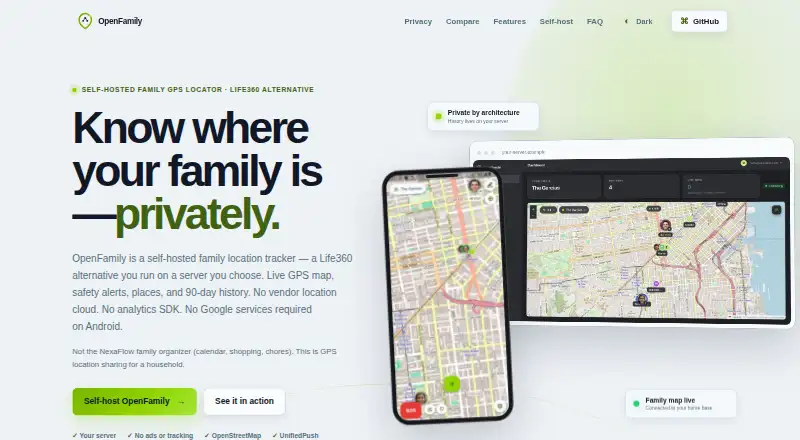
What OpenFamily is
OpenFamily is a self-hosted GPS tracker for households that want to share family locations. Its live map uses OpenStreetMap and displays photo avatars, battery levels, last-seen times, and movement states, with updates through WebSocket. Saved places can trigger arrival and departure alerts. Safety options include SOS with a ten-second countdown, check-ins with notes, and requests for non-emergency family help. Location history shows map trails, stays, stops, and in-transit segments; detailed history is kept for 90 days. People join with invite codes and can be assigned admin, member, or child roles. A web admin panel manages accounts and families, creates invites, configures optional SMS, downloads the Android APK, and displays the live map. Deployment uses a Docker Compose stack on a VPS, Synology NAS, home server, or LAN machine. The project is free and open source, with Android, iOS, web, API, and self-hosted options. Coordinates and other account data are stored in PostgreSQL on the operator's server.
Who it suits
OpenFamily is intended for households with someone comfortable operating a small Docker stack. It is designed for family location sharing, not fleets or public tracking.
What it does well
- Live map displays battery, last-seen, and movement information.
- Saved places can trigger arrival and departure alerts.
- SOS, check-ins, and non-emergency help are available.
- Detailed location history is retained for 90 days.
What to know first
- Deployment requires operating a Docker Compose stack.
- The operator must manage the server and PostgreSQL data.
- Default map tile hosts can see the viewed area.
- The app does not encrypt database rows itself.
Limits
The free self-hosted plan retains detailed location history for 90 days. The app does not encrypt database rows itself.
Plans
| Plan | Billed and limits | Price |
|---|---|---|
| Open source self-hosted | Self-hosted deployment · AGPL-3.0 | Free |
| Self-hosted OpenFamily | free · Requires your own Docker server · 90-day detailed history · household use | Free |
As openfamily.app lists them, read 9 Oct 2026. The maker's own page has the final word.
Getting started
- Open the OpenFamily website.
- Choose the free, self-hosted AGPL-3.0 plan.
- Run the Docker Compose stack on a VPS, Synology NAS, home server, or LAN machine.
- Use the web admin panel to manage the family and create invite codes.
- Have family members join with an invite code and assign their roles.
- Install the Android app using the APK from the web admin panel, or use the iOS or web platform.
OpenFamily is a self-hosted family GPS and safety service for households that want to run their own location-sharing stack. It suits families with someone able to manage Docker and server security; its strongest appeal is operational control, while its main drawback is that control becomes the household’s responsibility.
Overview
OpenFamily combines live household location sharing with place alerts, safety check-ins, SOS, and historical trails. It is designed for a family server rather than fleet management or public tracking. Deployment uses a Docker Compose stack on a VPS, Synology NAS, home server, or LAN machine, so the practical fit depends on having a suitable host and someone willing to maintain it.
Accounts, coordinates, saved places, and history are kept in PostgreSQL on the operator’s server. The app has no analytics SDK or crash reporter, but it does not encrypt database rows itself. Production operation therefore calls for strong secrets, closed public registration, backups, production mode, and host disk encryption. Default map-tile hosts can see the areas being viewed; iOS push goes through APNs, and optional SMS goes through Twilio.
Key features
Live location and places
The live map uses OpenStreetMap and displays family members with photo avatars, battery level, last-seen time, and movement state. WebSocket updates make it suitable for checking current household whereabouts without repeatedly refreshing. Saved places can trigger arrival and departure alerts, useful for routine coordination such as home, school, or work. Operators can select another raster provider or supply their own tiles, giving technically capable households more control over map delivery.
Safety tools
SOS starts with a ten-second countdown, providing a brief chance to cancel an accidental activation. Check-ins support notes, and a non-emergency family-help flow covers situations that do not warrant SOS. These tools make OpenFamily more than a passive map, although their usefulness still depends on a working self-hosted service and participating family members.
History and family access
Location history presents map trails, place stays, stops, and in-transit segments, with detailed history retained for 90 days. That is enough for recent context but not a long-term archive. Members join through an invite code and can receive admin, member, or child roles, allowing a household to separate management duties from ordinary access.
Administration and notifications
The web administration panel manages accounts and families, creates invites, configures optional SMS, downloads the Android APK, and shows the live map. Android notifications use UnifiedPush through ntfy, and Android operation does not require Google Play Services. This is valuable for households avoiding Google’s mobile dependencies, but it adds another service component for an operator to configure.
Pricing
| Plan | Price | Includes |
|---|---|---|
| Open source self-hosted | free | Self-hosted deployment under AGPL-3.0 |
There is no subscription charge for the software, but hosting, storage, backups, security work, and any optional SMS usage remain part of running it. The plan is best for a household that can supply and maintain its own infrastructure; families wanting a managed service should look elsewhere.
Platforms
OpenFamily supports Android, iOS, web, an API, and self-hosted deployment. The combination covers mobile members and browser administration, while the API and self-hosting options are most relevant to technically capable operators.
Who it's for
Choose OpenFamily when a household wants family location, alerts, and safety workflows while keeping its core records on a server it operates. It is particularly suitable for people comfortable with Docker Compose, backups, secrets, and host hardening, or for those who need Android notifications without Google Play Services. It is not the right choice for a family seeking turnkey setup, for a fleet, or for public tracking.
Pros and cons
Pros
- Self-hosted data: PostgreSQL storage on the operator’s server gives the household control over accounts, coordinates, places, and history.
- Broad safety coverage: SOS, a countdown, noted check-ins, and non-emergency help address more situations than location viewing alone.
- Useful live context: Avatars, battery, last-seen time, movement state, and WebSocket updates make the map practical for daily coordination.
- Open mapping flexibility: OpenStreetMap is the default, with support for another raster provider or self-supplied tiles.
- No Google Play Services requirement on Android: UnifiedPush through ntfy provides an alternative notification path.
Cons
- Real operational burden: The household must deploy, update, secure, back up, and monitor the Docker stack.
- Database rows are not app-encrypted: Host protection and disk encryption matter if the server is compromised.
- External-service exposure remains: Default tile hosts see viewed areas, while APNs and optional Twilio SMS handle some communications.
- History is limited: Detailed location records are retained for 90 days, not indefinitely.
Alternatives
For a broader comparison, see Family Locator Apps.
- Hauk is another free self-hosted option for Android, Linux, web, and PHP-based hosting.
- Family Locator suits readers who prefer freemium mobile apps, a free version, and a one-time Lifetime plan at 14.99 USD.
- Findmykids is a freemium Android, iOS, and web choice with a free Básico tier and paid Cuidar plan.
- Glympse fits users wanting a free mobile location-sharing app or a separate 15.00 USD-per-month PRO offering.
- iSharing offers freemium Android, iOS, and web access, including a free tier with one place alert and seven-day history after watching an ad.
- OtoZen is a freemium Android and iOS alternative with a free annual plan.
- Be Closer provides free real-time location on Android and iOS, with a 3.99 USD monthly Premium plan.
- Bluelane is an iOS and web alternative with a free tier and a 47.99 USD annual Pro subscription.
Verdict
OpenFamily is a strong choice for a technically comfortable household that wants family location and safety features on infrastructure it controls, especially when avoiding Google Play Services matters. Look elsewhere if you want managed reliability, minimal setup, or longer-term history without maintaining servers and security yourself.
Verdict
OpenFamily provides household location sharing and safety tools while keeping account and location data on the operator's server. It requires self-hosting and security upkeep, and map tile providers may see which areas are viewed.
Questions
How much does OpenFamily cost?
The self-hosted Open source plan is free.
Is OpenFamily open source?
Yes. Its self-hosted plan is listed under AGPL-3.0.
Which platforms does it support?
Android, iOS, API, self-hosted deployment, and web.
How is family access managed?
People join using invite codes and can have admin, member, or child roles.
Where is location data stored?
Accounts, coordinates, saved places, and history are stored in PostgreSQL on the operator’s server.
What external services are involved?
Default map tile hosts can see the viewed area; iOS push uses APNs, and optional SMS uses Twilio.
Facts from OpenFamily's own pages
- Analytics
- The software states that it contains no analytics SDK, crash reporter or advertising identifier. · openfamily.app, 15 Oct 2026
- Android notifications
- Android push uses UnifiedPush through ntfy and does not require Google Play Services or a Google account. · openfamily.app, 15 Oct 2026
- API
- The public Go API documents health, configuration, authentication, family, place, device, location and alert endpoints plus a WebSocket stream. · github.com, 15 Oct 2026
- API examples
- The quick start shows curl calls for health checking and account registration and login. · openfamily.app, 15 Oct 2026
- Data custody
- Accounts, coordinates, places and history are stored in PostgreSQL on the operator's machine rather than a vendor location cloud. · openfamily.app, 15 Oct 2026
- Deployment
- The product runs as a Docker Compose stack on a VPS, Synology NAS, home server, or LAN machine. · openfamily.app, 9 Oct 2026
- Deployment stack
- Docker Compose bundles Caddy, a Go REST and WebSocket API, PostgreSQL with PostGIS and TimescaleDB, and ntfy. · openfamily.app, 15 Oct 2026
- Documentation depth
- Documentation covers Docker installation, production environment variables, TLS, push setup, tile configuration, backups, encryption and custom domains. · openfamily.app, 15 Oct 2026
- External services
- Default map tile hosts can see the viewed area, iOS push uses APNs, and optional SMS uses Twilio. · openfamily.app, 9 Oct 2026
- Family access
- People can join by invite code and have admin, member, or child roles. · openfamily.app, 9 Oct 2026
- Family roles
- Invite codes support admin, member and child roles within a family. · openfamily.app, 15 Oct 2026
- History
- History includes trails, named-place stays, stops and transit segments, with detailed records retained for 90 days. · openfamily.app, 15 Oct 2026
- Independent alternatives
- AlternativeTo names Life360 Family Locator and OwnTracks as listed alternatives. · alternativeto.net, 15 Oct 2026
- Independent listing
- AlternativeTo lists the product as free, open source under AGPL-3.0, and developed by Frank Johnette. · alternativeto.net, 15 Oct 2026
- Independent platforms
- AlternativeTo lists Android, iPhone, self-hosted and Docker support. · alternativeto.net, 15 Oct 2026
- Independent positioning
- AlternativeTo marks the product as privacy-focused and categorizes it under Development, Home & Family, and Travel & Location. · alternativeto.net, 15 Oct 2026
- Independent store coverage
- AlternativeTo links the project to GitHub rather than Apple, Google, Chrome or Microsoft app stores. · alternativeto.net, 15 Oct 2026
- Integrations
- Android notifications use UnifiedPush through ntfy, and the app does not require Google Play Services. · openfamily.app, 9 Oct 2026
- Intended users
- OpenFamily is designed for households with a member comfortable running a small Docker stack, rather than fleets or public tracking. · openfamily.app, 9 Oct 2026
- iOS notifications
- iOS push depends on Apple APNs; payloads contain no coordinates and the app fetches alert details from the server over TLS. · openfamily.app, 15 Oct 2026
- Licence
- OpenFamily is released under the GNU Affero General Public License 3.0. · github.com, 15 Oct 2026
- Limit: database encryption
- The application does not encrypt database rows itself, so operators are told to use host or volume encryption. · openfamily.app, 15 Oct 2026
- Limit: external visibility
- Default OSM and Esri tile hosts can see the viewed map area unless the operator configures another tile server. · openfamily.app, 15 Oct 2026
- Limit: operational burden
- The product is intended for households with someone comfortable operating a small Docker stack and maintaining backups and TLS. · openfamily.app, 15 Oct 2026
Where OpenFamily stands on Freedom251
- Family Locator Apps#1 of 29