Freedom251 › Family Locator Apps

Bluelane
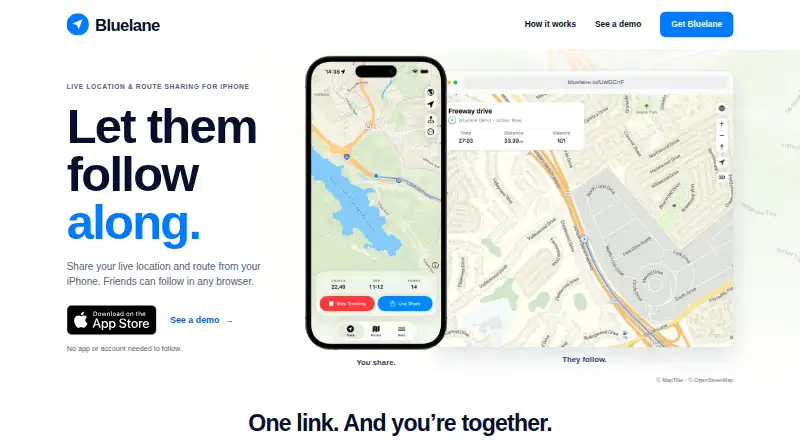
What Bluelane is
Bluelane is an iPhone route recorder that lets people share their location and route live with friends following in a browser. The person recording needs Bluelane; viewers can open the shared link on Android or iPhone phones, tablets, and computers without installing the app or creating an account. Links can be sent by text, chat, or email. Anyone with a link can view its route, including someone who receives a forwarded link, and ending a recording does not revoke access.
Route recording works offline. Live updates resume when the iPhone reconnects. Bluelane saves route history so users can return to past trips and review the route, distance, and time. It also supports GPX import and export. Apple Watch users can start, stop, and share a route, then view distance, time, and viewers. Route maps credit MapTiler and OpenStreetMap.
The iOS app is free, with in-app purchases available. The Annual Pro Subscription costs $47.99 a year, billed annually. Bluelane’s terms allow personal, non-commercial use. Its privacy policy describes collecting route location updates, support contact information, and usage and device details.
Who it suits
Bluelane suits iPhone users who want friends to follow a live route through a browser, including people who do not have the app or an account. It also fits users who want to keep trip history, work with GPX files, or control recording from an Apple Watch.
What it does well
- Followers can open shared routes in a browser without an app or account.
- Route recording continues offline, with live updates resuming after reconnection.
- Saved trips show route, distance, and time.
- GPX files can be imported and exported.
- Apple Watch supports starting, stopping, and sharing routes.
What to know first
- Anyone with the route link can view it, even if it is forwarded.
- Stopping a recording does not revoke the shared link.
- The terms limit access to personal, non-commercial use.
Limits
The Free plan costs nothing; in-app purchases are available. The Annual Pro Subscription costs $47.99 a year, billed annually, and its features and usage limits are not described here.
Plans
| Plan | Billed and limits | Price |
|---|---|---|
| Free | Bluelane labels the iOS app free; in-app purchases are available | Free |
| Annual Pro Subscription | Annually · Pro subscription; features and usage limits not specified on the opened page | $47.99 a year |
As bluelane.io lists them, read 4 Oct 2026. The maker's own page has the final word.
Getting started
- Visit https://bluelane.io/ and get the iOS app.
- Start recording a route on the iPhone.
- Send the route link by text, chat, or email to invite viewers.
- Use Apple Watch to start, stop, or share a route if desired.
Verdict
Choose Bluelane if you record routes on an iPhone and want others to follow through a browser without signing up. Its route history, GPX support, offline recording, and Apple Watch controls add useful options for trip sharing. Consider the link’s broad visibility and the personal, non-commercial use terms before using it for a route.
Questions
Is Bluelane free?
The iOS app is listed as free, with in-app purchases available. An Annual Pro Subscription is $47.99 a year, billed annually.
What devices can view a shared route?
Shared links work in browsers on Android and iPhone phones, tablets, and computers. Viewers do not need the app or an account.
Can a route be recorded without an internet connection?
Yes. Recording works offline, and live updates resume when the iPhone reconnects.
Can anyone view a route link?
Anyone with the link can view the route, including if the link is forwarded. Stopping recording does not revoke access.
Who makes Bluelane, and what information does it collect?
The listed website is bluelane.io. Its privacy policy says it collects route location updates, support contact information, and usage and device details.
Facts from Bluelane's own pages
- Apple Watch
- Users can start, stop, and share a route from Apple Watch and view distance, time, and viewers. · bluelane.io, 4 Oct 2026
- GPX
- The site says users can import and export GPX files. · bluelane.io, 4 Oct 2026
- Integrations
- The site credits MapTiler and OpenStreetMap on its route maps. · bluelane.io, 4 Oct 2026
- Intended use
- The terms grant access for personal, non-commercial use. · bluelane.io, 4 Oct 2026
- Link sharing
- The route link can be sent by text, chat, or email, and followers do not need an app or account. · bluelane.io, 4 Oct 2026
- Offline recording
- Route recording works offline, while live updates resume after the iPhone reconnects. · bluelane.io, 4 Oct 2026
- Privacy collection
- The privacy policy says Bluelane collects route location updates and support contact information, plus usage and device details. · bluelane.io, 4 Oct 2026
- Product
- Bluelane shares a live location and route from an iPhone so friends can follow in a browser. · bluelane.io, 4 Oct 2026
- Route history
- Bluelane keeps route history and lets users revisit trips and see route, distance, and time. · bluelane.io, 4 Oct 2026
- Security
- The privacy policy describes physical, electronic, and procedural safeguards and says access is limited to authorized personnel who need it. · bluelane.io, 4 Oct 2026
- Sharing visibility
- Anyone with the link can view a route, including if the link is forwarded; stopping recording does not revoke it. · bluelane.io, 4 Oct 2026
- Support
- The site lists [email protected] as its contact email. · bluelane.io, 4 Oct 2026
- Supported audience devices
- Shared links work in browsers on Android, iPhone, tablets, and computers; only the route recorder needs Bluelane. · bluelane.io, 4 Oct 2026
Where Bluelane stands on Freedom251
- Family Locator Apps#3 of 29