Freedom251 › Online Proctoring Software
Open edX edx-proctoring
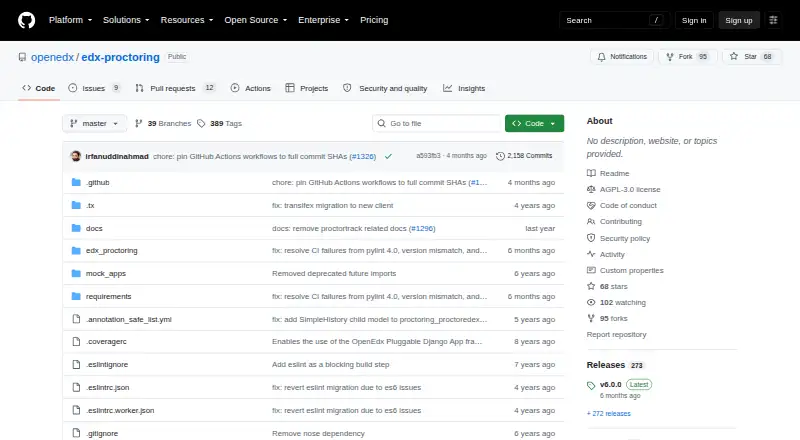
What Open edX edx-proctoring is
Open edX edx-proctoring is the exam-proctoring subsystem for the Open edX platform. It provides proctoring for timed exams, where software may monitor a learner’s computer, surroundings, and behavior. Course teams can configure proctoring backends and create ungraded practice exams to help learners prepare for software installation and required checks. Open edX documentation identifies Software Secure RPNow as the provider used on edx.org. RPNow supplies standard exam rules, which course teams can supplement; learners on edx.org must be in the verified enrollment track to take a proctored exam. The provider sends collected proctoring information for review, with learner support and course teams handling flagged or unclear cases. Depending on the service, learners may need to install software, verify identity, use a webcam, and scan their testing environment. The code is free under AGPL 3.0 unless otherwise noted, and is available as an API or for self-hosting. It requires Open edX and may require a third-party proctoring provider.
Who it suits
It is for Open edX operators and course teams that need to administer proctored exams. Learners should note that provider requirements can include identity checks, webcam use, and an environment scan.
What it does well
- Free under AGPL 3.0 unless otherwise noted
- Course teams can create practice proctored exams
- Supports configurable proctoring backends
- Includes exam administration through the Instructor Dashboard
What to know first
- Requires the Open edX platform
- A third-party proctoring provider may be required
- RPNow exams require at least 500 kbps connectivity
- Proctoring may require webcam and environment checks
Limits
The subsystem requires Open edX and may require a third-party provider. For RPNow exams, the secure browser requires a consistent connection of at least 500 kbps; an exam ends if the connection falls below that rate or the browser closes.
Plans
| Plan | Billed and limits | Price |
|---|---|---|
| Open edX edx-proctoring | AGPL-3.0 · requires Open edX platform · third-party proctoring provider may be required | Free |
As github.com lists them, read 5 Oct 2026. The maker's own page has the final word.
Getting started
- Visit the edx-proctoring repository on GitHub.
- Use it with the Open edX platform as an API or self-hosted subsystem.
- For self-managed deployment, arrange setup, infrastructure, and maintenance.
- Configure a proctoring backend; a third-party provider may be required.
- Create proctored exams and, if useful, ungraded practice exams.
- Use the Instructor Dashboard’s Special Exams tab to administer proctoring.
Overview
Open edX edx-proctoring is a proctoring subsystem for timed exams delivered through Open edX, aimed at institutions and organizations running that platform. Its strongest case is configurable exam administration within an existing Open edX operation; it is less suitable for teams seeking a complete, managed exam-proctoring service.
Key features
Configurable proctoring workflows
The subsystem supports configurable proctoring backends, and Open edX identifies Software Secure RPNow as the provider used on edx.org. Proctored exams monitor the learner’s computer, surroundings, and behavior during a timed assessment. This flexibility can fit organizations choosing a provider, but the subsystem is not itself the monitoring service, and a third-party provider may be required.
Practice exams and administration
Course teams can create ungraded practice proctored exams, giving learners a chance to prepare for software installation and required checks before a graded exam. Instructors can administer proctoring from the Special Exams tab in the Instructor Dashboard, add per-user allowances, and reset attempts. Those controls help with routine course operations, although support staff and course teams remain involved when cases are flagged or unclear.
Rules, identity, and review
RPNow supplies standard exam rules that course teams can supplement with custom rules. On edx.org, learners must be in the verified enrollment track to take a proctored exam. RPNow sends collected proctoring information to Software Secure for review; flagged or ambiguous cases can require follow-up from learner support and course staff. This workflow supports review, but it also means proctoring entails people and processes beyond the software.
Learner requirements and connectivity
Depending on the provider, learners may need to install software, verify identity, use a webcam, and scan their testing environment. RPNow’s secure browser requires a consistent connection of at least 500 kbps; an exam ends if the connection falls below that threshold or the browser closes. These requirements can be a poor fit for learners with limited connectivity, restricted devices, or privacy concerns.
Pricing
Open edX edx-proctoring: free (AGPL-3.0 · requires Open edX platform · third-party proctoring provider may be required). The open-source code has no software license fee, but that is not the total cost of operating it. Open edX operators are responsible for hosting, infrastructure, maintenance, support, and customization, and self-managed distributions require setup and ongoing care. The free plan is therefore most compelling for organizations already equipped to run Open edX; it is not a low-effort, no-cost route to managed proctoring.
Platforms
The subsystem is available as an API and for self-hosted deployment, and requires the Open edX platform. That makes it a natural fit for an organization operating its own Open edX environment, not a standalone option for teams using another learning platform.
Who it's for
Open edX is used by universities, governments, nongovernmental organizations, and enterprises worldwide. Within that audience, edx-proctoring best fits organizations that can manage Open edX infrastructure, select and coordinate with a proctoring provider, and support exam administration. It is a weaker choice for small teams that need a turnkey service or cannot accommodate provider-dependent software, identity, webcam, environment-scan, or connectivity requirements for learners.
Pros and cons
- Pro: Configurable provider backends let Open edX operators shape proctoring workflows around a selected service.
- Pro: Ungraded practice exams and dashboard controls help course teams prepare learners and manage allowances or retakes.
- Pro: The AGPL-3.0 code is free to use, with no Open edX software license fee.
- Con: Hosting, infrastructure, maintenance, support, and customization remain the operator’s responsibility.
- Con: Provider-specific learner requirements, including RPNow’s 500 kbps minimum and exam-ending connectivity or browser conditions, can make access fragile.
- Con: Identity checks and possible webcam use, software installation, and room scans raise practical and privacy considerations.
Alternatives
Compare online proctoring software if you want to consider services beyond a subsystem designed for Open edX.
- Proctorio is an option to compare if you want a freemium proctoring product with a free evaluation plan and broad platform support.
- Respondus Monitor may suit institutions seeking a paid option with a free pilot or a student-purchase plan.
- ThinkExam is worth comparing if you want a freemium assessment platform with mobile support and a Standard plan priced at $3,125 a month, billed annually.
- OctoProctor may be preferable if you want hours-based pricing and support for self-hosted deployment; its specific fees are set in the license agreement, invoice, or order form.
- ExamSoft is another paid option, with capabilities depending on the product and customer order terms.
- Grafari is a paid alternative to compare if its plans and supported platforms better suit your needs.
- Janison Assessment Platform is an alternative if you want organisation-specific pricing based on a quote.
- Proctor360 is another paid remote-proctoring option to consider.
Verdict
Choose Open edX edx-proctoring if your organization already runs Open edX and wants configurable proctoring administration without a software license fee. Its main advantage is fitting proctoring workflows into that platform; its main drawback is the operational burden and reliance on a provider, whose requirements can affect learner access and privacy. Look elsewhere for a standalone or managed service.
Verdict
This subsystem adds configurable proctoring workflows to Open edX, but it is not a standalone exam platform. Operators should account for provider requirements and the infrastructure, maintenance, and support involved in self-managed deployment.
Questions
How much does edx-proctoring cost?
The listed plan is free. Operators are responsible for hosting, infrastructure, maintenance, support, and customization costs for the Open edX platform.
Is it open source?
Yes. The repository code is licensed under AGPL 3.0 unless otherwise noted.
What platforms does it support?
It is listed for API and self-hosted use, and it requires the Open edX platform.
Does it include a proctoring provider?
A third-party proctoring provider may be required. The Open edX documentation identifies Software Secure RPNow as the provider used on edx.org.
What do learners need for a proctored exam?
Requirements depend on the service and may include installing software, verifying identity, using a webcam, and scanning the testing environment. On edx.org, learners must be in the verified enrollment track.
Facts from Open edX edx-proctoring's own pages
- Administration
- The developer guide says the Instructor Dashboard’s Special Exams tab can administer proctoring, add per-user allowances, and reset exam attempts. · github.com, 5 Oct 2026
- Audience
- The Open edX platform is used by universities, governments, nongovernmental organizations, and enterprises worldwide. · openedx.org, 5 Oct 2026
- Connectivity limit
- The RPNow secure browser requires a consistent internet connection of at least 500 kbps, and an exam ends if connectivity falls below that level or the browser is closed. · docs.openedx.org, 5 Oct 2026
- Cost
- Open edX states that its platform has no software license fees, while operators are responsible for hosting, infrastructure, maintenance, support, and customization costs. · openedx.org, 5 Oct 2026
- Deployment
- Open edX describes self-managed distributions as requiring the operator to handle setup, maintenance, and infrastructure. · openedx.org, 5 Oct 2026
- Exam monitoring
- Proctored exams are timed exams where online proctoring software monitors the learner’s computer, environment, and behavior. · docs.openedx.org, 5 Oct 2026
- Exam rules
- RPNow provides standard exam rules that course teams can supplement with custom rules. · docs.openedx.org, 5 Oct 2026
- Identity requirements
- Learners must be in the verified enrollment track to take a proctored exam on edx.org. · docs.openedx.org, 5 Oct 2026
- License
- The repository code is licensed under AGPL 3.0 unless otherwise noted. · github.com, 5 Oct 2026
- Practice exams
- Course teams can create ungraded practice proctored exams to help learners prepare for software installation and required checks. · docs.openedx.org, 5 Oct 2026
- Privacy-sensitive data
- Depending on the proctoring service, learners may need to install software, verify identity, use a webcam, and scan their testing environment. · docs.openedx.org, 5 Oct 2026
- Provider integration
- The subsystem supports configurable proctoring backends, and Open edX documentation identifies Software Secure RPNow as the provider used on edx.org. · docs.openedx.org, 5 Oct 2026
- Purpose
- edx-proctoring is the exam proctoring subsystem for the Open edX platform and provides its proctoring implementation. · github.com, 5 Oct 2026
- Review workflow
- RPNow submits collected proctoring information to Software Secure for review, with learner support and course teams handling flagged or unclear cases. · docs.openedx.org, 5 Oct 2026
Where Open edX edx-proctoring stands on Freedom251
- Online Proctoring Software#2 of 27