Freedom251 › Stock Vector Libraries
Open Doodles
What Open Doodles is
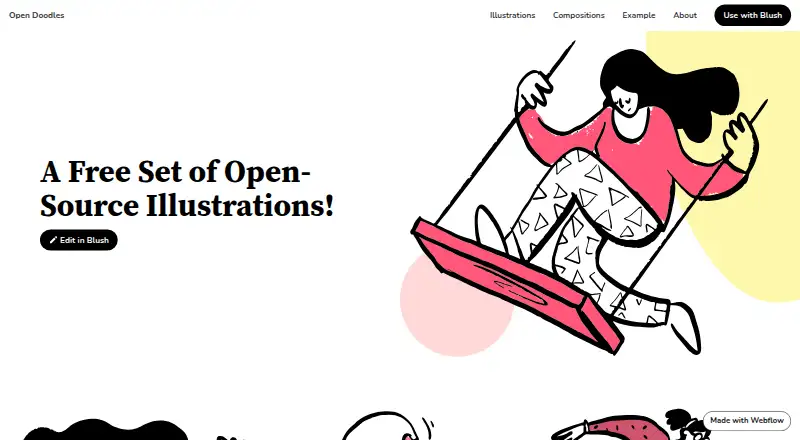
Open Doodles is a web-based set of illustrations, compositions, and animated GIFs for designers and other creators. Its illustrations are available under CC0, and the site says they can be used for personal or commercial purposes without credit or a separate license. The free Open Doodles plan is priced at $0. Illustration downloads include SVG and PNG files, with GIF links for some illustrations; compositions are available as SVG and PNG. A linked generator offers Theme and Create sections, ink and accent color inputs, a background input, and a Download Pack option. The illustrations page also links to Blush for editing, while individual assets and source files can be downloaded on Dropbox. Open Doodles credits Pablo Stanley. The site describes the collection as a way to demonstrate illustration in mockups, including as placeholders before hiring an illustrator. Its creation process involved sketching on an iPad in Procreate, vectorizing in Illustrator, organizing in Sketch, and exporting as SVG and PNG.
Who it suits
Open Doodles suits designers who want illustrations for mockups, including placeholders before hiring an illustrator. It also suits people seeking assets they can adapt and use in personal or commercial work under CC0.
What it does well
- CC0 allows copying, editing, remixing, sharing, or redrawing for any purpose.
- Free for personal and commercial use without credit.
- Illustrations and compositions are available in SVG and PNG.
- Some illustrations have GIF links.
- A linked generator offers color, background, and Download Pack controls.
What to know first
- The listed platform is web.
- GIF links are available for some illustrations, not all.
Plans
| Plan | Billed and limits | Price |
|---|---|---|
| Open Doodles | Free illustrations · Free for commercial and personal use | Free |
As opendoodles.com lists them, read 7 Oct 2026. The maker's own page has the final word.
Getting started
- Visit the Open Doodles website.
- Browse the illustrations or compositions pages.
- Download available SVG or PNG files, or follow GIF links for some illustrations.
- Use the linked generator to make doodles and select Download Pack.
- Follow the Blush link to edit illustrations, or use Dropbox for individual assets and source files.
Verdict
Choose Open Doodles if you want illustrations and compositions that can be adapted for personal or commercial projects without credit. Look elsewhere if you need a platform other than web or require GIF downloads for every illustration.
Questions
How much does Open Doodles cost?
The free Open Doodles plan is priced at $0.
Can I use Open Doodles commercially?
Yes. The site says its illustrations are free for commercial and personal use, with no credit or separate license required.
What file formats are available?
Illustrations and compositions are available as SVG and PNG. Some illustrations also have GIF links.
Can I edit or create doodles?
The illustrations page links to Blush for editing, and the site links to a generator with theme, color, background, and Download Pack controls.
Who created Open Doodles?
The site credits Pablo Stanley.
Facts from Open Doodles's own pages
- Asset source files
- The about page says individual assets and source files can be downloaded on Dropbox. · opendoodles.com, 7 Oct 2026
- Commercial use
- The site says the illustrations are free for commercial and personal use, with no need to credit or obtain a license. · opendoodles.com, 7 Oct 2026
- Compositions
- The compositions page provides SVG and PNG downloads for its artwork. · opendoodles.com, 7 Oct 2026
- Creation process
- The about page says the illustrations were sketched on an iPad using Procreate, vectorized in Illustrator, organized in Sketch, and exported as SVG and PNG. · opendoodles.com, 7 Oct 2026
- Creator
- The site credits Open Doodles to Pablo Stanley. · opendoodles.com, 7 Oct 2026
- Downloads
- The illustrations page provides SVG and PNG downloads, and GIF links for some illustrations. · opendoodles.com, 7 Oct 2026
- Editing integration
- The illustrations page links to edit illustrations in Blush. · opendoodles.com, 7 Oct 2026
- Generator
- The site links to a generator for making doodles. · opendoodles.com, 7 Oct 2026
- Generator controls
- The generator page shows Theme and Create sections, ink and accent color inputs, a background input, and a Download Pack option. · opendoodles.com, 7 Oct 2026
- Intended use
- The about page says the illustrations may help designers show the value of illustration in mockups, including as placeholders before hiring an illustrator. · opendoodles.com, 7 Oct 2026
- License
- The about page says the images can be copied, edited, remixed, shared, or redrawn for any purpose under CC0. · opendoodles.com, 7 Oct 2026
- What it is
- Open Doodles is a free set of open-source illustrations. · opendoodles.com, 7 Oct 2026
Where Open Doodles stands on Freedom251
- Stock Vector Libraries#14 of 24