Freedom251 › PDF Merger Software

Online PDF Merger
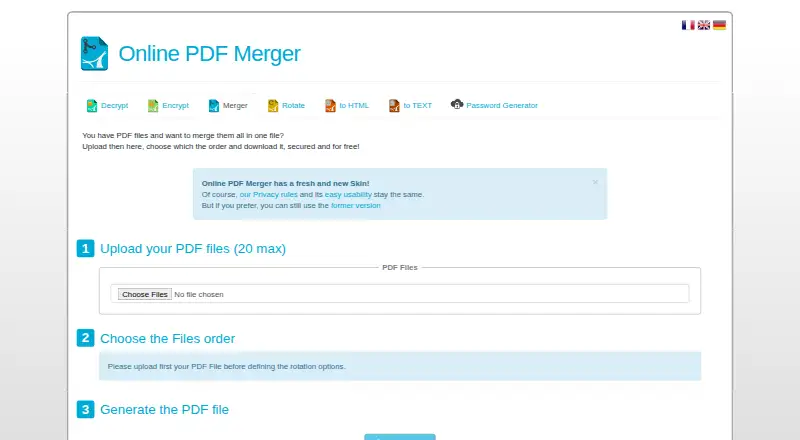
What Online PDF Merger is
Online PDF Merger is a web service for combining uploaded PDF files into one PDF. Users can choose the order of the files before merging, then download the combined result. Each operation accepts up to 20 PDF files. The service is free of charge, and its listed plan is the Free online service at no cost.
The workflow is to upload PDFs, arrange their order, merge them, and download the output. Uploaded PDFs are deleted after processing, and generated PDFs are automatically removed after 30 minutes. Users can also remove generated files manually with the “Delete all Datas” button. The privacy page says uploaded files and related information, including passwords, are used only for PDF processing and are not shared with third parties. It also says the site uses Google Analytics cookies for statistics. KNet Solutions is identified as responsible for the website service. A help page provides usage instructions, and the site links to related tools for decrypting, encrypting, and rotating PDFs, converting PDFs to HTML or text, and generating passwords. The terms state that successful processing is not guaranteed and that the service is not liable for software errors during PDF processing.
Who it suits
Online PDF Merger suits people who want to combine several PDFs in a browser and control their order before creating one file. It is a fit for occasional merging within the limit of 20 PDFs per operation.
What it does well
- Combines up to 20 PDFs in one operation.
- Lets users arrange file order before merging.
- Free to use.
- Deletes uploaded PDFs after processing.
- Offers manual deletion of generated files.
What to know first
- The service does not guarantee successful processing.
- Generated PDFs are automatically removed after 30 minutes.
- The listed platform is web only.
Limits
Each operation supports up to 20 PDF files. Generated PDFs are automatically removed after 30 minutes, and the terms say successful processing is not guaranteed.
Plans
| Plan | Billed and limits | Price |
|---|---|---|
| Free online service | Free of charge · Up to 20 PDF files | Free |
As pdfmerger.org lists them, read 4 Oct 2026. The maker's own page has the final word.
Getting started
- Open https://www.pdfmerger.org/ in a web browser.
- Upload up to 20 PDF files for one operation.
- Arrange the files in the order you want.
- Merge the PDFs and download the result.
- Use “Delete all Datas” to remove generated files manually if needed.
Verdict
Choose Online PDF Merger for a free browser workflow that combines and orders up to 20 PDF files at a time. Look elsewhere if you need guaranteed processing or need generated files to remain available beyond 30 minutes without saving them.
Questions
Is Online PDF Merger free?
Yes. The service is free of charge. Its listed Free online service plan costs nothing.
Which platforms does it support?
It is a web service, and web is its primary platform.
How many PDFs can I merge at once?
An operation can include up to 20 PDF files.
Can I choose the order of the files?
Yes. You can arrange uploaded PDFs before merging them.
When are files deleted?
Uploaded PDFs are deleted after processing. Generated PDFs are automatically removed after 30 minutes, and users can also delete generated files with the “Delete all Datas” button.
Who is responsible for the service?
The privacy page identifies KNet Solutions as responsible for the website service.
Facts from Online PDF Merger's own pages
- Cookies
- The privacy page says the service uses Google Analytics cookies for statistics. · pdfmerger.org, 4 Oct 2026
- Data use
- The privacy page says uploaded files and further information such as passwords are used only for PDF processing and are not shared with third parties. · pdfmerger.org, 4 Oct 2026
- File order
- Users can choose the order of uploaded files before merging. · pdfmerger.org, 4 Oct 2026
- Free service
- The service is offered free of charge. · pdfmerger.org, 4 Oct 2026
- Manual deletion
- Users can manually delete generated files with the “Delete all Datas” button. · pdfmerger.org, 4 Oct 2026
- Purpose
- The service merges uploaded PDF files into one file. · pdfmerger.org, 4 Oct 2026
- Related tools
- The site links to PDF decrypt, encrypt, rotate, PDF-to-HTML, PDF-to-text, and password-generator tools in its suite. · pdfmerger.org, 4 Oct 2026
- Service limitation
- The terms say the tool does not guarantee successful processing and is not liable for software errors during PDF processing. · pdfmerger.org, 4 Oct 2026
- Service provider
- The privacy page identifies KNet Solutions as responsible for the website service. · pdfmerger.org, 4 Oct 2026
- Support
- The site provides a help page with instructions for using the merger. · pdfmerger.org, 4 Oct 2026
- Uploaded-file deletion
- Uploaded PDFs are deleted after processing, and generated PDFs are automatically removed after 30 minutes. · pdfmerger.org, 4 Oct 2026
- Upload limit
- The merger page allows up to 20 PDF files per operation. · pdfmerger.org, 4 Oct 2026
- Workflow
- The help page describes uploading PDFs, arranging their order, merging them, and downloading the result. · pdfmerger.org, 4 Oct 2026
Where Online PDF Merger stands on Freedom251
- PDF Merger Software#18 of 36
- PDF mergers#16 of 23