Freedom251 › Digital Signage Software
Omnivex Moxie
What Omnivex Moxie is
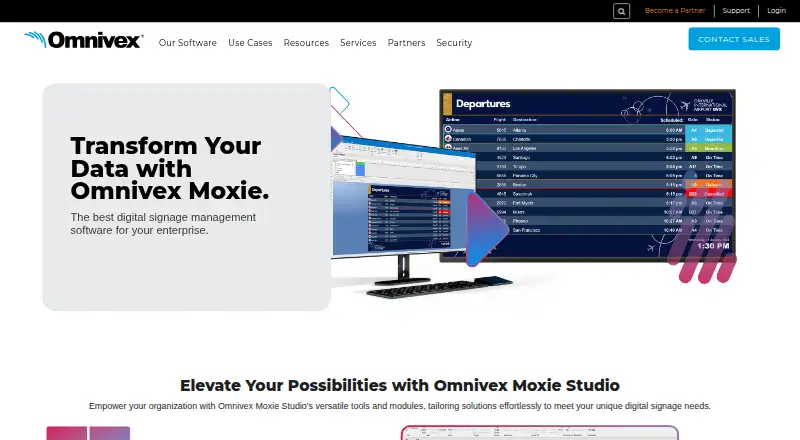
Omnivex Moxie is on-premise digital signage management software for enterprises operating screens from one location to worldwide deployments. It handles text, images, audio, video, web content, PowerPoint, HTML, and real-time data. Moxie Studio’s Layout Designer provides timelines, alignment tools, and code-free interactivity. Player Manager remotely manages players, assigns content, previews displays, reviews transmission logs, and applies metadata. Scheduling supports time- or data-driven playlists, while Map Builder creates interactive wayfinding without programming. Data connections include spreadsheets, databases, text files, web APIs, RSS feeds, data feeds, and hardware devices through DataPipe Server and the Omnivex Platform. Workflows include folder synchronization, triggered actions, metadata management, and IronPython scripts. Studio and Player requirements list Windows 11; Data Server uses Windows Server 2019 or 2022. Pricing is available from sales on request.
Who it suits
It suits organizations needing on-premise control of digital signage, data-driven content, player management, and wayfinding. Deployments can range from a single location to organizations with sites worldwide.
What it does well
- Supports many media and real-time data types
- Remotely manages players and content
- Creates data-driven playlists and wayfinding maps
- Connects databases, feeds, files, and devices
- Offers role-based access and multifactor authentication
What to know first
- Pricing is available only by contacting sales
- Studio and Player require Windows 11
- Latest downloads require a current AMS agreement
- Support excludes installation, customization, and training
Plans
| Plan | Billed and limits | Price |
|---|---|---|
| Omnivex Moxie | On-premise digital signage software; contact Omnivex for pricing | On request |
As omnivex.com lists them, read 13 Oct 2026. The maker's own page has the final word.
Verdict
Moxie provides a broad on-premise toolkit for designing, scheduling, integrating, and administering enterprise signage. Its Windows requirements, AMS download access, and sales-led pricing matter when planning deployment.
Facts from Omnivex Moxie's own pages
- Automation and scripting
- Moxie supports content scheduling, folder synchronization, triggered actions, metadata management, and scripts written in IronPython. · omnivex.com, 12 Oct 2026
- Compliance
- Omnivex states it is SOC 2 compliant and Level 4 SAQ compliant under PCI DSS. · omnivex.com, 13 Oct 2026
- Content design
- Moxie Studio’s Layout Designer provides a timeline, alignment tools, and code-free interactivity for designing content. · omnivex.com, 13 Oct 2026
- Content types
- text,images,audio,video,web content,PowerPoint,real-time data,HTML · omnivex.com, 21 Sept 2026
- Data connections
- The product page says Moxie can use spreadsheets, databases, text files, web APIs, data feeds, and devices; DataPipe Server connects databases, text files, RSS feeds, and hardware devices. · omnivex.com, 12 Oct 2026
- Data integration
- DataPipe Server connects databases, text files, RSS feeds, and hardware devices for use across the signage network. · omnivex.com, 13 Oct 2026
- Data sources
- The Omnivex Platform can integrate internal sources such as spreadsheets and databases and external sources such as web APIs, data feeds, and devices. · omnivex.com, 13 Oct 2026
- Deployment
- Moxie applications can run on one PC or across separate PCs; a typical network uses Studio, Server, and Player software on different PCs. · omnivex.com, 13 Oct 2026
- Download access
- Moxie installation files are provided through Omnivex Technical Services, and the latest release download is limited to customers with a current AMS agreement who are logged in. · omnivex.com, 13 Oct 2026
- Download eligibility
- The latest Moxie release download is for customers with current AMS agreements and requires website login. · omnivex.com, 12 Oct 2026
- Founded
- 1991 · omnivex.com, 28 Sept 2026
- Headquarters
- Concord, Ontario, Canada · omnivex.com, 28 Sept 2026
- Metadata
- Users can create custom metadata fields and tag images and videos with details such as start date and location for automated content distribution. · omnivex.com, 13 Oct 2026
- Offline playback
- Yes · omnivex.com, 21 Sept 2026
- Operating system
- Moxie is developed for Microsoft Windows; the requirements page lists Windows 11 for Studio and Player and Windows Server 2019 or 2022 for Data Server. · omnivex.com, 13 Oct 2026
- Payment security compliance
- Omnivex states that it is Level 4 SAQ compliant under PCI DSS. · omnivex.com, 12 Oct 2026
- Player management
- Player Manager can remotely manage players, assign content, preview displays, view transmission logs, and assign metadata. · omnivex.com, 13 Oct 2026
- Pricing
- The product page directs interested customers to contact sales; it does not state a Moxie price. · omnivex.com, 12 Oct 2026
- Product
- Moxie is Omnivex’s on-premise digital signage management software for enterprise use. · omnivex.com, 13 Oct 2026
- Purpose
- Omnivex describes Moxie as enterprise digital signage management software for transforming and displaying data across screens. · omnivex.com, 12 Oct 2026
- Scheduling and wayfinding
- Moxie includes tools to schedule content, create time- or data-driven playlists, and build interactive wayfinding maps without programming. · omnivex.com, 12 Oct 2026
- Scripting and wayfinding
- Moxie supports IronPython scripts and a Map Builder for creating interactive wayfinding without programming. · omnivex.com, 13 Oct 2026
- Security
- Omnivex states it uses multi-factor authentication, role-based access controls, regular audits, continuous monitoring, and 24/7 managed SOC/SIEM services. · omnivex.com, 13 Oct 2026
- Support
- Omnivex provides a support request channel, instructional videos, software updates, a knowledge base, and technical support by phone and email. · omnivex.com, 13 Oct 2026
Where Omnivex Moxie stands on Freedom251
- Digital Signage Software#154 of 207