Freedom251 › Digital Signage Software
Omnivex Ink
by Omnivex Ink
What Omnivex Ink is
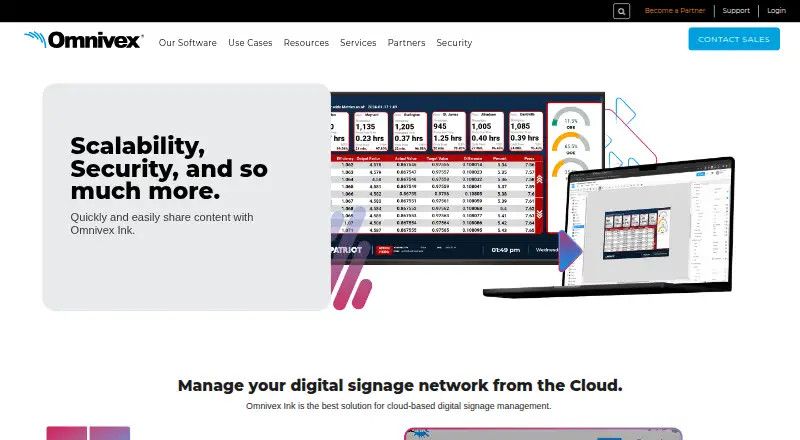
Omnivex Ink is a cloud-based digital signage management system managed through a web interface. Its App Builder uses drag-and-drop controls for placing images and text in layouts, while the Displays page adds screens and manages existing displays. The platform handles images, videos, text, and real-time data. Users can tag images and videos with metadata such as start dates and locations, schedule when content appears, and change on-screen elements according to data. Omnivex DataPipe connects internal sources such as spreadsheets, databases, and text files with external sources including web APIs, data feeds, and devices. DataStack provides on-premises sheet data so displays can continue receiving real-time information during an internet interruption. Files supports uploads, folders, storage, and asset metadata. Event Builder adds actions to images or buttons without coding. Logs show user activity and proof-of-play records. Any browser-and-internet device can act as a display, including desktops, tablets, mobile devices, and System-on-Chip displays. Pricing is available on request.
Who it suits
It suits advanced users managing digital signage across screens, content types, data sources, and locations. Teams can assign roles and control access, while organizations can use APIs, logs, and real-time integrations.
What it does well
- Drag-and-drop layout creation
- Supports real-time data sources
- Schedules and targets content
- No-code interactive actions
- Works on browser-enabled display devices
What to know first
- Pricing requires contacting sales
- Chromium 142+ may require local-network permission
- Advanced user roles may be complex for beginners
Plans
| Plan | Billed and limits | Price |
|---|---|---|
| Omnivex Ink | Contact sales for pricing | On request |
As omnivex.com lists them, read 13 Oct 2026. The maker's own page has the final word.
Verdict
Omnivex Ink combines layout creation, scheduling, asset management, data integration, and display administration in one cloud system.
Facts from Omnivex Ink's own pages
- Activity logs
- Ink provides user activity logs and proof of play logs for display content. · omnivex.com, 13 Oct 2026
- API access
- Yes · omnivex.com, 21 Sept 2026
- Asset management
- Ink’s Files page supports uploading, folder organization, storage, and adding metadata to assets. · omnivex.com, 12 Oct 2026
- Browser permission limit
- On Chromium 142 and higher, Ink components using DataStack may fail to display apps unless the user allows local network access for the Ink site. · omnivex.com, 13 Oct 2026
- Content metadata
- Users can tag images and videos with details such as start date and location for automated content distribution. · omnivex.com, 12 Oct 2026
- Content targeting
- Users can tag images and videos with metadata such as start date and location for automated content distribution. · omnivex.com, 13 Oct 2026
- Content types
- images,videos,text,real-time data · omnivex.com, 21 Sept 2026
- Data integrations
- Omnivex says its platform can integrate data from spreadsheets, databases, text files, web APIs, data feeds, and devices. · omnivex.com, 13 Oct 2026
- Data sources
- Omnivex says its platform can integrate data from internal sources such as spreadsheets, databases, and text files, and external sources such as web APIs, data feeds, and devices. · omnivex.com, 12 Oct 2026
- DataStack security
- DataStack communications use HTTPS and WSS secured with a TLS certificate over a private network. · omnivex.com, 13 Oct 2026
- Display management
- Ink’s Displays page lets users add screens and manage existing displays. · omnivex.com, 12 Oct 2026
- Founded
- 1991 · omnivex.com, 28 Sept 2026
- Hardware drivers
- Ink provides Gen2 display drivers, including a Samsung Tizen 7 driver, and supports adding displays before they are connected. · omnivex.com, 13 Oct 2026
- Headquarters
- Concord, Ontario, Canada · omnivex.com, 28 Sept 2026
- Interactive content
- Event Builder lets users add actions to images or buttons to create interactive solutions without coding. · omnivex.com, 13 Oct 2026
- Interactivity
- The Event Builder can add an action to an image or button to create interactive solutions without coding. · omnivex.com, 12 Oct 2026
- Layout creation
- Its web-based App Builder uses drag-and-drop tools to add images and text to layouts. · omnivex.com, 12 Oct 2026
- Layout editor
- Its App Builder uses drag and drop controls to add images and text to layouts. · omnivex.com, 13 Oct 2026
- Logs
- Ink’s Logs page displays user activity logs and proof-of-play logs for display content. · omnivex.com, 12 Oct 2026
- Maker history
- Omnivex says it has helped businesses deliver targeted visual messaging since 1991. · omnivex.com, 13 Oct 2026
- On premises data
- Ink's DataStack option provides on premises sheet data so displays can obtain real time data during an internet connection interruption. · omnivex.com, 13 Oct 2026
- Pricing
- The product page directs prospective customers to contact sales and does not state a price. · omnivex.com, 12 Oct 2026
- Product
- Omnivex Ink is a cloud based digital signage management system that users manage through a web interface. · omnivex.com, 13 Oct 2026
- Purpose
- Omnivex Ink is a cloud-based digital signage management system for sharing content. · omnivex.com, 12 Oct 2026
Where Omnivex Ink stands on Freedom251
- Digital Signage Software#138 of 207