Freedom251 › Outlining Software

OmniOutliner
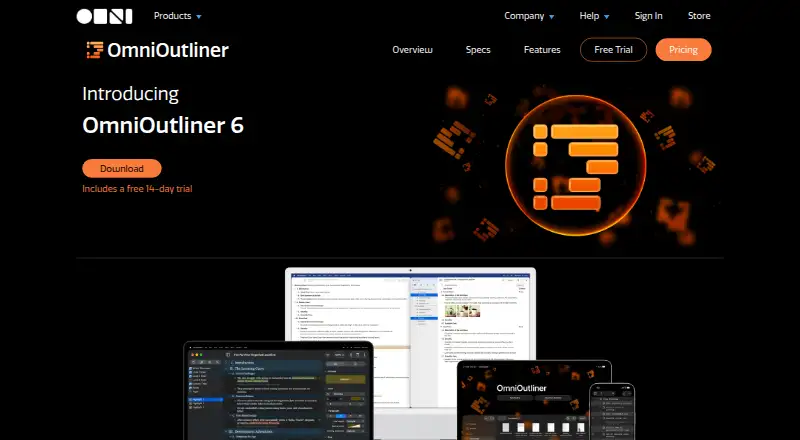
What OmniOutliner is
OmniOutliner organizes information as outlines that you can develop and rearrange to clarify ideas. Outlines can have unlimited levels, expandable sections, status checkboxes, and row notes. Pro adds multiple columns for values such as text, numbers, dates, durations, checkboxes, and pop-up lists. Writing options include Distraction Free and Typewriter modes, with optional row, word, and character counts. The app imports OPML, plain text, RTF, RTFD, and earlier OmniOutliner files. It exports CSV, HTML, Dynamic HTML, OPML, plain text, and RTF; Pro adds DOCX, PPTX, and XLSX. Documents can sync through iCloud Drive or OmniPresence, and flat files can work with services such as Box, Dropbox, Google Drive, and OneDrive. The maker says documents remain on-device by default and users control where synced data is hosted. It works offline on Apple platforms. Essentials costs $24.99 USD once; Pro is $99.99 USD once or available by subscription for $49.99 a year. A 14-day trial is available, but there is no free plan.
Who it suits
OmniOutliner suits writers, students, attorneys, and software developers who want to shape ideas in structured outlines. Its multiple export formats and Pro columns may also suit people moving outline content into other document or data formats.
What it does well
- Supports unlimited outline hierarchy levels.
- Includes Distraction Free and Typewriter modes.
- Works offline on Apple platforms.
- Imports and exports multiple document formats.
- Documents are stored on-device by default, says the maker.
What to know first
- No free plan; a 14-day trial is available.
- Requires macOS 15, iOS/iPadOS 26, or visionOS 26.
- iOS Connected Folders exclude Box, Google Drive, OneDrive, and Proton Drive.
- Password encryption is a Pro feature.
Limits
Essentials provides the basic feature set at $24.99, paid once. Pro features, including additional export formats, multiple columns, automation plug-ins, and document password encryption, require the $99.99, paid once Pro license or the $49.99 a year subscription.
Plans
| Plan | Billed and limits | Price |
|---|---|---|
| v6 Essentials License | Purchase once; includes all 6.x updates. · Essentials feature set · universal Mac, iPhone, iPad, and Apple Vision Pro license | $24.99, paid once |
| OmniOutliner Subscription | Annual Subscription; auto-renews until canceled. · Latest Pro version · Mac, iPhone, iPad, and Apple Vision Pro | $49.99 a year |
| v6 Pro License | Purchase once; includes all 6.x updates. · Pro feature set · universal Mac, iPhone, iPad, and Apple Vision Pro license | $99.99, paid once |
As omnigroup.com lists them, read 8 Oct 2026. The maker's own page has the final word.
Getting started
- Open the OmniOutliner website
- Start the 14-day trial or choose an Essentials, Pro, or subscription plan
- Install on a compatible Mac, iPhone, iPad, or Apple Vision Pro
- Create an outline with sections, rows, checkboxes, and notes
- Connect iCloud Drive or OmniPresence for document sync
Verdict
OmniOutliner combines flexible outline structure, writing modes, and broad file support for developing ideas. Check the platform requirements and plan differences, especially if you need Pro exports, columns, or password encryption.
Questions
How much does OmniOutliner cost?
The v6 Essentials License is $24.99, paid once. The v6 Pro License is $99.99, paid once, and the OmniOutliner Subscription is $49.99 a year.
Is there a free plan or trial?
There is no free plan, but a 14-day trial is available.
Which Apple platforms are supported?
The app platforms are macOS, iOS, iPadOS, and visionOS. OmniOutliner 6 requires macOS 15, iOS/iPadOS 26, or visionOS 26 or newer.
What does Pro add?
Pro adds multiple value columns, DOCX/PPTX/XLSX export, cross-platform Omni Automation plug-ins, and document password encryption.
Where can documents sync?
Documents can sync through iCloud Drive or OmniPresence. Flat files also work with Box, Dropbox, Google Drive, and OneDrive; iOS Connected Folders support iCloud Drive, OmniPresence, and Dropbox.
Facts from OmniOutliner's own pages
- Audience
- The maker identifies writers, students, attorneys, and software developers as people who can use OmniOutliner to develop ideas and concepts. · omnigroup.com, 8 Oct 2026
- Automation
- Pro includes cross-platform Omni Automation plug-ins, while Mac also supports AppleScript. · omnigroup.com, 8 Oct 2026
- Columns
- Pro supports multiple columns for values such as checkboxes, numbers, dates, durations, pop-up lists, and text. · omnigroup.com, 8 Oct 2026
- Encryption
- The feature comparison lists document password encryption as a Pro feature. · omnigroup.com, 8 Oct 2026
- Files and formats
- It imports OPML, plain text, RTF, RTFD, and previous OmniOutliner formats; exports include CSV, HTML, OPML, plain text, RTF, and, with Pro, DOCX, PPTX, and XLSX. · omnigroup.com, 8 Oct 2026
- Headquarters
- Seattle, Washington, United States · omnigroup.com, 28 Sept 2026
- Mobile cloud limit
- On iOS, iPadOS, and visionOS, Connected Folders currently support iCloud Drive, OmniPresence, and Dropbox, but not Box, Google Drive, OneDrive, or Proton Drive. · support.omnigroup.com, 8 Oct 2026
- Outline structure
- Outlines support unlimited hierarchy levels, expandable sections, row status checkboxes, and notes on rows. · omnigroup.com, 8 Oct 2026
- Purpose
- OmniOutliner organizes and reorganizes information into outlines to help clarify and develop ideas. · omnigroup.com, 8 Oct 2026
- Requirements
- OmniOutliner 6 requires macOS 15, iOS/iPadOS 26, or visionOS 26 or newer. · omnigroup.com, 8 Oct 2026
- Security
- The maker says documents are stored on the device by default, server connections are not required, and users control where synced data is hosted. · support.omnigroup.com, 8 Oct 2026
- Support
- OmniOutliner support is available by email and by phone Monday through Friday, 10 a.m.–5 p.m. Pacific Time. · support.omnigroup.com, 8 Oct 2026
- Sync and cloud services
- Documents can sync through iCloud Drive or OmniPresence, and flat files are compatible with services including Box, Dropbox, Google Drive, and OneDrive. · support.omnigroup.com, 8 Oct 2026
- Writing tools
- The app offers Distraction Free and Typewriter writing modes, and optional statistics for rows, words, and characters. · omnigroup.com, 8 Oct 2026
Where OmniOutliner stands on Freedom251
- Outlining Software#21 of 22
- Outliner Software#30 of 31