Freedom251 › AI Music Transcription Software
Oh Sheet!
What Oh Sheet! is
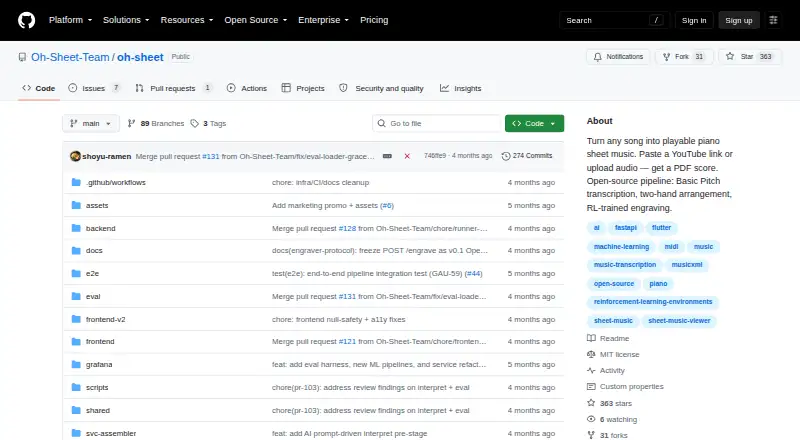
Oh Sheet! is free, open-source software that turns songs into playable piano sheet music with AI. It accepts YouTube links, MP3, WAV, FLAC, and M4A uploads, plus MIDI files, and produces PDF scores, MusicXML, and playable MIDI. Spotify’s Basic Pitch detects notes, while optional Demucs separation can isolate instruments before transcription. The arrangement places melody in the right hand and bass and harmony in the left. Humanized playback can add micro-timing, velocity dynamics, pedal marks, and articulations. A browser viewer renders notation with OpenSheetMusicDisplay and uses Tone.js for playback with cursor synchronization. Its documented API supports job submission, status checks, artifact downloads, and WebSocket progress events. TuneChat can send results to shared rooms for collaborative practice. The public repository uses an MIT license, and self-hosting is described with Docker Compose on one GCP VM. Local PDF engraving requires LilyPond; MusicXML works without it. Tablature output is not supported.
Who it suits
It suits musicians who want to convert recordings or MIDI into piano notation on web, iOS, Android, or macOS. Players needing tablature should note that tab output is unavailable.
What it does well
- Accepts YouTube, audio, and MIDI inputs
- Exports PDF, MusicXML, and playable MIDI
- Polyphonic transcription with optional stem separation
- Humanized playback adds expressive details
- MIT-licensed and self-hostable
What to know first
- PDF output requires LilyPond locally
- Tablature output is not supported
- Hosted engraver is proprietary
- Remote engraver has no public Docker image
Limits
Local PDF output depends on LilyPond; MusicXML does not. Tablature is not produced, and the optional hosted engraver is proprietary.
Getting started
- Open the Oh Sheet! website or repository
- Choose web, iOS, Android, or macOS scaffolding
- Provide a YouTube link, supported audio file, or MIDI file
- Submit a transcription job through the interface or documented API
- Use the browser viewer or download generated artifacts
- Install LilyPond when local PDF engraving is needed
- Deploy with Docker Compose on a GCP VM for self-hosting
Verdict
Oh Sheet! combines AI transcription, piano arrangement, notation viewing, and playback across several platforms. Its open-source core supports self-hosting, while PDF generation has an additional LilyPond requirement.
Questions
What inputs does Oh Sheet! accept?
It accepts YouTube links, MP3, WAV, FLAC, and M4A uploads, plus MIDI files.
What files can it produce?
Outputs include PDF scores, MusicXML, and playable MIDI.
Does it support polyphonic transcription?
Yes. Its transcription handles multiple notes sounding at once.
Is Oh Sheet! open source?
Yes. The public repository lists an MIT license.
Can I self-host it?
The README describes Docker Compose deployment on a single GCP VM, using the local engraving backend.
Does it create tablature?
No. Tablature is not among its notation outputs.
Facts from Oh Sheet!'s own pages
- API
- The documented API includes job submission and status endpoints, artifact downloads, and a WebSocket event stream. · github.com, 9 Oct 2026
- Arrangement
- It arranges melody for the right hand and bass and harmony for the left hand. · github.com, 9 Oct 2026
- Engraving requirement
- The local backend requires LilyPond for PDF output, while MusicXML still works without it. · github.com, 8 Oct 2026
- Hosted component
- The README says its remote HTTP engraver is a hosted proprietary component and has no public Docker image. · github.com, 9 Oct 2026
- Humanization
- The pipeline can add micro-timing, velocity dynamics, pedal marks, and articulations. · github.com, 9 Oct 2026
- Inputs and outputs
- It accepts YouTube links, audio uploads, and MIDI files and produces PDF scores, MusicXML, and playable MIDI. · github.com, 8 Oct 2026
- Integration
- Oh Sheet! can push results to TuneChat rooms for collaborative practice. · github.com, 9 Oct 2026
- Integrations
- TuneChat can upload files to Oh Sheet's API, poll for results, and display MusicXML in shared rooms. · github.com, 8 Oct 2026
- License
- The repository lists an MIT license. · github.com, 9 Oct 2026
- Open source
- The repository is public and lists an MIT license. · github.com, 8 Oct 2026
- Organization
- The GitHub organization page says it has no public members. · github.com, 9 Oct 2026
- Outputs
- The README lists PDF scores, MusicXML, and playable MIDI as outputs. · github.com, 9 Oct 2026
- PDF requirement
- The local engraving backend requires LilyPond for PDF output; MusicXML can work without it. · github.com, 9 Oct 2026
- Platform setup
- The frontend uses Flutter for web and mobile, and the README gives scaffolding instructions for web, iOS, Android, and macOS. · github.com, 8 Oct 2026
- Playback
- Humanized playback adds micro-timing, velocity dynamics, pedal marks, and articulations. · github.com, 8 Oct 2026
- Playback and viewing
- The browser viewer uses OpenSheetMusicDisplay and Tone.js for notation playback and cursor sync. · github.com, 9 Oct 2026
- Progress
- WebSocket events stream pipeline status and the interface displays mascot animations for each stage. · github.com, 8 Oct 2026
- Purpose
- Oh Sheet! turns YouTube links, audio uploads, or MIDI files into piano sheet music and playable MIDI. · github.com, 9 Oct 2026
- Self-hosting
- The README documents running the app locally with Docker Compose and a backend API plus Flutter frontend. · github.com, 9 Oct 2026
- Supported inputs
- The API accepts MP3, WAV, FLAC, and M4A audio uploads, as well as MIDI uploads. · github.com, 9 Oct 2026
- Transcription
- Its pipeline uses Spotify Basic Pitch to detect notes from audio, with optional Demucs stem separation. · github.com, 9 Oct 2026
- Viewer
- The browser viewer renders notation with OpenSheetMusicDisplay and provides Tone.js playback with cursor sync. · github.com, 8 Oct 2026
Where Oh Sheet! stands on Freedom251
- AI Music Transcription Software#29 of 29