Freedom251 › AI Music Transcription Software
Tremo
What Tremo is
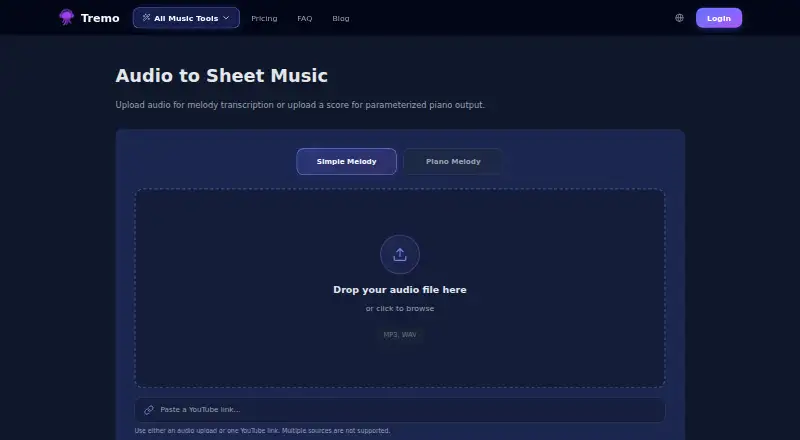
Tremo is a web service offering AI tools for converting audio into sheet music and separating vocals from instruments. The sheet-music converter accepts an MP3 or WAV upload or one YouTube link; it does not accept multiple sources at once. Simple Melody extracts a single-line melody from vocals or lead instruments. Piano Melody provides Harmony, Rhythm and Note Duration controls, each adjustable from 0 to 2. Users can preview PDF scores, play MusicXML results and explore MIDI in a piano roll with play, loop and zoom controls. Audio Separation accepts MP3, WAV or FLAC files or one YouTube link, with Vocals + Instrumental and Full Stem Split modes. Tokens are charged once when a conversion starts, and plan duration limits still apply. The free plan includes 20T and supports tracks up to 3 minutes; Light and Pro provide larger token allowances and longer limits. Studio is priced by custom quote. Tremo warns that generated results may be inaccurate or unexpected and should be reviewed. The interface offers English and Korean, saving the selected language in the browser.
Who it suits
Tremo may suit individuals trying basic conversion features, people making frequent or higher-volume conversions, and teams or companies seeking bulk conversion. It is web-based and supports English and Korean interfaces.
What it does well
- Free plan includes 20T
- Converts audio to scores and MIDI
- Offers two audio-separation modes
- PDF, MusicXML and MIDI playback options
What to know first
- Each conversion accepts only one source
- Free plan limits tracks to 3 minutes
- Generated results may be inaccurate or unexpected
Limits
The Free plan includes 20T, supports tracks up to three minutes, exports sheet music as PDF, and offers piano and voice audio-to-MIDI plus all audio-separation modes. Light allows 200T monthly and five-minute tracks; Pro allows 500T monthly and 15-minute tracks. Studio has no track-length limit and starts at 2,000T monthly, with custom pricing.
Plans
| Plan | Billed and limits | Price |
|---|---|---|
| Free | 20T included · Up to 3-min tracks · Audio to Sheet: PDF export · Audio to MIDI: Piano and Voice · Audio Separation: All modes available | Free |
| Pro | $14.00/ month · 500T per month · All features unlocked · Up to 15-min tracks · All export formats | $14 a month |
| Light | $9.00/ month · 200T per month · All features unlocked · Up to 5-min tracks · All export formats | $9 a month |
| Studio | Custom Quote · 2,000T+ per month · Team account management · No track length limit · Bulk conversion · Custom contracts | On request |
As tremo.flatmusic.net lists them, read 8 Oct 2026. The maker's own page has the final word.
Getting started
- Open the Tremo website
- Use the web interface in English or Korean
- Choose a conversion or audio-separation tool
- Upload a supported audio file or provide one YouTube link
- Select the available output or separation mode
- Start the conversion using the plan’s tokens
Verdict
Tremo combines audio-to-score conversion, MIDI tools and audio separation in a web interface. Check track-length and token limits for the plan, and review generated output for errors.
Questions
Does Tremo have a free plan?
Yes. The Free plan costs nothing and includes 20T.
Which platforms does Tremo support?
Tremo is available on the web.
What audio formats can be uploaded?
Sheet-music conversion accepts MP3 and WAV. Audio Separation accepts MP3, WAV, and FLAC.
Can Tremo use YouTube links?
Yes, each conversion accepts one YouTube link; multiple sources are not supported.
What languages does the interface offer?
Settings offers English and Korean, and the selected language is saved in the browser.
Facts from Tremo's own pages
- Audio formats
- The sheet-music converter accepts MP3 and WAV files. · tremo.flatmusic.net, 8 Oct 2026
- Audio separation
- Audio Separation can separate vocals and instruments, with Vocals + Instrumental and Full Stem Split modes. · tremo.flatmusic.net, 8 Oct 2026
- Audio separation formats
- The Audio Separation page accepts MP3, WAV, and FLAC files or one YouTube link; multiple sources are not supported. · tremo.flatmusic.net, 8 Oct 2026
- Conversion warning
- Tremo says AI-generated results may contain inaccuracies or unexpected outputs and asks users to review them carefully. · tremo.flatmusic.net, 8 Oct 2026
- Headquarters
- Cheonan-si, Chungcheongnam-do, Republic of Korea · tremo.flatmusic.net, 28 Sept 2026
- Input
- Audio-to-sheet-music conversion accepts an audio upload or one YouTube link, and multiple sources are not supported. · tremo.flatmusic.net, 8 Oct 2026
- Intended users
- The listed plans address individual use from testing basic features to frequent or higher-volume conversions, plus teams and companies using bulk conversion. · tremo.flatmusic.net, 8 Oct 2026
- Language support
- The interface offers English and Korean in Settings, and saves the selected language in the browser. · tremo.flatmusic.net, 8 Oct 2026
- Melody transcription
- Simple Melody extracts a single-line melody from vocals or lead instruments. · tremo.flatmusic.net, 8 Oct 2026
- Piano transcription
- Piano Melody has adjustable Harmony, Rhythm, and Note Duration controls, each set to 0, 1, or 2. · tremo.flatmusic.net, 8 Oct 2026
- Preview and playback
- Users can preview PDF scores, play MusicXML results, and explore MIDI in a piano roll with play, loop, and zoom controls. · tremo.flatmusic.net, 8 Oct 2026
- Product
- Tremo offers AI music tools, including audio-to-sheet-music conversion. · tremo.flatmusic.net, 8 Oct 2026
- Token charging
- Tokens are charged once when a conversion starts, and plan duration limits still apply. · tremo.flatmusic.net, 8 Oct 2026
Where Tremo stands on Freedom251
- AI Music Transcription Software#25 of 29