Freedom251 › Static site generators
Nitro
What Nitro is
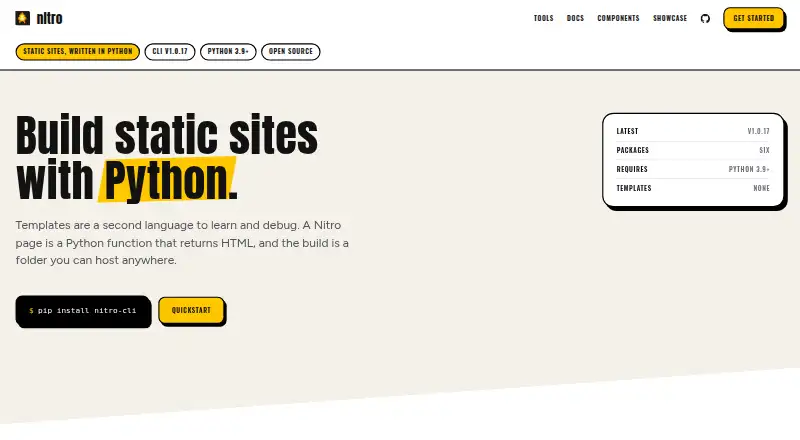
Nitro is a collection of Python tools for creating static websites, with pages expressed as Python functions. Its CLI offers live reload, incremental builds, dynamic routes, image optimization, draft pages, and an islands architecture. Nitro UI produces HTML from Python classes and supports type hints, reusable components, HTMX, forms, and CSS helpers. The wider suite also provides JSON data access, plugins, data validation, and image processing. Nitro UI can be used with FastAPI, Django, Flask, or standalone scripts; the CLI can deploy to Netlify, Vercel, or Cloudflare Pages. Builds create static files that can also be uploaded to S3 or a user's own server. Nitro is free, with all packages available under BSD 3-Clause or MIT licenses and no paid tiers. It requires no account, and its FAQ says it has no telemetry. The CLI requires Python 3.9 or later, while Nitro UI supports Python 3.8 or later; individual tools can have different version ranges. The site credits sswn.dev as maker. Support is available through GitHub issues or the tool documentation.
Who it suits
Nitro suits Python developers who want to build websites with Python throughout the process. It is especially relevant to developers who want static output alongside tools such as reusable UI components, data validation, or image processing.
What it does well
- Free access to all Nitro packages, with no paid tiers.
- CLI includes live reload and incremental builds.
- UI supports FastAPI, Django, Flask, and standalone scripts.
- Static output can be uploaded to several hosting services or a user's server.
- Packages use BSD 3-Clause or MIT licenses.
What to know first
- Nitro CLI requires Python 3.9 or later.
- Tools in the suite can have different Python version requirements.
Limits
Nitro CLI requires Python 3.9 or later, while Nitro UI supports Python 3.8 or later. Individual tools may have slightly different version ranges.
Plans
| Plan | Billed and limits | Price |
|---|---|---|
| Free / open source | All Nitro packages · no paid tiers · no accounts | Free |
As nitro.sh lists them, read 9 Oct 2026. The maker's own page has the final word.
Getting started
- Visit https://nitro.sh/.
- Use the free Nitro packages; no account is required.
- Check the Python requirement for the tool you plan to use.
- Use Nitro UI with FastAPI, Django, Flask, or standalone scripts, or use the CLI to build static files.
- Deploy CLI output to Netlify, Vercel, or Cloudflare Pages, or upload it to S3 or your own server.
Verdict
Choose Nitro if you want a Python-centered toolkit for generating static websites and value its CLI, UI library, and supporting utilities in one suite. Check the Python version required by each tool before adopting it, since the CLI and UI have different minimum versions.
Questions
How much does Nitro cost?
The Free / open source plan costs nothing and includes all Nitro packages. There are no paid tiers.
Is there a free plan or trial?
Nitro has a free plan. There is no free trial.
Which platforms does Nitro support?
The listed platforms are Linux and self-hosted. Its CLI requires Python 3.9 or later, while Nitro UI supports Python 3.8 or later.
Is Nitro open source?
Yes. The packages are open source under BSD 3-Clause or MIT licenses.
Who makes Nitro?
The site credits sswn.dev as the maker.
Where can Nitro sites be deployed?
The CLI can deploy to Netlify, Vercel, and Cloudflare Pages. Static files can also be uploaded to S3 or a user's own server.
Facts from Nitro's own pages
- CLI features
- Nitro CLI includes live reload, incremental builds, dynamic routes, image optimization, an islands architecture, and draft pages. · nitro.sh, 9 Oct 2026
- Free plan
- Yes · nitro.sh, 20 Sept 2026
- Hosting
- Nitro builds static files that can be uploaded to Netlify, Vercel, Cloudflare Pages, S3, or a user's own server. · nitro.sh, 9 Oct 2026
- Incremental builds
- Yes · nitro.sh, 20 Sept 2026
- Integrations
- Nitro UI works with FastAPI, Django, Flask, or standalone scripts; Nitro CLI can deploy to Netlify, Vercel, and Cloudflare Pages. · nitro.sh, 9 Oct 2026
- Intended users
- Nitro is aimed at Python developers who want to build websites in Python end to end. · nitro.sh, 9 Oct 2026
- Licensing
- The FAQ says Nitro packages are open source under BSD 3-Clause or MIT licenses. · nitro.sh, 9 Oct 2026
- Maker
- The site credits sswn.dev as the maker, but the pages reviewed do not state a headquarters or founding date. · nitro.sh, 9 Oct 2026
- Notable limit
- Nitro CLI supports Python 3.9 and later, and the individual tools may have slightly different version ranges. · nitro.sh, 9 Oct 2026
- Other tools
- The Nitro suite also includes JSON data access, a plugin system, data validation, and image processing tools. · nitro.sh, 9 Oct 2026
- Local preview server
- Yes · nitro.sh, 20 Sept 2026
- Privacy
- The FAQ says Nitro has no telemetry and requires no accounts. · nitro.sh, 9 Oct 2026
- Product
- Nitro is a suite of Python tools for building static websites, with pages written as Python functions. · nitro.sh, 9 Oct 2026
- Python support
- Nitro CLI requires Python 3.9 or later, while Nitro UI supports Python 3.8 or later. · nitro.sh, 9 Oct 2026
- Security
- Nitro DataStore says it includes path traversal protection and file size limits. · nitro.sh, 9 Oct 2026
- Support
- Nitro directs users with questions to open an issue on GitHub or consult the tool documentation. · nitro.sh, 9 Oct 2026
- Supported languages
- Python · nitro.sh, 20 Sept 2026
- UI library
- Nitro UI generates HTML with Python classes and supports type hints, reusable components, HTMX, forms, and CSS helpers. · nitro.sh, 9 Oct 2026
Where Nitro stands on Freedom251
- Static site generators#24 of 35