Freedom251 › Spaced Repetition Software
Nibomo
by Nibomo
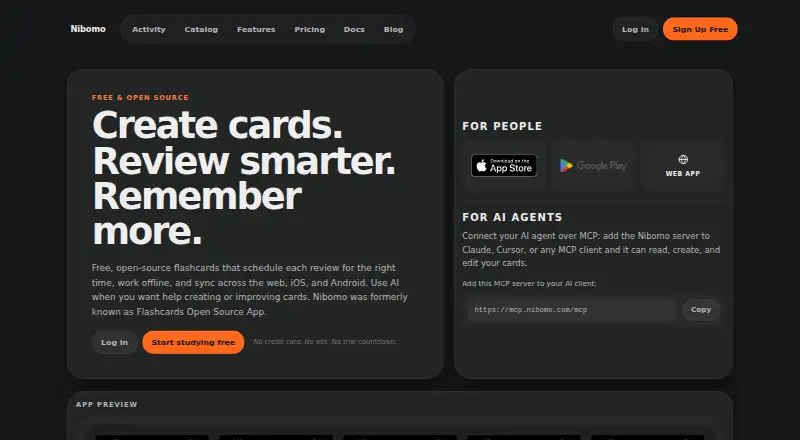
What Nibomo is
Nibomo is a flashcard study app for the web, iOS, and Android. Its FSRS scheduling brings difficult cards back sooner and familiar cards later, while AI can help create cards, refine wording, and clarify answers. Studying on mobile works offline, with automatic syncing when connected. You can import and export cards, tags, and related media, and connect AI agents through MCP or the Agent API; its MCP server works with Claude, Cursor, or other MCP clients.
The hosted app is free during beta, with no credit card, trial countdown, or plan-based quotas on cards, files, or storage, though technical limits still apply. AI features and syncing are included during beta; higher AI use may later require a provider API key or paid option. The open-source stack can be run on your AWS infrastructure, where infrastructure and provider costs are separate. Hosted sign-in uses a one-time email code. Nibomo is built by Kirill Markin and operated by SAMO DANNI EOOD in Plovdiv, Bulgaria.
Who it suits
Nibomo suits learners who want to study flashcards across web and mobile, including offline on mobile. It may also suit people who want to import and export study materials or connect AI agents.
What it does well
- Mobile study works offline and syncs automatically.
- FSRS schedules difficult cards sooner.
- AI can create and clarify cards.
- Cards, tags, and media can be imported and exported.
- Hosted app is free during beta.
What to know first
- Technical limits still apply during beta.
- Higher AI use may later require a key or paid option.
- Self-hosting requires you to cover infrastructure and provider costs.
Limits
During beta, the hosted plan has no plan-based quotas on cards, files, or total storage, though technical limits apply. The self-hosted plan requires the operator to pay infrastructure and third-party provider costs.
Plans
| Plan | Billed and limits | Price |
|---|---|---|
| Hosted | Hosted service is free during beta · AI features included during beta · Sync across web, iOS, and Android · No plan-based quotas on cards, files, or total storage during beta · Import and export cards, tags, and media | Free |
| Self-Hosted | Infrastructure and third-party provider costs are separate · Open-source application and AWS CDK infrastructure · AWS deployment path and local Docker/Postgres setup · Infrastructure and third-party provider costs are paid by the operator | Free |
| Hosted Free | — | On request |
| Self-Hosted Free | — | On request |
As nibomo.com lists them, read 20 Sept 2026. The maker's own page has the final word.
Getting started
- Open https://nibomo.com/ in a web browser.
- Sign in to the hosted app with a one-time email code; no password or credit card is required.
- Create or import cards, tags, and related media.
- Study with flashcards and review cards scheduled by FSRS.
- Install the iOS or Android app for mobile study and offline syncing.
- For self-hosting, deploy the open-source stack on AWS or use the local Docker/Postgres setup.
Nibomo is a flashcard study app for people who want AI-assisted card creation alongside scheduled reviews. It is best suited to learners who value offline mobile study and broad import and export options. Its hosted app is free during beta, while self-hosting shifts infrastructure and provider costs to the operator.
Overview
Nibomo combines basic flashcards with FSRS spaced repetition, which schedules difficult cards sooner and familiar ones later. AI can help create cards, refine wording, and clarify answers, giving learners a way to work on both card preparation and review in one app. The hosted service avoids a credit-card requirement and has no plan-based quotas on cards, files, or total storage during beta, though technical limits still apply.
The open-source stack offers a different trade-off: more control over deployment, but responsibility for AWS or local infrastructure and associated costs. Aggregate activity figures do not reveal card content, email addresses, or individual study histories, and the free start page says the app has no ads.
Key features
- Spaced repetition: FSRS brings difficult cards back sooner and familiar cards later, making it a useful fit for ongoing recall practice rather than a collection of cards without review scheduling.
- AI-assisted cards: AI can generate cards, improve wording, and clarify answers. AI features are included in the hosted beta, but higher usage may later require a provider API key or paid option.
- Offline mobile study: Study on iOS or Android without an internet connection; the app syncs automatically when connected. This suits learners who need to review while offline.
- Import and export: Cards, tags, and related media can move into or out of Nibomo, giving users a portability option rather than locking their study material into the app.
- AI agent access: Agents can connect through MCP or the Agent API. The MCP server works with Claude, Cursor, or any MCP client, a distinctive option for users who want agent integrations.
- Passwordless hosted sign-in: Hosted users sign in with a one-time email code instead of a password.
Pricing
Hosted: free. The hosted service is free during beta, with AI features, sync across web, iOS, and Android, and import and export for cards, tags, and media. There is no trial countdown and no credit card requirement. No plan-based card, file, or storage quotas apply during beta, although technical limits still apply. The beta terms matter: higher AI usage may later require a provider API key or paid option.
Self-Hosted: free for the open-source application and AWS CDK infrastructure. It includes an AWS deployment path and a local Docker/Postgres setup, but the operator pays infrastructure and third-party provider costs and maintains the deployment. This is a fit for people prepared to run the service, not a way to avoid the costs of operating it.
The hosted free plan is the simpler choice for individual learners who want Nibomo without managing infrastructure. Self-hosting gives operators deployment control at the cost of maintenance and ongoing infrastructure or provider expenses.
Platforms
Nibomo works on the web, iOS, and Android. Mobile apps support offline studying and automatic sync, so a connection is not required for every review session.
Who it's for
Choose Nibomo if you want flashcards with FSRS scheduling, offline mobile review, AI-assisted card work, and the ability to import and export study materials. It is especially appealing during beta to learners who want a hosted option without a subscription charge or card requirement. Consider another app if your priority is a mature paid plan with established pricing terms, or if you do not want beta-era AI terms or self-hosting responsibilities.
Pros and cons
- Pro: Hosted access is free during beta without a credit card or trial countdown, lowering the barrier to trying the app.
- Pro: No plan-based quotas on cards, files, or total storage during beta leave room for large study collections, subject to technical limits.
- Pro: Offline mobile study, automatic sync, and import/export for cards, tags, and media support flexible study across devices and app transitions.
- Pro: MCP and Agent API access offers integration paths for AI-agent users.
- Con: Beta inclusion of AI features does not guarantee unlimited future use; higher usage may require an API key or paid option.
- Con: Self-hosting requires the operator to maintain infrastructure and pay AWS or other infrastructure and provider costs.
Alternatives
Mochi is worth considering if you want a free-forever option with no sign-up requirement and unlimited cards and decks, or need Linux, macOS, or Windows support. diStudero may suit learners who prefer a paid Pro plan with 20 credits per month, a free trial, and browser-extension support.
Recall offers a free plan capped at 3 decks and 300 cards, so it may fit someone whose collection stays within those limits. StudyGlen has a one-time Mini Pack at $4.99, paid once, with 10 study credits and five regenerations per day; consider it if that credit-based package suits your use.
Brainscape may appeal if you want a paid Pro option at $7.99 a year that includes unlimited AI flashcard creation. Cogni is another free-plan option, with spaced repetition, notes, sync, and Anki import alongside a daily review limit.
FlashLeap is an alternative for learners seeking a freemium iOS or Android app. Jambo may be a better fit if its free plan's 2,000-card, 15-deck, and daily AI-generation and translation allowances match your needs. For broader discovery, browse AI Flashcard Generators or Flashcard apps.
Verdict
Nibomo is a strong fit for learners who want an adaptable flashcard workflow: FSRS reviews, offline mobile study, AI-assisted card creation, and portable materials, all on a hosted app that is free during beta. The main reason to look elsewhere is uncertainty around future high-volume AI costs or the work and expense of self-hosting. Choose the hosted app for low-friction study now; choose another product if you need firmer long-term pricing terms.
Verdict
Nibomo brings flashcards, spaced repetition, offline mobile study, and AI-assisted card creation together. The hosted option is free during beta, while self-hosting means maintaining and paying for the infrastructure.
Questions
How much does Nibomo cost?
The hosted app is free during beta, with no credit card required. The self-hosted plan is listed as free, while infrastructure and third-party provider costs are separate.
Is there a free plan?
Yes. Hosted use is free during beta, and there is no trial countdown or plan-based quota on cards, files, or total storage. Technical limits still apply.
Which platforms does Nibomo support?
Nibomo works on the web, iOS, and Android. Mobile studying works offline and syncs automatically.
Can I self-host Nibomo?
Yes. The open-source stack can run on your AWS infrastructure, with an AWS deployment path and a local Docker/Postgres setup. The operator pays infrastructure and third-party provider costs.
Can I export my study data?
Yes. Cards, tags, and related media can be imported and exported.
Who makes Nibomo?
Nibomo is built by Kirill Markin and operated by SAMO DANNI EOOD, headquartered in Plovdiv, Bulgaria.
Facts from Nibomo's own pages
- Activity privacy
- Aggregate activity figures do not expose card content, email addresses, or individual study histories. · nibomo.com, 28 Sept 2026
- Adaptive review
- Yes · nibomo.com, 20 Sept 2026
- Advertising policy
- The free start page states that Nibomo has no ads. · nibomo.com, 28 Sept 2026
- AI card creation
- AI can help create cards, improve wording, and clarify answers. · nibomo.com, 28 Sept 2026
- AI integrations
- AI agents can connect through MCP or the Agent API. · nibomo.com, 28 Sept 2026
- Authentication method
- Hosted sign-in uses a one-time email code without a password. · nibomo.com, 28 Sept 2026
- Billing requirement
- No credit card is required for the hosted free app. · nibomo.com, 28 Sept 2026
- Card formats
- basic · nibomo.com, 20 Sept 2026
- Company operator
- Nibomo is built by Kirill Markin and operated by SAMO DANNI EOOD. · nibomo.com, 28 Sept 2026
- Data portability
- Cards, tags, and related media can be imported and exported. · nibomo.com, 28 Sept 2026
- Export options
- Yes · nibomo.com, 20 Sept 2026
- Free plan
- Yes · nibomo.com, 20 Sept 2026
- Free plan limits
- No plan-based quotas on cards, files, or total storage during beta; technical limits still apply. · nibomo.com, 28 Sept 2026
- Future AI billing
- Higher AI usage may later require a provider API key or paid option. · nibomo.com, 28 Sept 2026
- Headquarters
- Plovdiv, Bulgaria · nibomo.com, 28 Sept 2026
- Hosted pricing
- The hosted app is free to use with no credit card required. · nibomo.com, 28 Sept 2026
- MCP clients
- The Nibomo MCP server works with Claude, Cursor, or any MCP client. · nibomo.com, 28 Sept 2026
- Mobile apps
- Yes · nibomo.com, 20 Sept 2026
- Mobile offline
- Mobile studying works without an internet connection and syncs automatically. · nibomo.com, 28 Sept 2026
- Self-hosting
- The open-source stack can be run on your own AWS infrastructure. · nibomo.com, 28 Sept 2026
- Source formats
- mixed · nibomo.com, 20 Sept 2026
- Spaced repetition
- FSRS schedules reviews by bringing difficult cards sooner and familiar cards later. · nibomo.com, 28 Sept 2026
- Study modes
- flashcards · nibomo.com, 20 Sept 2026
- Supported platforms
- Nibomo works across the web, iOS, and Android. · nibomo.com, 28 Sept 2026
Where Nibomo stands on Freedom251
- Spaced Repetition Software#6 of 38
- AI Flashcard Generators#11 of 27
- Flashcard apps#23 of 27