Freedom251 › Spaced Repetition Software
Mochi
What Mochi is
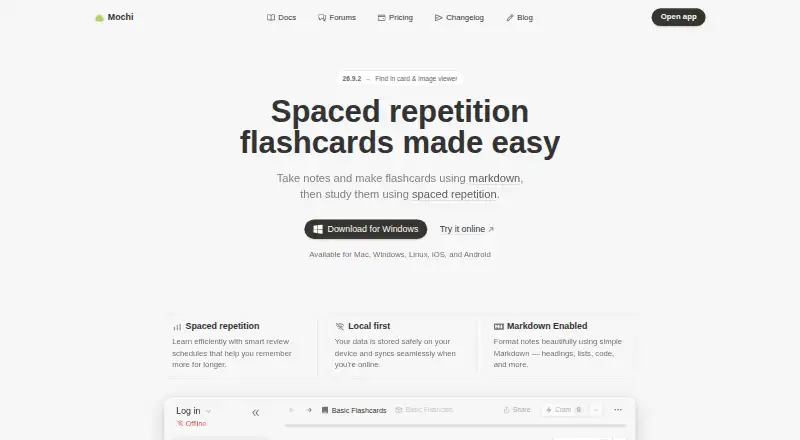
Mochi is a flashcard and note-taking app for making study materials with Markdown and reviewing them through spaced repetition. It is available on Mac, Windows, Linux, iOS, and Android. The Free plan is free forever and requires no sign-up; it includes unlimited cards and decks, import and export, and unlimited offline use. Data is stored on the user's device and syncs when online. Pro syncs cards and notes across devices and includes 10 GB of cloud storage for synced materials and attachments. Pro users can publish decks by link or in a deck library, and the plan includes AI completion, AI integration, and language services subject to monthly limits. Those limits reset at the start of each calendar month, unused amounts do not carry over, and a service stops when its limit is reached. Pro is listed at $5 a month when billed annually; a monthly Pro plan is also listed at $5 a month. Documentation and forum support are included, with email support on Pro. After downgrading, cards and notes remain usable offline, while Pro features stop at the billing period's end.
Who it suits
Mochi suits learners who want to make Markdown notes and flashcards, then review them with spaced repetition. Its free offline use and cross-platform availability may suit people studying across devices, while Pro adds sync and cloud storage.
What it does well
- Free plan requires no sign-up
- Unlimited cards, decks, and offline use
- Import and export included on Free
- Available on desktop and mobile platforms
- Cards and notes remain usable offline after downgrade
What to know first
- Pro AI and language services have monthly limits
- Reached service limits pause that service until reset
- Pro sync and cloud storage require Pro
Limits
Free includes unlimited cards, decks, and offline use, but cross-device sync and Pro features are not included. Pro has 10 GB of cloud storage and monthly limits for AI completion, dictionary lookups, translation, transcription, and text-to-speech; unused amounts do not carry over, and each service stops when its limit is reached.
Plans
| Plan | Billed and limits | Price |
|---|---|---|
| Free | forever · Unlimited cards and decks | Free |
| Pro | billed annually · 10 GB cloud storage · 500,000 AI-completion tokens · 1,000 dictionary lookups · 100,000 translation characters · 20,000 transcription seconds · 200,000 text-to-speech characters | $5 a month |
| Pro Monthly | $5 per month | $5 a month |
| Pro Yearly | billed annually | On request |
As mochi.cards lists them, read 28 Sept 2026. The maker's own page has the final word.
Getting started
- Install Mochi for Mac, Windows, Linux, iOS, or Android.
- Start using the Free plan without signing up.
- Create Markdown notes and flashcards.
- Import existing materials or export your cards and notes.
- Choose Pro if you want device sync, cloud storage, deck publishing, or Pro services.
Mochi combines Markdown note-taking with flashcard creation and spaced-repetition review. It suits learners who want to build their own study materials and keep working offline. Its generous free plan is the draw; syncing and deck sharing require Pro.
Overview
Mochi keeps notes and flashcards together, so learners can turn written material into cards and revisit it through scheduled reviews. Flashcards are its study mode, and its local-first design stores data on the device, syncing when online. That makes it a strong fit for self-directed study, especially when offline access matters more than seamless multi-device use.
Key features
- Markdown notes and cards: Create notes and flashcards with Markdown. This suits people who prefer to make and organize their own materials, rather than relying only on preloaded decks.
- Spaced repetition: Smart review scheduling is designed to bring material back over time, supporting longer-term recall. Mochi is therefore better suited to ongoing study than to a one-off reference lookup.
- Offline-first use: Free users can study offline without a usage cap. Data syncs when online, but syncing across devices is a Pro feature.
- Imports and exports: Both are included for free, giving users a way to bring in materials and take them elsewhere without paying for Pro.
- Pro sharing and storage: Pro adds 10 GB of cloud storage for synced cards, notes, and attachments, and lets users share decks by link or list them in the deck library.
- Connected tools: Integrations include AI models, dictionaries, translation, text-to-speech, image search, and an HTTP API. Pro AI and language services have monthly limits; when a service reaches its cap, it stops until the next calendar month. Unused quota does not carry forward.
- Support: Documentation and forum support are included; Pro adds email support.
Pricing
Free: free, billed forever, with no sign-up required. It includes unlimited cards and decks, unlimited offline use, and import and export. This is enough for a single-device learner who does not need cloud sync or deck publishing.
Pro: $5 a month, billed annually. It includes 10 GB of cloud storage, 500,000 AI-completion tokens, 1,000 dictionary lookups, 100,000 translation characters, 20,000 transcription seconds, and 200,000 text-to-speech characters. These monthly quotas make Pro useful for people who expect to use the connected services, but they are finite: each service pauses at its limit until the monthly reset, and unused amounts do not roll over.
Pro Monthly: $5 a month, billed monthly, with a free trial. It includes sync, publishing, AI integration, and email support. The monthly option avoids annual billing, while the stated price matches the annual-billing Pro rate; the trial length is not given.
Pro Yearly: custom pricing. Yearly billing saves $12 a year. Free users give up sync, publishing, AI integration, and email support, but retain their cards and notes offline if they downgrade. Pro features stop at the end of the billing period.
Platforms
Mochi is available on Android, iOS, Linux, macOS, and Windows. Its desktop and mobile coverage is broad, though cross-device continuity depends on Pro sync.
Who it's for
Mochi is a sensible choice for learners who want to write their own notes and flashcards, use spaced repetition, and study offline without a card or deck cap. It is less suitable for anyone who needs free multi-device syncing, or who expects heavy AI and language-tool use beyond Pro's monthly allowances.
Pros and cons
- Pro: Unlimited free cards, decks, and offline use make it practical for substantial single-device study without a subscription.
- Pro: Free import and export reduce friction when bringing in materials or moving them out.
- Pro: Markdown notes and flashcards in one app support a self-made study workflow.
- Con: Sync and deck publishing are reserved for Pro, so free use is less convenient across devices or for sharing materials.
- Con: AI and language features stop when their monthly quotas run out, which can interrupt workflows for frequent users.
- Con: Pro prices and billing terms differ across the stated monthly and annual options, so compare the billing choice before subscribing.
Alternatives
Flashcard apps and AI Flashcard Generators are useful starting points for comparing broader categories. Consider diStudero if you want a paid flashcard option with a free plan and trial, and its listed monthly tier includes 20 credits for €11.99 a month. Nibomo is a free alternative whose hosted service is free during beta and includes AI features and sync across web, iOS, and Android. Choose Recall if a free allowance of 3 decks and 300 cards is enough, or consider its paid plan for unlimited decks and cards. StudyGlen offers a one-time 4.99 USD Mini Pack with 10 study credits and 5 regenerations per day. Brainscape may suit users seeking pre-loaded flashcards; its Pro plan is $7.99 a year. Cogni has a free plan with a daily review limit, plus spaced repetition, notes, sync, and Anki import. Jambo offers a free plan capped at 2,000 cards, 15 decks, 5 AI generations per day, and 100 translations per day. RemNote is another flashcard option for users who want annotated PDFs and image-occlusion cards in its free plan. For note-taking comparisons, see Note-taking apps.
Verdict
Choose Mochi if you want a free, offline-capable home for self-made notes and flashcards, with no cap on cards or decks. The reason to look elsewhere is clear: if you need syncing or deck sharing without Pro, or rely on AI and language tools heavily, its paid tier and monthly service caps may not fit.
Verdict
Mochi provides a free, offline-capable way to create and review flashcards, with Pro adding sync, storage, and publishing. Check the monthly service limits if you expect to use its AI or language tools.
Questions
Is Mochi free?
Yes. Its Free plan is free forever, requires no sign-up, and includes unlimited cards and decks, import and export, and unlimited offline usage.
How much does Pro cost?
Pro is listed at $5 a month when billed annually. Pro Monthly is also listed at $5 a month.
Which devices can I use Mochi on?
Mochi is available on Mac, Windows, Linux, iOS, and Android.
Does Mochi work offline?
Yes. Free includes unlimited offline usage, and data is stored on the user’s device and syncs when online.
What does Pro add?
Pro syncs cards and notes across devices, provides 10 GB of cloud storage, and supports deck sharing or listing in the deck library. It also includes AI completion, AI integration, language services, and email support.
Who operates Mochi?
Mochi is operated by Mochi Cards, LLC.
Facts from Mochi's own pages
- Adaptive review
- Yes · mochi.cards, 20 Sept 2026
- AI services
- Pro includes AI completion, AI integration, and language services with monthly limits. · mochi.cards, 28 Sept 2026
- Card formats
- mixed · mochi.cards, 20 Sept 2026
- Company identity
- Mochi is operated by Mochi Cards, LLC. · mochi.cards, 28 Sept 2026
- Deck publishing
- Pro users can share a deck with a link or list it in the deck library. · mochi.cards, 28 Sept 2026
- Downgrade behavior
- Cards and notes remain usable offline after downgrade, while Pro features stop at the billing period's end. · mochi.cards, 28 Sept 2026
- Export options
- Yes · mochi.cards, 20 Sept 2026
- Free access
- Mochi is free forever and does not require sign-up. · mochi.cards, 28 Sept 2026
- Free cards decks
- The Free plan includes unlimited cards and decks. · mochi.cards, 28 Sept 2026
- Free import export
- Import and export are included in the Free plan. · mochi.cards, 28 Sept 2026
- Free offline usage
- The Free plan includes unlimited offline usage. · mochi.cards, 28 Sept 2026
- Free plan
- Yes · mochi.cards, 20 Sept 2026
- Limit behavior
- When a service limit is reached, that service stops until the limit resets. · mochi.cards, 28 Sept 2026
- Local-first storage
- Data is stored on the user's device and syncs when online. · mochi.cards, 28 Sept 2026
- Markdown notes
- Users can take notes and make flashcards using Markdown. · mochi.cards, 28 Sept 2026
- Mobile apps
- Yes · mochi.cards, 20 Sept 2026
- Pro cloud storage
- Pro includes 10 GB of cloud storage for synced cards, notes, and attachments. · mochi.cards, 28 Sept 2026
- Pro device sync
- Pro syncs cards and notes across devices. · mochi.cards, 28 Sept 2026
- Source formats
- mixed · mochi.cards, 20 Sept 2026
- Spaced repetition
- Smart review schedules help users remember information for longer. · mochi.cards, 28 Sept 2026
- Paid from
- 5 · mochi.cards, 20 Sept 2026
- Study modes
- flashcards · mochi.cards, 20 Sept 2026
- Support channels
- Documentation and forum support are included; email support is included with Pro. · mochi.cards, 28 Sept 2026
- Supported platforms
- Mochi is available for Mac, Windows, Linux, iOS, and Android. · mochi.cards, 28 Sept 2026
Where Mochi stands on Freedom251
- Spaced Repetition Software#4 of 38
- AI Flashcard Generators#9 of 27
- Note-taking apps#74 of 216
- Flashcard apps#14 of 27