Freedom251 › Network Monitoring
NetTraffic
What NetTraffic is
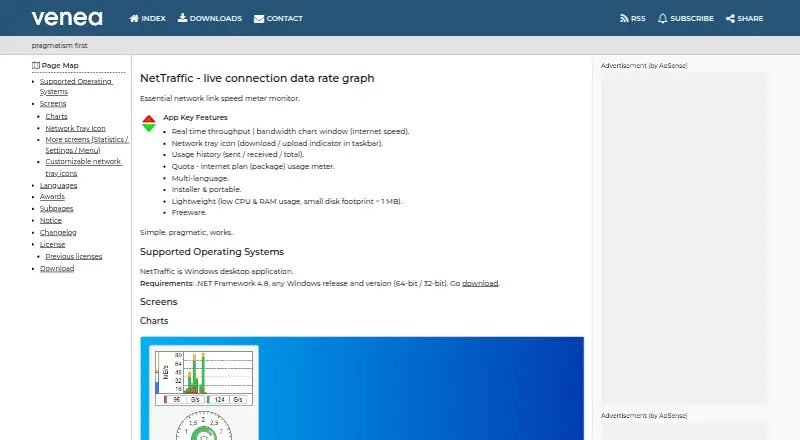
NetTraffic is a free Windows desktop application for monitoring connection speed and network data use. Its live chart displays throughput, while an indicator in the network tray shows download and upload rates. It records sent, received, and total usage and presents the figures in statistics and charts. A quota counter tracks data against a limit and shows how much of the billing period has elapsed. The application can also read statistics counters from local or remote devices over HTTP(S), with optional Basic, Digest, or form-based authentication. Listed utilities include ping, nslookup, tracert, ipconfig, netstat, route, arp, nbstat, and hostname. The maker offers installer and portable editions with the same executable and functionality. By default, the portable edition stores data and configuration in a Data directory in its working folder. NetTraffic supports 32-bit and 64-bit Windows and requires .NET Framework 4.8. The maker describes its resource use as low, with a disk footprint of about 1 MB. Silent installation and uninstallation using command-line arguments are documented for administrators.
Who it suits
NetTraffic suits Windows users who want to track live connection rates, data usage, or quota progress. Its portable edition and documented silent installation may also suit IT administrators.
What it does well
- Free to use and copy under its license.
- Tracks live rates and historical usage.
- Quota counter shows usage and billing-period progress.
- Portable edition has the installer's functionality.
What to know first
- Windows only; requires .NET Framework 4.8.
- License prohibits modification and decompilation.
- Software is provided as-is without warranty.
Limits
NetTraffic is offered as a free plan at no cost. It requires Windows and .NET Framework 4.8.
Plans
| Plan | Billed and limits | Price |
|---|---|---|
| NetTraffic | Freeware; Windows desktop application; .NET Framework 4.8 required | Free |
As venea.net lists them, read 11 Oct 2026. The maker's own page has the final word.
Getting started
- Open the NetTraffic website
- Choose the installer or portable edition
- Run the Windows application on a 32-bit or 64-bit system
- Install or use it with .NET Framework 4.8 available
- Use the chart, tray indicators, usage statistics, quota counter, or listed utilities
Verdict
NetTraffic covers live speed monitoring, usage history, quotas, and device statistics in a free Windows application. Check the .NET Framework requirement and license restrictions before adopting it.
Questions
What does NetTraffic monitor?
It displays live network throughput, download and upload rates, and records sent, received, and total usage.
Can it track a data allowance?
Yes. A quota counter shows data-limit usage and the elapsed part of the billing period.
Can it monitor another device?
Its HTTP(S) parser can monitor local or remote devices that expose statistics counters, with optional Basic, Digest, or form-based authentication.
Which operating systems are supported?
NetTraffic is a Windows desktop application supporting 32-bit and 64-bit systems, and it requires .NET Framework 4.8.
Is there a portable version?
Yes. The portable edition has the same executable and functionality as the installer and stores data and configuration in a Data directory by default.
Facts from NetTraffic's own pages
- Administration
- Silent installation and uninstallation with command-line arguments are documented as useful for IT administrators. · venea.net, 11 Oct 2026
- Build options
- The maker offers installer and portable versions; the portable edition has the same executable and functionality as the installer edition. · venea.net, 11 Oct 2026
- License
- The license permits free use and copying, while prohibiting modification, decompilation, disassembly, merging, sublicensing, or sale. · venea.net, 11 Oct 2026
- Live monitoring
- It displays real-time throughput in a bandwidth chart and a download/upload indicator in the network tray. · venea.net, 11 Oct 2026
- Network utilities
- The feature page lists ping, nslookup, tracert, ipconfig, netstat, route, arp, nbstat, and hostname. · venea.net, 11 Oct 2026
- Portable storage
- The portable edition stores data and configuration in a Data directory in its working directory by default. · venea.net, 11 Oct 2026
- Purpose
- NetTraffic is a live connection data rate graph and network link speed monitor. · venea.net, 11 Oct 2026
- Quota tracking
- A quota counter shows data limit usage and the elapsed part of the billing period. · venea.net, 11 Oct 2026
- Remote device monitoring
- Its HTTP(S) parser can monitor remote or local devices that provide statistics counters over HTTP(S), with optional Basic, Digest, or form-based authentication. · venea.net, 11 Oct 2026
- Resource footprint
- The maker describes NetTraffic as lightweight, with low CPU and RAM use and a disk footprint of about 1 MB. · venea.net, 11 Oct 2026
- Support
- The maker provides a contact email and a contact form, and notes that some email messages may not be delivered. · venea.net, 11 Oct 2026
- System requirements
- The maker states that NetTraffic is a Windows desktop application requiring .NET Framework 4.8, with 32-bit and 64-bit support. · venea.net, 11 Oct 2026
- Usage history
- It tracks sent, received, and total network usage and presents usage statistics and charts. · venea.net, 11 Oct 2026
- Warranty
- The software is provided as-is without warranty, and the license limits author and copyright-holder liability. · venea.net, 11 Oct 2026
Where NetTraffic stands on Freedom251
- Network Monitoring#27 of 55