Freedom251 › Handwriting Practice Apps
Nazoru
What Nazoru is
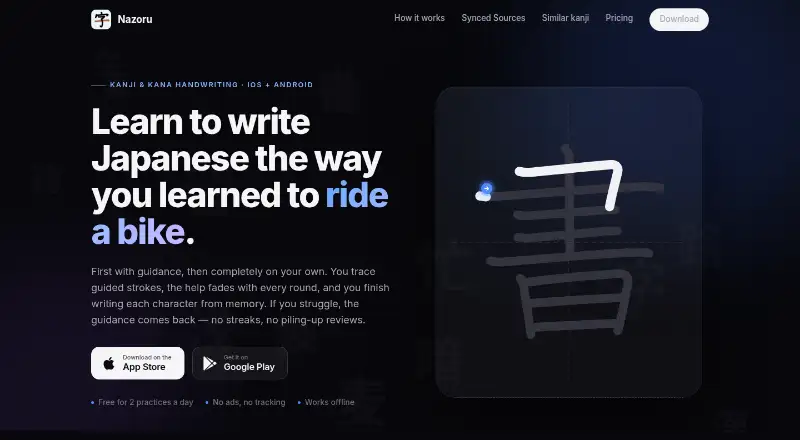
Nazoru helps learners practice handwriting Japanese kanji, hiragana and katakana, moving from guided tracing toward writing from memory. Practice guidance fades from character outlines to dashed stroke cues, direction hints and finally a blank canvas. If a stroke is missed, its guide returns; the next session begins at a level reflecting the learner’s memory. Learners can follow paths for JLPT N5 to N1, Japanese school grades, frequency or Heisig ordering, and browse categories or custom lists. The app identifies confusable kanji a learner has seen for side-by-side practice. It can suggest work based on kanji studied in WaniKani, Bunpro and MaruMori; the read-only API key stays on the device, and practice does not count as a review in those services. Nazoru works offline and offers optional Google Drive backup for progress, history and settings. The maker says it has no server of its own and accesses only its dedicated Drive app-data folder for backups. The Free plan includes two full practices per day; Unlimited costs $3.99 per month.
Who it suits
Nazoru suits Japanese learners who want handwriting practice for kanji and kana, including those studying through listed learning paths. It also suits learners who want offline practice or optional progress backup.
What it does well
- Practice guidance adapts when a stroke is missed.
- Includes JLPT, grade, frequency and Heisig paths.
- Works offline.
- Free plan has no ads or tracking.
What to know first
- Free plan limits users to two full practices daily.
- Unlimited costs $3.99 per month.
- Listed platforms are Android, iOS and macOS.
Limits
The Free plan permits two full practices per day. Unlimited includes unlimited practices and unlimited side-by-side similar-kanji drills, in addition to everything in Free.
Plans
| Plan | Billed and limits | Price |
|---|---|---|
| Free | $0 forever · 2 full practices per day · WaniKani, Bunpro & MaruMori sync · JLPT, grade, frequency & Heisig paths · no ads, no tracking | Free |
| Unlimited | $3.99 / month · Unlimited practices · unlimited side-by-side similar-kanji drills · everything in Free | $3.99 a month |
| Unlimited monthly | $3.99 / month · Unlimited practices · unlimited side-by-side similar-kanji drills · everything in Free | $3.99 a month |
| Unlimited | $39.99 / year · Unlimited practices · unlimited side-by-side similar-kanji drills · everything in Free | $39.99 a year |
| Unlimited yearly | $39.99 / year · Unlimited practices · unlimited side-by-side similar-kanji drills · everything in Free | $39.99 a year |
As nazoru.net lists them, read 15 Oct 2026. The maker's own page has the final word.
Getting started
- Visit https://nazoru.net/ to get started.
- Use Nazoru on Android, iOS, or macOS.
- Choose a built-in study path, browse a category, or use a custom list.
- Practice characters through the guided stages, or browse and search characters you have seen.
- Optionally connect WaniKani, Bunpro, or MaruMori with a read-only API key kept on the device.
- Optionally enable Google Drive backup for progress, practice history, and settings.
- Choose the free plan or Unlimited at $3.99 per month through the App Store or Google Play.
Verdict
Nazoru pairs fading handwriting guidance with study paths, similar-kanji drills and optional integrations. The free daily practice limit is worth considering before choosing a plan.
Questions
Is Nazoru free?
Yes. Its Free plan costs nothing and includes two full practices per day. Unlimited costs $3.99 per month.
What does the free plan include?
It includes two full practices per day, WaniKani, Bunpro, and MaruMori sync, study paths, and no ads or tracking.
Which platforms does Nazoru support?
Nazoru is available on Android, iOS, and macOS.
Can I use Nazoru offline?
Yes. Nazoru works offline.
Which services can it connect to?
It can suggest practice based on kanji studied in WaniKani, Bunpro, and MaruMori. The read-only API key stays on the device, and Nazoru practice does not count as a review in those services.
Who publishes Nazoru?
The site identifies Elysoft as the company behind Nazoru.
Facts from Nazoru's own pages
- Adaptive help
- When a learner misses a stroke, Nazoru restores guidance for that stroke and starts the next session at the learner’s current memory level. · nazoru.net, 15 Oct 2026
- API integration model
- Connected study services use read-only API keys kept on the device; Nazoru reads progress without writing reviews back. · nazoru.net, 15 Oct 2026
- Apple app size
- The App Store lists the app size as 39.5 MB. · apps.apple.com, 15 Oct 2026
- Apple compatibility
- The App Store listing requires iOS 26 or later, iPadOS 26 or later, watchOS 26 or later, and macOS 26 or later on Apple silicon Macs. · apps.apple.com, 15 Oct 2026
- Backend architecture
- The developer states that Nazoru has no backend and keeps connected-account data on the device. · community.wanikani.com, 15 Oct 2026
- Backup
- Optional Google Drive backup syncs progress, practice history, and settings across devices in a private app-only folder. · nazoru.net, 7 Oct 2026
- Backup and sync
- Optional backups use the user’s private Google Drive app-data folder on Android or iCloud on Apple devices. · nazoru.net, 15 Oct 2026
- Billing
- The site says prices are in USD, may vary by region, and are charged through the App Store or Google Play. · nazoru.net, 7 Oct 2026
- Company headquarters
- Google Play lists Elysoft at Rua 03 553 Quadra 21 Lote 10 Sala 01, Vila Barrinha, Itapuranga, Goiás 76680-000, Brazil. · play.google.com, 15 Oct 2026
- Company legal name
- Google Play identifies the developer as ELYSOFT TECNOLOGIA LTDA. · play.google.com, 15 Oct 2026
- Content types
- Users can practice individual kanji, words and complete phrases. · play.google.com, 15 Oct 2026
- Data handling
- Nazoru says it has no server of its own and only accesses its dedicated Google Drive app-data folder for backups. · nazoru.net, 7 Oct 2026
- Data safety on Google Play
- Google Play reports no third-party data sharing, possible collection of app activity, app information and device IDs, and encryption in transit. · play.google.com, 15 Oct 2026
- Google Play reach
- Google Play shows 1K+ downloads and a 3+ content rating. · play.google.com, 15 Oct 2026
- Guidance progression
- A practice moves through full outlines, dashed hints, direction hints and a blank canvas. · nazoru.net, 15 Oct 2026
- Imported lists
- The developer says users can import lists in addition to using connected services and built-in paths. · community.wanikani.com, 15 Oct 2026
- Integration privacy
- The synced-source integrations use a read-only API key that stays on the device, and practice in Nazoru does not count as a review in those services. · nazoru.net, 7 Oct 2026
- Integrations
- Officially listed study integrations are WaniKani, Bunpro and MaruMori, while the app listing also mentions Anki. · nazoru.net, 15 Oct 2026
- Kana and discovery
- The app supports hiragana and katakana and lets users browse by category, path, or custom lists and search kanji and words they have seen. · nazoru.net, 7 Oct 2026
- Kana support
- The app supports hiragana and katakana practice. · nazoru.net, 15 Oct 2026
- Limit: Apple reviewer request
- The sole App Store reviewer requested a much smaller writing canvas option for iPad use. · apps.apple.com, 15 Oct 2026
- Limit: free usage cap
- The independent review says the free tier limits users to two practice sessions per day and requires a subscription for unlimited practice. · alllanguageresources.com, 15 Oct 2026
- Limit: missing integrations
- Community feedback requested Ringotan import support and NativShark integration; the developer said these were future investigation items. · community.wanikani.com, 15 Oct 2026
- Limits and ads
- The free plan includes two full practices per day, and the site says the app has no ads or tracking. · nazoru.net, 7 Oct 2026
Where Nazoru stands on Freedom251
- Handwriting Practice Apps#18 of 27