Freedom251 › Bookmark Managers
NavMark
What NavMark is
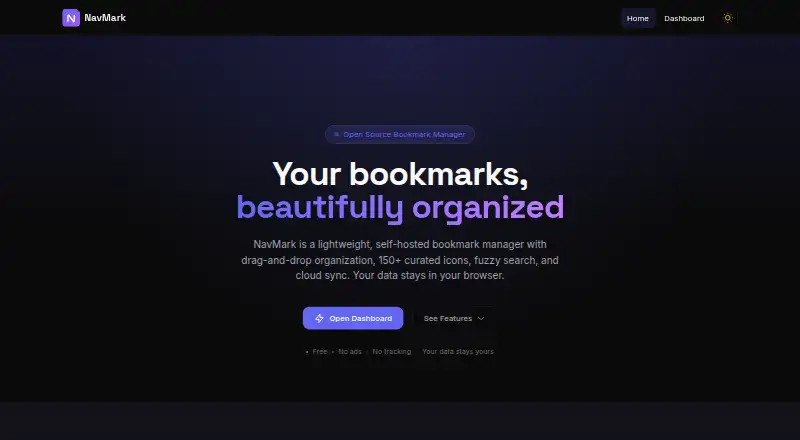
NavMark is a bookmark manager and navigation page service for organizing, syncing, and sharing bookmarks. Its dashboard works offline and stores bookmarks in browser localStorage; signing in also enables cloud sync and stores data in a Cloudflare D1 database. Bookmarks and categories can be reordered with drag-and-drop, including on touch devices, and arranged with categories and tags. Fuzzy search covers bookmark names, URLs, descriptions, and tags, and the service offers more than 150 curated Material Design icons. Users can import bookmark files from Chrome, Firefox, or Safari and export bookmarks as JSON or HTML. The dashboard is private by default; an optional public page exposes only categories users have marked public. A browser extension, API, and self-hosted option are also listed. NavMark is free: the browser dashboard requires no sign-up, while cloud sync and public sharing require an account. Its privacy policy describes password hashing, HMAC-SHA256 authentication tokens, HTTPS in transit, and user rights to access, correct, delete, or export personal data and object to processing. The terms set a minimum age of 13 and do not guarantee uninterrupted access.
Who it suits
NavMark suits people who want to arrange bookmarks across categories and tags, with offline dashboard access and optional syncing or public sharing. It also offers import and export options for people moving bookmark files between browsers or formats.
What it does well
- Dashboard works offline and requires no sign-up.
- Drag-and-drop organization works on touch devices.
- Imports Chrome, Firefox, and Safari bookmark files.
- Public pages expose only selected categories.
What to know first
- Cloud sync and public sharing require an account.
- Uninterrupted access is not guaranteed.
- Users must be at least 13 years old.
Limits
The free dashboard works without sign-up, but cloud sync and public sharing require an account. NavMark does not provide full-text search, and access can be temporarily restricted for maintenance or other circumstances.
Plans
| Plan | Billed and limits | Price |
|---|---|---|
| Free | No sign-up required for browser-based dashboard · cloud sync and public sharing require an account | Free |
As navmark.site lists them, read 9 Oct 2026. The maker's own page has the final word.
Getting started
- Open the NavMark website in a browser.
- Use the dashboard without signing up, or create an account for cloud sync.
- Import a Chrome, Firefox, or Safari bookmark file if needed.
- Organize links with categories, tags, drag-and-drop ordering, and icons.
- Mark selected categories public if you want a public page.
- Install the browser extension or use the API or self-hosted option.
Verdict
NavMark combines offline bookmark organization with optional account-based sync and sharing. Its free browser dashboard needs no sign-up, but users should note the account requirement for cloud features and the service's availability caveat.
Questions
Is NavMark free?
Yes. The Free plan costs 0.00 USD, and the browser-based dashboard does not require sign-up.
Which platforms are available?
NavMark lists web, browser extension, API, and self-hosted options.
Can NavMark sync bookmarks across devices?
Yes, signing in enables cloud sync across devices.
Can I share bookmarks publicly?
Yes. An optional public page can expose selected categories, while the dashboard stays private by default. An account is required.
Which browsers can import bookmarks?
NavMark can import bookmark files from Chrome, Firefox, or Safari.
Does NavMark offer full-text search?
No. Its listed search is fuzzy across bookmark names, URLs, descriptions, and tags.
Facts from NavMark's own pages
- Age requirement
- The terms state that users must be at least 13 years old to use the service. · navmark.site, 9 Oct 2026
- Availability
- The terms say NavMark does not guarantee uninterrupted access and may temporarily suspend or restrict access for maintenance, updates, or other circumstances. · navmark.site, 9 Oct 2026
- Browser storage
- The dashboard works offline and saves bookmarks to browser localStorage; signed-in data is also stored in a Cloudflare D1 database. · navmark.site, 9 Oct 2026
- Data rights
- The privacy policy says users can access, correct, delete, and export their personal data, and object to its processing. · navmark.site, 9 Oct 2026
- Icons and search
- The service offers 150+ curated Material Design icons and fuzzy search across bookmark names, URLs, descriptions, and tags. · navmark.site, 9 Oct 2026
- Import and export
- Users can import bookmark files from Chrome, Firefox, or Safari and export bookmarks as JSON or HTML. · navmark.site, 9 Oct 2026
- Organization
- Users can reorder bookmarks and categories with drag-and-drop, including on touch devices, and organize bookmarks with categories and tags. · navmark.site, 9 Oct 2026
- Privacy controls
- The dashboard is private by default, and only categories explicitly marked public are exposed on a public page. · navmark.site, 9 Oct 2026
- Purpose
- NavMark is a bookmark management and navigation page service for organizing, syncing, and sharing bookmarks. · navmark.site, 9 Oct 2026
- Security
- The privacy policy says passwords are stored as PBKDF2 hashes with 100,000 iterations, authentication tokens use HMAC-SHA256, and data in transit uses HTTPS. · navmark.site, 9 Oct 2026
- Support
- The site lists [email protected] as its contact address. · navmark.site, 9 Oct 2026
- Sync and sharing
- Signing in enables cloud sync across devices and an optional public page for selected bookmark categories. · navmark.site, 9 Oct 2026
Where NavMark stands on Freedom251
- Bookmark Managers#15 of 43