Freedom251 › Game Motion Capture Software
NANSENSE Studio
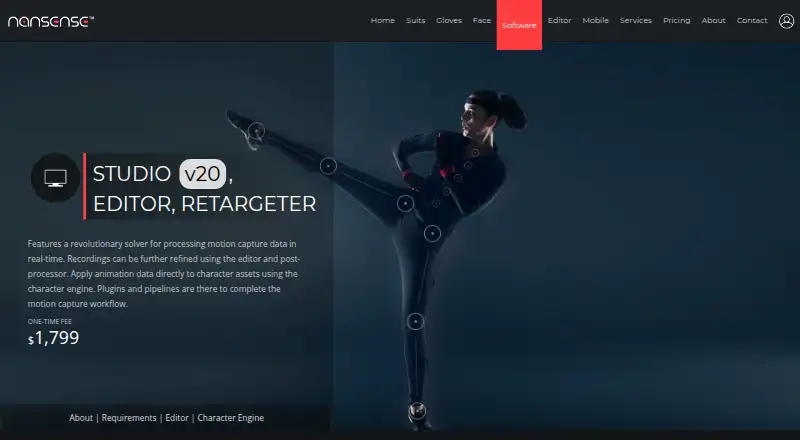
What NANSENSE Studio is
NANSENSE Studio processes inertial motion-capture data in real time and provides tools to edit recordings, post-process them, and animate character assets. Its locomotion solver addresses foot placement, floor collisions, foot sliding, jumps, and height tracking. Recording tags for events such as foot, hand, hip, jump, and floor guide automated post-processing. The Character Engine imports, poses, retargets, and animates humanoid assets, with mapping for body, finger, and face data. Studio streams data to Unreal, Unity, Maya, MotionBuilder, and Blender, and supports custom integrations through its streaming protocol. It uses timecode for synchronization and UDP triggers to control recordings. Export formats include FBX, BVH, C3D, ASF, AMC, CSV, and TC; recordings can also be saved in a proprietary raw format. The Studio plan costs $1,799, paid once and is licensed per customer, not per seat, with no monthly fees. Licenses expire every two years; free renewal or paid additional support is available by contacting NANSENSE.
Who it suits
It suits teams working with inertial motion capture and humanoid character animation, including those using the listed streaming integrations. NANSENSE says licensing is free for noncommercial use by schools and research institutions.
What it does well
- Processes inertial capture data in real time.
- Retargets body, finger, and face data.
- Streams to Unreal, Unity, Maya, MotionBuilder, and Blender.
- Exports FBX, BVH, C3D, ASF, AMC, CSV, and TC.
- Per-customer license has no monthly fees.
What to know first
- Studio costs $1,799, paid once.
- Licenses expire every two years.
- Minimum listed system requirement is 64-bit Windows 7 or later.
- The pricing FAQ says licenses expire every two years.
Limits
The Studio plan costs $1,799, paid once, and its license expires every two years. NANSENSE offers free renewal or paid additional support by contact; noncommercial software licensing is free for schools and research institutions.
Plans
| Plan | Billed and limits | Price |
|---|---|---|
| Plugin Library | STUDIO ADDON · MotionBuilder · 3ds Max · Maya · Unreal · Unity · Blender | Free |
| Character Engine | STUDIO ADDON · Commercial licensing · software updates · online support | Free |
| Studio | ONE TIME FEE · Per-customer license · commercial licensing · software updates · online support | $1,799, paid once |
As nansense.com lists them, read 30 Sept 2026. The maker's own page has the final word.
Getting started
- Visit the NANSENSE software website.
- Review the Studio license and the listed Windows system requirements.
- Contact [email protected] for a live demo or quote.
- Purchase the Studio plan for $1,799, paid once.
- Use the included online support as needed.
NANSENSE Studio is a Windows-focused inertial motion-capture suite for turning live or recorded sensor data into usable character animation. It suits studios, production teams, and institutions that need capture cleanup, retargeting, and pipeline streaming in one application. The one-time customer license is appealing for teams avoiding subscriptions, but the two-year term and Windows dependency make the buying decision consequential.
Overview
Studio covers the capture pipeline from real-time processing through editing, post-processing, character animation, and export. Its emphasis is production control rather than general-purpose animation: locomotion correction, event-guided cleanup, humanoid retargeting, and software integrations are central to the product.
NANSENSE is based in Los Angeles. Online support, live demonstrations, and quotations are offered through the company, while academic licensing is free for noncommercial use by schools and research institutions.
Key features
The locomotion solver addresses foot placement, floor collisions, foot sliding, jumps, and height tracking. In practice, that targets the recurring defects that can make raw inertial capture look unstable, reducing manual cleanup for movement-heavy scenes. The editor uses tags for foot, hand, hip, jump, and floor events to direct automated post-processing, so users can focus corrections around meaningful moments instead of treating every frame alike.
The Character Engine imports, poses, retargets, and animates humanoid assets. It maps body, finger, and face data, making it a better fit for performances that require hand and facial detail as well as body motion. Facial capture and hand tracking are supported capabilities, not separate products that require a different workflow.
Studio streams to Unreal, Unity, Maya, MotionBuilder, and Blender, and its streaming protocol permits custom integrations. Timecode synchronization helps align capture with other equipment or recordings, while UDP triggers can control recording starts and stops in coordinated setups.
Exports cover FBX, BVH, C3D, ASF, AMC, and CSV, plus TC in the stated export support. Recordings can also be saved in NANSENSE's proprietary raw format. That breadth helps when a pipeline spans game engines, animation packages, motion-analysis tools, or data-processing scripts.
Pricing
Studio follows a freemium pricing model, but there is no consumer free plan. The Studio plan costs $1,799.00 USD once as a one-time fee and provides a per-customer commercial license, software updates, and online support. Licensing is not subscription-based and has no monthly fees, which favors organizations budgeting for a substantial upfront purchase rather than recurring software spend.
The pricing FAQ says licenses expire every two years. Renewal is free, while additional support can be purchased by contacting NANSENSE. Because the license is per customer rather than per seat, it is better suited to a team that needs shared organizational use than to a model charging separately for every operator.
Plugin Library and Character Engine are shown as free Studio add-ons. Plugin Library covers MotionBuilder, 3ds Max, Maya, Unreal, Unity, and Blender; Character Engine includes commercial licensing, software updates, and online support. Schools and research institutions can use the software free for noncommercial work, making the academic provision the clearest low-cost route.
Platforms
Studio supports iOS and Windows, with 64-bit Windows 7, 8, 10, or 11 as the minimum listed operating systems. Windows 10 or 11 is recommended. Teams standardizing on current Windows versions should fit the stated target; organizations built around macOS or Linux should look elsewhere.
Who it's for
Choose Studio for commercial motion-capture production that needs inertial capture, automated locomotion cleanup, humanoid retargeting, facial and hand data, and direct delivery into major game or 3D packages. Its custom streaming protocol and synchronization controls also suit facilities coordinating capture with other systems.
It is less suitable for casual creators seeking a free entry point, teams that require macOS or Linux, or buyers who want a conventional monthly subscription with no renewal milestone.
Pros and cons
Pros
- Broad production pipeline: real-time processing, event-guided editing, retargeting, and multiple industry export formats sit in one tool.
- Useful locomotion correction: foot, collision, jump, sliding, and height handling target common inertial-capture problems.
- Pipeline connectivity: streaming to Unreal, Unity, Maya, MotionBuilder, and Blender, plus custom protocol support, reduces isolation from existing tools.
- Predictable billing structure: one customer license has no monthly fee and is not charged per seat.
Cons
- High upfront cost: $1,799 is a substantial commitment for individuals and small teams without commercial or academic eligibility.
- Two-year license cycle: the license expires every two years, so renewal remains an administrative checkpoint even though renewal is free.
- Platform constraint: the recommended environment is Windows 10 or 11, limiting cross-platform organizations.
- No general free plan: prospective users cannot rely on a permanent personal tier for unrestricted evaluation.
Alternatives
Mocai is the better starting point for creators who need a free plan, broad platform coverage, and a public API, accepting a one-minute monthly quota and 15-second clips.
Cascadeur fits noncommercial animators wanting a free-forever tier with animation and rigging tools, though that tier exports only to .casc.
Move AI suits users seeking cloud/API-oriented capture with a free allotment of 30 credits and videos up to 30 seconds.
FreeMoCap is the straightforward choice for users who want free software with no subscriptions, licenses, or hidden fees.
Rokoko Create is preferable for a free-forever workflow built around Vision AI video processing and text-to-motion clips, with monthly processing and import caps.
Rokoko Studio offers a free starter tier for Vision AI processing, Studio imports, and one month of cloud storage.
DeepMotion Animate 3D is an alternative for web/API users who can work within credit, clip-length, person, character, resolution, and upload limits.
Plask Motion suits web-based users who prefer a daily free allowance and a storage cap, with paid annual access beyond that tier.
For a wider set of motion-capture options, browse the Game Motion Capture Software list.
Verdict
NANSENSE Studio is a strong fit for commercial teams that need inertial capture cleanup, detailed humanoid retargeting, and dependable connections to established animation and game pipelines. Choose it for the integrated workflow and per-customer, non-subscription licensing; look elsewhere if you need a free personal tier, a native macOS or Linux workflow, or a lower-commitment way to experiment.
Verdict
NANSENSE Studio combines real-time capture processing, editing, retargeting, and export in one tool. Check the listed Windows requirements and two-year license term before choosing it.
Questions
How much does NANSENSE Studio cost?
The Studio plan costs $1,799, paid once. It is licensed per customer, not per seat, and has no monthly fees.
Is there a free plan?
The listing says there is no free plan. NANSENSE says software licensing is free for noncommercial use by schools and research institutions.
Which operating systems are listed?
The software listing names iOS and Windows. Its stated minimum system requirements specify 64-bit Windows 7, 8, 10, or 11, with Windows 10 or 11 recommended.
What happens when a Studio license expires?
Licenses expire every two years. NANSENSE says renewal is free, while additional support is available for a fee by contacting the company.
Which applications can receive streamed capture data?
Studio streams to Unreal, Unity, Maya, MotionBuilder, and Blender. It also supports custom integrations through its streaming protocol.
What support comes with Studio?
Online support is included with Studio. NANSENSE also offers live demos and quotes through [email protected].
Facts from NANSENSE Studio's own pages
- Academic use
- NANSENSE says software licensing is free for noncommercial use by schools and research institutions. · nansense.com, 30 Sept 2026
- Data formats
- Studio exports FBX, BVH, C3D, ASF, AMC, and CSV, and saves recordings in a proprietary raw format. · nansense.com, 30 Sept 2026
- Editing
- The editor uses recording tags such as foot, hand, hip, jump, and floor events to guide automated post-processing. · nansense.com, 30 Sept 2026
- Headquarters
- Los Angeles, California, USA · nansense.com, 28 Sept 2026
- Integrations
- It streams motion capture data to Unreal, Unity, Maya, MotionBuilder, and Blender, and supports custom integrations through its streaming protocol. · nansense.com, 30 Sept 2026
- License limitation
- The pricing FAQ says licenses expire every two years, with free renewal or paid additional support available by contacting NANSENSE. · nansense.com, 30 Sept 2026
- License terms
- Licensing is per customer rather than per seat, is not subscription-based, and carries no monthly fees. · nansense.com, 30 Sept 2026
- Locomotion
- Its solver handles foot placement, floor collisions, foot sliding, jumps, and height tracking. · nansense.com, 30 Sept 2026
- Maker
- NANSENSE describes itself as a motion capture technology company based in Los Angeles, California; the opened About page does not state a founding year. · nansense.com, 30 Sept 2026
- Privacy
- NANSENSE's privacy policy says website personal information may be stored and processed in the United States or jurisdictions where it or its providers maintain facilities; it does not state a security certification. · nansense.com, 30 Sept 2026
- Purpose
- Studio processes inertial motion capture data in real time and includes tools to edit recordings, post-process them, and apply animation to character assets. · nansense.com, 30 Sept 2026
- Retargeting
- The Character Engine imports, poses, retargets, and animates humanoid assets, including mapping body, finger, and face data. · nansense.com, 30 Sept 2026
- Support
- Online support is included with Studio, and NANSENSE offers live demos and quotes by contacting [email protected]. · nansense.com, 30 Sept 2026
- Synchronization
- Studio uses timecode to synchronize capture and supports UDP triggers to control recordings. · nansense.com, 30 Sept 2026
- System requirements
- The minimum listed operating system is 64-bit Windows 7, 8, 10, or 11; recommended systems use Windows 10 or 11. · nansense.com, 30 Sept 2026
Where NANSENSE Studio stands on Freedom251
- Game Motion Capture Software#18 of 23