Freedom251 › Phone Transfer Software
MyPhoneExplorer
What MyPhoneExplorer is
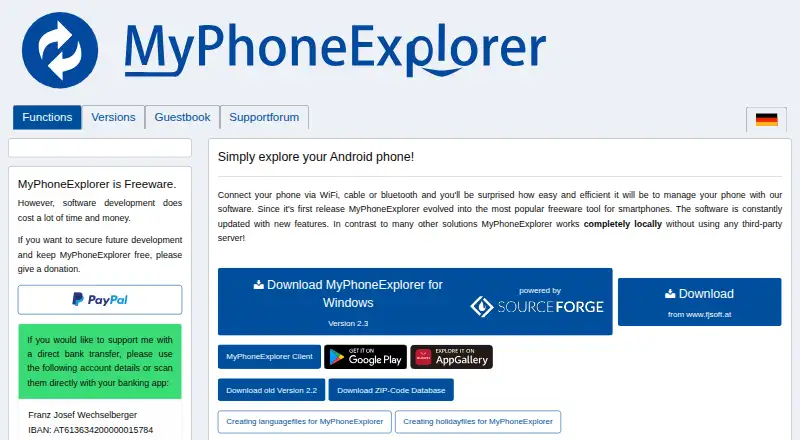
MyPhoneExplorer is freeware for managing an Android phone from a Windows PC over WiFi, cable or Bluetooth. Its desktop tools cover files, phonebook entries, calendar data and SMS and MMS messages, along with backup, photo and file sync, call control, notifications, screen mirroring and remote control. Listed synchronization targets include Outlook since version 2003, Thunderbird, SeaMonkey, Lotus Notes, Tobit David, Fritz!Box, vCard/iCal files and an internal sync database. Before changing data on the phone or in a database, the program presents the planned actions. The maker says the phone client sends data only to MyPhoneExplorer Desktop on the PC and does not connect to the internet. The desktop uses the internet for update checks, a push command to launch the phone client, and telephone-number name or address searches; the maker says no other private data is sent online. Version 2.3 is dated 2025-10-27. The maker directs users needing help to its support forum or the creator by email.
Who it suits
MyPhoneExplorer may suit Android users who want to manage and synchronize phone data from a Windows PC. Its local transfer model may be relevant to users who want phone data sent to the desktop rather than a third-party server.
What it does well
- Connects over WiFi, cable or Bluetooth.
- Shows planned data changes before applying them.
- Supports many listed sync targets.
- Includes backup, screen mirroring and remote control.
What to know first
- Supports Android phones and Windows PCs only.
- The desktop uses the internet for listed functions.
Plans
| Plan | Billed and limits | Price |
|---|---|---|
| MyPhoneExplorer | Freeware; optional donations | Free |
As fjsoft.at lists them, read 8 Oct 2026. The maker's own page has the final word.
Getting started
- Visit the MyPhoneExplorer website.
- Use an Android phone and a Windows PC.
- Connect the phone to the PC over WiFi, cable, or Bluetooth.
- Choose the phone data and synchronization targets you want to manage.
- Review the planned changes before applying them.
Verdict
MyPhoneExplorer offers a broad set of PC tools for Android data, synchronization and remote control. Its maker describes local phone-to-PC communication, while the desktop still connects online for specified functions.
Questions
How much does MyPhoneExplorer cost?
The listed plan is free. It is freeware, with optional donations.
Is there a free plan or trial?
The plan is free. No free trial is offered.
Which platforms does it support?
The listed platforms are Android and Windows.
Which services and formats can it sync with?
Listed targets include Outlook since version 2003, Thunderbird, SeaMonkey, Lotus Notes, Tobit David, Fritz!Box, vCard and iCal files, and an internal sync database.
How does the phone client handle internet access?
The maker says the smartphone client does not connect to the internet and sends data only to MyPhoneExplorer Desktop on the PC.
Who makes MyPhoneExplorer?
The imprint identifies Franz Josef Wechselberger as the site operator and gives an address in Hainzenberg, Austria.
Facts from MyPhoneExplorer's own pages
- Client network behavior
- The privacy page says the smartphone client does not connect to the internet and sends data only to MyPhoneExplorer Desktop on the PC. · fjsoft.at, 8 Oct 2026
- Creator
- The imprint identifies Franz Josef Wechselberger as the site operator and gives an address in Hainzenberg, Austria. · fjsoft.at, 8 Oct 2026
- Desktop features
- The maker lists desktop messaging, call control, notifications, backup, photo and file sync, screen mirroring and remote control, remote keyboard, barcode scanning, and phone clipboard access. · fjsoft.at, 8 Oct 2026
- Desktop network use
- The maker says the desktop connects to the internet for update checks, a push command to launch the phone client, and telephone-number name/address searches; it says no other private data is sent to the internet. · fjsoft.at, 8 Oct 2026
- Headquarters
- Hainzenberg, Austria · fjsoft.at, 28 Sept 2026
- Local operation
- The maker says MyPhoneExplorer works completely locally without a third-party server. · fjsoft.at, 8 Oct 2026
- Phone data
- Management features include a file browser, phonebook, calendar, and SMS and MMS messages. · fjsoft.at, 8 Oct 2026
- Purpose
- MyPhoneExplorer manages an Android phone from a PC over WiFi, cable, or Bluetooth. · fjsoft.at, 8 Oct 2026
- Recent version
- The versions page lists MyPhoneExplorer 2.3 dated 2025-10-27 and notes remote phone control via WiFi and sync with Microsoft cloud/Outlook. · fjsoft.at, 8 Oct 2026
- Support
- The maker directs users who need help to its support forum or to contact the creator by email. · fjsoft.at, 8 Oct 2026
- Sync review
- Before changing data on the phone or in a database, MyPhoneExplorer presents the planned actions. · fjsoft.at, 8 Oct 2026
- Sync targets
- The maker lists Outlook since version 2003, Thunderbird, SeaMonkey, Lotus Notes, Tobit David, Fritz!Box, vCard/iCal files, and an internal sync database as synchronization targets. · fjsoft.at, 8 Oct 2026
Where MyPhoneExplorer stands on Freedom251
- Phone Transfer Software#15 of 44