Freedom251 › Log Management Software
MyEventViewer
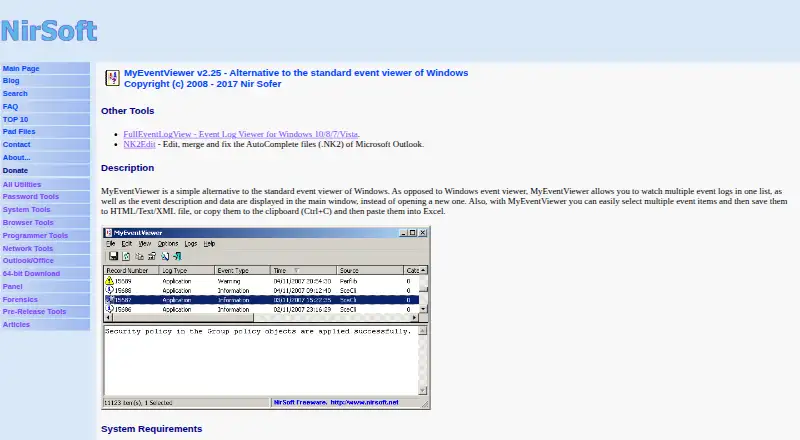
What MyEventViewer is
MyEventViewer is a free, portable Windows utility that provides an alternative to the standard Windows Event Viewer. It combines multiple event logs in one list and shows descriptions and data in its main window. Live log tailing lets users follow new activity, while selected events can be saved as HTML, text, or XML files or copied for pasting into Excel. Filters narrow results by time range, event type, event ID, or user name. The utility can view logs on another network computer when full administrator access is available, and it can load .evt files through a command-line option. Command-line controls support filtering, sorting, and saving CSV, tab-delimited, HTML, or XML output. Run MyEventViewer.exe directly without installation or extra DLL files. Separate standard and x64 downloads are listed. The maker warns of possible errors and crashes on Windows 10 and 11.
Who it suits
It suits Windows users who need portable event-log viewing, filtering, live monitoring, or export. Users on newer Windows versions should note the maker’s warning about possible problems.
What it does well
- Portable, with no installation required
- Combines multiple event logs
- Live log tailing included
- Exports HTML, text, and XML
- Supports command-line filtering and sorting
What to know first
- Possible errors and crashes on Windows 10 and 11
- Requires full administrator access for remote computers
- Windows-only utility
Plans
| Plan | Billed and limits | Price |
|---|---|---|
| Freeware | Portable utility · No installation required · Windows event log viewing and export | On request |
| MyEventViewer | Freeware; Windows utility | Free |
As nirsoft.net lists them, read 21 Sept 2026. The maker's own page has the final word.
Verdict
MyEventViewer focuses on inspecting and exporting Windows event logs without installation. Its broad export and filtering controls are useful, but the maker recommends another utility for newer Windows versions.
Facts from MyEventViewer's own pages
- Architecture downloads
- The product page links to separate standard and x64 downloads. · nirsoft.net, 11 Oct 2026
- Archive export
- Yes · nirsoft.net, 21 Sept 2026
- Automation
- Command-line options support filtering, sorting, and saving event lists in formats including CSV, tab-delimited text, HTML, and XML. · nirsoft.net, 11 Oct 2026
- Combined logs
- It displays multiple event logs together in one list, with event descriptions and data in the main window. · nirsoft.net, 11 Oct 2026
- Export and copy
- Users can select multiple events and save them to HTML, text, or XML files, or copy them to the clipboard for pasting into Excel. · nirsoft.net, 11 Oct 2026
- External files
- It can load event data from one or more .evt files using a command-line option. · nirsoft.net, 11 Oct 2026
- Filtering
- Its advanced filters include time ranges, event types, event IDs, and user names. · nirsoft.net, 11 Oct 2026
- Founded
- 2001 · nirsoft.net, 19 Oct 2026
- Free plan
- Yes · nirsoft.net, 21 Sept 2026
- License and support
- The utility is freeware with redistribution allowed under stated conditions; the maker invites bug reports and feedback by email and provides the address [email protected]. · nirsoft.net, 11 Oct 2026
- Live log tailing
- Yes · nirsoft.net, 21 Sept 2026
- Log pipelines
- No · nirsoft.net, 21 Sept 2026
- Maker
- NirSoft says it is a one-person website developed and maintained by Nir Sofer, and that the site began in 2001. · nirsoft.net, 11 Oct 2026
- Portable use
- The utility requires no installation or additional DLL files; the maker says to start it by running MyEventViewer.exe. · nirsoft.net, 11 Oct 2026
- Privacy claim
- NirSoft says its utilities do not collect personal information from a user's computer or send information to anyone. · nirsoft.net, 11 Oct 2026
- Purpose
- MyEventViewer is an alternative to the standard Windows Event Viewer for viewing event logs. · nirsoft.net, 11 Oct 2026
- Recommended alternative
- The maker recommends FullEventLogView for Windows 10 and 11, and also recommends it on Windows 8, 7, and Vista to see event logs added starting with Vista. · nirsoft.net, 11 Oct 2026
- Remote computers
- It can view events on another computer on the network, provided the user has full administrator access to that computer. · nirsoft.net, 11 Oct 2026
- Warranty
- The maker provides the software as-is without express or implied warranties and disclaims liability for specified damages. · nirsoft.net, 11 Oct 2026
- Windows compatibility
- The maker lists Windows 2000, XP, Server 2003, Vista, Windows 7/2008, and Windows 8, and warns of possible errors, crashes, and other problems on Windows 10 and 11. · nirsoft.net, 11 Oct 2026
Where MyEventViewer stands on Freedom251
- Log Management Software#68 of 111