Freedom251 › Cross-Browser Testing Software

MultiBrowser
What MultiBrowser is
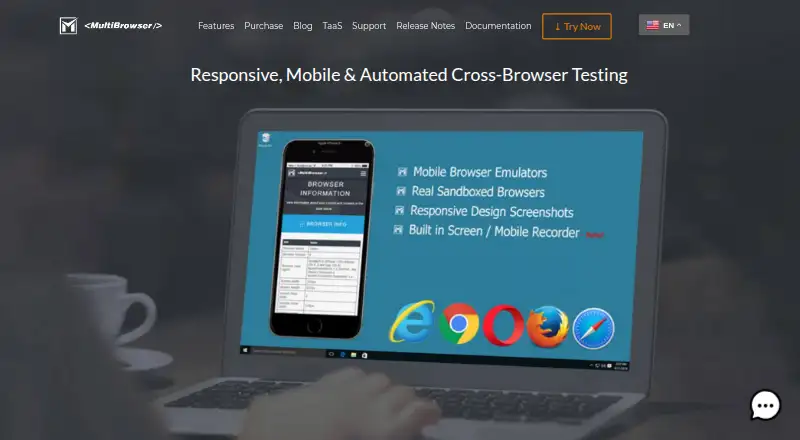
MultiBrowser is desktop software for checking website behavior and rendering in multiple browser and device environments. It opens encapsulated browsers side by side on one computer, including Internet Explorer 11, Chrome 40 and later, and Firefox 35 and later. Mobile emulators cover iPhone, iPad, and Android scenarios, with controls for orientation, pixel density, and developer tools. The Responsive Design Screenshots app previews pages at different device sizes and resolutions and accepts custom device settings. Users can record functionality checks without programming, replay them across browsers, and export recordings as Java, C#, Python, or Ruby source code. Automated tests can be connected with build-server builds. A recorder captures desktop sessions, standalone browsers, and automated executions. The browser and simulator suite runs offline on the desktop. MultiBrowser supports Linux, macOS, and Windows; downloads are offered for Windows 7, 8, 10, and 11. Plans include standalone browsers, mobile emulators, and unlimited responsive design tests. Evaluation costs $0.99 once with one day of updates, Monthly Subscription costs $19.99 per month per user license, and Professional costs $99 once per user license with one year of updates.
Who it suits
MultiBrowser suits developers and organizations that need browser compatibility checks, mobile emulation, responsive previews, or repeatable automated tests. Its offline desktop operation and support for Linux, macOS, and Windows fit teams working across those systems.
What it does well
- Side-by-side encapsulated browser instances
- iPhone, iPad, and Android emulators
- No-code test recording and replay
- Exports tests to four programming languages
- Offline desktop testing
- Build-server integration for automated tests
What to know first
- No real device testing
- No visual comparison feature
- Evaluation updates last one day
- Paid product with no free plan
Limits
The $0.99 Evaluation plan includes browser and application updates for one day. Monthly Subscription includes one month of updates, while Professional includes one year; all listed plans provide unlimited responsive web design tests.
Plans
| Plan | Billed and limits | Price |
|---|---|---|
| Evaluation | $0.99 · All standalone browsers · mobile browser emulators · 1 day of browser and application updates · unlimited responsive web design tests | $0.99, paid once |
| Monthly Subscription | $19.99 per user license · All standalone browsers · mobile browser emulators · 1 month of browser and application updates · unlimited responsive web design tests | $19.99 a month |
| Professional | $99 per user license · All standalone browsers · mobile browser emulators · 1 year of browser and application updates · unlimited responsive web design tests | $99, paid once |
As multibrowser.com lists them, read 7 Oct 2026. The maker's own page has the final word.
Getting started
- Open the MultiBrowser website
- Choose the Evaluation, Monthly Subscription, or Professional plan
- Download the version for Windows, macOS, or Linux
- Install the desktop application
- Launch standalone browsers, emulators, or Responsive Design Screenshots
- Record or replay tests and connect automation with build-server builds
Verdict
Choose MultiBrowser for desktop-based browser coverage, mobile emulation, responsive screenshots, and exportable test automation. Look elsewhere if testing must run on physical devices or requires visual comparison tools.
Questions
What does MultiBrowser cost?
Evaluation is $0.99 once, Monthly Subscription is $19.99 per month per user license, and Professional is $99 once per user license.
Is there a free plan?
No. A free trial is available through the one-day Evaluation plan.
Which operating systems are supported?
MultiBrowser supports Linux, macOS, and Windows, with downloads for Windows 7, 8, 10, and 11.
Can it test mobile devices?
It provides emulators for iPhone, iPad, and Android, but does not provide real device testing.
Can recorded tests be exported?
Recorded tests can be exported as Java, C#, Python, or Ruby source code.
Facts from MultiBrowser's own pages
- Build integration
- The product page says automated tests can be integrated with build server builds. · multibrowser.com, 7 Oct 2026
- Code export
- Recorded tests can be exported to Java, C#, Python or Ruby source code. · multibrowser.com, 7 Oct 2026
- Founded
- 2014 · multibrowser.com, 28 Sept 2026
- Headquarters
- Atasehir, Istanbul, Turkey · multibrowser.com, 28 Sept 2026
- Intended users
- The company says it serves large Fortune 500 companies as well as individual developers. · multibrowser.com, 7 Oct 2026
- Local and offline use
- The product homepage says its browser and simulator testing suite can run offline in the user's desktop environment. · multibrowser.com, 7 Oct 2026
- Mobile emulation
- Its mobile emulators support iPhone, iPad and Android testing, with device orientation, pixel densities and developer tools. · multibrowser.com, 7 Oct 2026
- Purpose
- MultiBrowser is desktop software for testing website functionality and rendering across web browsers and desktop or mobile devices. · multibrowser.com, 7 Oct 2026
- Responsive testing
- The Responsive Design Screenshots app previews websites across multiple devices and resolutions and allows custom devices. · multibrowser.com, 7 Oct 2026
- Standalone browsers
- It runs encapsulated browsers side by side on one PC, including legacy versions such as IE 11, Chrome 40+ and Firefox 35+. · multibrowser.com, 7 Oct 2026
- Support
- The company lists [email protected] as its support contact. · multibrowser.com, 7 Oct 2026
- Supported operating systems
- The download page offers versions for Windows 7, 8, 10 and 11, macOS and Linux. · multibrowser.com, 7 Oct 2026
- Test automation
- Users can record functionality tests without programming and play them back across multiple browsers. · multibrowser.com, 7 Oct 2026
- Video recording
- The built-in recorder can capture desktop sessions, standalone browsers and automated test executions. · multibrowser.com, 7 Oct 2026
Where MultiBrowser stands on Freedom251
- Cross-Browser Testing Software#19 of 25