Freedom251 › Windows Compatibility Layers
Moonshine
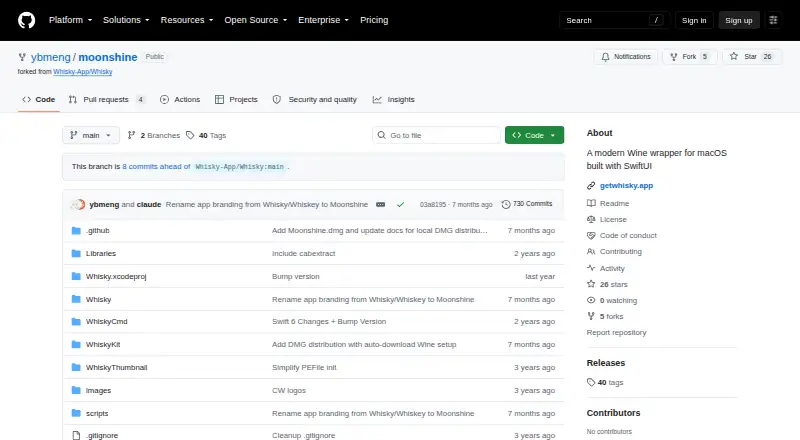
What Moonshine is
Moonshine is a free, open-source macOS app for running Windows games and applications through Wine. Its graphical interface lets users create bottles, adjust settings, and launch Windows programs. The setup wizard downloads and installs Wine Staging 11.2, then applies a patch to Wine's macOS driver for OpenGL 3.2 and later context creation. The project describes DXVK as translating Direct3D to Vulkan and MoltenVK as translating Vulkan to Metal. Moonshine also records Wine output in timestamped logs, including crash details, DLL load diagnostics, and exit codes. The stated minimum requirements are an Apple Silicon Mac and macOS Sonoma 14.0 or later. Users can install from a DMG or build from source; source builds require Xcode 16 or later, and a provided script installs dependencies, builds the app, and launches it. The repository lists GPL-3.0 as its license and identifies Moonshine as a fork of Whisky, which its README says was archived in May 2025. The README also says the project was built with Claude Code and was not thoroughly tested.
Who it suits
Moonshine suits Mac users who want a graphical way to configure Wine bottles and launch Windows programs. It requires an Apple Silicon Mac running macOS Sonoma 14.0 or later.
What it does well
- Graphical interface for bottles and settings
- Setup wizard installs Wine Staging 11.2
- Captures timestamped Wine diagnostic logs
- Free and open source under GPL-3.0
What to know first
- Requires Apple Silicon
- Requires macOS Sonoma 14.0 or later
- README says it was not thoroughly tested
- Repository releases page lists no releases
Limits
The stated minimum is an Apple Silicon Mac running macOS Sonoma 14.0 or later. The source-build route requires Xcode 16 or later; the README says the project was not thoroughly tested.
Getting started
- Visit the project at https://github.com/ybmeng/moonshine.
- Use an Apple Silicon Mac running macOS Sonoma 14.0 or later.
- Install from a DMG, or build from source with Xcode 16 or later.
- Launch Moonshine and complete the setup wizard to install Wine and apply the OpenGL patch.
- Create a bottle, configure settings, and launch a Windows program.
Verdict
Moonshine provides a graphical route to running Windows programs through Wine on qualifying Apple Silicon Macs. Its README warns that the project was not thoroughly tested, and the repository currently lists no releases.
Questions
Is Moonshine free and open source?
Yes. The project is free and the repository lists GPL-3.0 as its license.
Which operating system does Moonshine support?
It supports macOS. The stated minimum is macOS Sonoma 14.0 or later on an Apple Silicon Mac.
Can I use it on Linux?
No. Linux support is listed as unavailable.
How does installation work?
The README describes installing from a DMG or building from source. First launch runs a wizard that installs Wine and applies the OpenGL patch.
What is required to build it from source?
Building from source requires Xcode 16 or later. A provided script installs dependencies, builds the app, and launches it.
Who makes Moonshine?
The public GitHub repository is owned by the account ybmeng. The README describes Moonshine as a fork of Whisky.
Facts from Moonshine's own pages
- Audience
- The README says users can create bottles, configure settings, and launch Windows programs through a graphical interface without technical knowledge. · github.com, 9 Oct 2026
- Build from source
- Building from source requires Xcode 16 or later, and the project provides a script that installs dependencies, builds the app, and launches it. · github.com, 9 Oct 2026
- Crash logs
- Moonshine captures Wine output in timestamped logs, including crash details, DLL load diagnostics, and exit codes. · github.com, 9 Oct 2026
- Distribution
- The repository’s releases page currently says there are no releases. · github.com, 9 Oct 2026
- Graphics
- The project patches Wine’s macOS driver to support OpenGL 3.2 and later context creation. · github.com, 9 Oct 2026
- How it works
- Users create bottles, configure settings, and launch Windows programs through a graphical interface. · github.com, 9 Oct 2026
- Installation
- The README describes installing from a DMG or building from source; first launch runs a setup wizard that installs Wine and applies the OpenGL patch. · github.com, 9 Oct 2026
- Integration components
- The README credits Wine, Wine Staging, DXVK-macOS, MoltenVK, and Sparkle among the projects Moonshine builds on. · github.com, 9 Oct 2026
- License
- The repository lists GPL-3.0 as its license. · github.com, 9 Oct 2026
- Maker
- The public GitHub repository is owned by the account ybmeng. · github.com, 9 Oct 2026
- Project origin
- Moonshine is a fork of Whisky, which the README says was archived in May 2025. · github.com, 9 Oct 2026
- Purpose
- Moonshine is a native SwiftUI Wine wrapper for running Windows games and apps on a Mac. · github.com, 9 Oct 2026
- Rendering components
- The README describes DXVK for translating Direct3D to Vulkan and MoltenVK for translating Vulkan to Metal. · github.com, 9 Oct 2026
- Requirements
- The stated minimum requirements are an Apple Silicon Mac and macOS Sonoma 14.0 or later; building from source requires Xcode 16 or later. · github.com, 9 Oct 2026
- Security and testing
- The README discloses that Moonshine was built with Claude Code and was not thoroughly tested. · github.com, 9 Oct 2026
- Testing disclosure
- The README says the project was built with Claude Code and was not thoroughly tested. · github.com, 9 Oct 2026
- Wine version
- Moonshine uses Wine Staging 11.2, which its setup wizard downloads and installs. · github.com, 9 Oct 2026
Where Moonshine stands on Freedom251
- Windows Compatibility Layers#24 of 26