Freedom251 › AI Mockup Generators
mokup
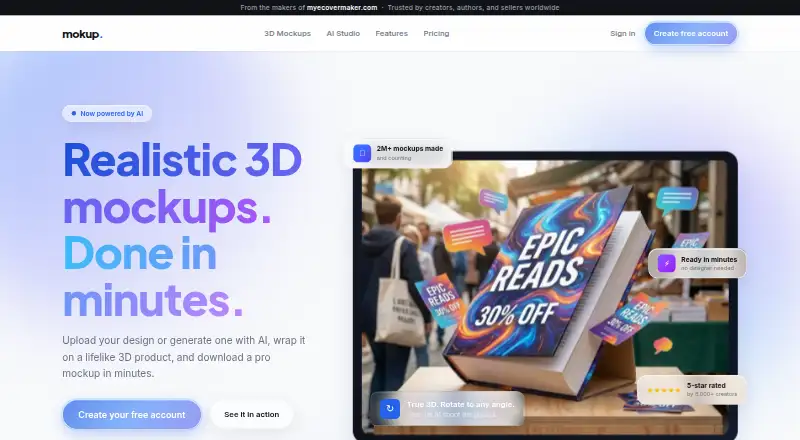
What mokup is
mokup is a web-based tool for turning artwork into product mockups and marketing visuals. You can upload a design or create one with AI, place it on a 3D product model, then adjust brightness, finish, studio lighting, camera angle, and background. Its model selection includes books, packaging, devices, magazines, mugs, and apparel. The AI design tool can create layered, editable designs with real fonts and live text.
AI Studio generates product photos, lifestyle scenes, promotions, and short videos from a mockup, while Pro Shot turns a phone photo of a physical product into an image with a white studio, gradient, lifestyle, or custom background. Users can also make AI persona videos for unboxings, reviews, demos, and lifestyle clips. The template library spans thousands of templates across niches, with stock images and background removal. Exports include high-resolution PNG, JPG, and WebP, plus print-ready PDF, including KDP-ready book covers. Launch Kit assembles a hero render, product shot, lifestyle scene, and promotions. The Free plan includes unlimited manual designs and editing, three AI designs and five 3D mockup renders per month. Pro costs $19/mo, billed monthly, and can be canceled anytime. The site says Mokup was formerly myecovermaker.com and is from its makers.
Who it suits
mokup suits creators who need product mockups, marketing visuals, or print-ready files for items such as books, packaging, devices, or apparel. Its examples include self-published authors, e-commerce sellers, and course creators.
What it does well
- Upload artwork or create designs with AI.
- Includes hundreds of realistic 3D models.
- Exports PNG, JPG, WebP, and PDF.
- Free plan includes unlimited manual designs and editing.
- Pro Shot images are suited to Amazon, Shopify, Etsy, or ads.
What to know first
- The Free plan allows three AI designs per month.
- The Free plan allows five 3D mockup renders per month.
- Pro costs $19/mo, billed monthly.
Limits
The Free plan includes three AI designs and five 3D mockup renders per month. Pro costs $19/mo and includes 40 AI designs per month, high-resolution exports, print-ready PDF, monthly AI credits, Launch Kit, and the full template library.
Plans
| Plan | Billed and limits | Price |
|---|---|---|
| Free | Forever · Unlimited manual designs & editing · 3 AI designs / month · AI photos, edits & bg removals · 5 3D mockup renders / month | Free |
| Pro | Billed monthly, cancel anytime · 40 AI designs / month · High-res exports and print-ready PDF · Monthly AI credits for photos, scenes, and video · Launch Kit and full template library · Brand kit and much more | $19 a month |
As mokup.com lists them, read 8 Oct 2026. The maker's own page has the final word.
Getting started
- Open mokup.com in a web browser.
- Choose the Free plan or Pro at $19/mo.
- Upload artwork or create a design with AI.
- Place the design on a 3D product model and adjust the render controls.
- Download the finished mockup in a supported export format.
Verdict
Choose mokup if you want a web tool for creating product mockups and related marketing images, with a free tier for manual design work. Consider Pro if you need its higher monthly AI design allowance, high-resolution exports, print-ready PDF, Launch Kit, or full template library.
Questions
Does mokup have a free plan?
Yes. Free includes unlimited manual designs and editing, three AI designs per month, and five 3D mockup renders per month.
How much does Pro cost?
Pro is $19/mo, billed monthly, and can be canceled anytime.
Which platforms does mokup support?
The listed platform is web.
What files can I export?
Exports include PNG, JPG, WebP, and PDF.
Can I use Mokup for commercial work?
Yes. Commercial use is listed as allowed.
Who makes Mokup?
The site describes Mokup as being from the makers of myecovermaker.com and says it was formerly myecovermaker.com.
Facts from mokup's own pages
- 3D models
- The site says Mokup offers hundreds of realistic 3D models, including models for books, packaging, devices, magazines, mugs, and apparel. · mokup.com, 8 Oct 2026
- AI design
- Mokup says its AI can generate layered, fully editable designs with real fonts and live text. · mokup.com, 8 Oct 2026
- AI photography
- AI Studio generates product photos, lifestyle scenes, promotions, and short videos from a mockup while keeping printed text letter-perfect. · mokup.com, 8 Oct 2026
- Exports
- Mokup lists high-resolution PNG, JPG, and WebP exports, plus print-ready PDF including KDP-ready book covers. · mokup.com, 8 Oct 2026
- Integrations and destinations
- The Pro Shot page says downloaded product images are ready for Amazon, Shopify, Etsy, or ads. · mokup.com, 8 Oct 2026
- Intended users
- The homepage describes Mokup as built for creators and features examples for self-published authors, e-commerce sellers, and course creators. · mokup.com, 8 Oct 2026
- Launch Kit
- Launch Kit generates a marketing bundle with a hero render, product shot, lifestyle scene, and promotions. · mokup.com, 8 Oct 2026
- Maker
- The site describes Mokup as being from the makers of myecovermaker.com and says it was formerly myecovermaker.com. · mokup.com, 8 Oct 2026
- Pro Shot
- Pro Shot turns a phone photo of a physical product into a product image and offers white studio, gradient, lifestyle, or custom backgrounds. · mokup.com, 8 Oct 2026
- Purpose
- Mokup lets users upload artwork or generate it with AI, wrap it on a 3D product model, and download a mockup. · mokup.com, 8 Oct 2026
- Render controls
- Users can adjust brightness, finish, studio lighting, camera angle, and background. · mokup.com, 8 Oct 2026
- Support
- The site lists [email protected] as its contact email. · mokup.com, 8 Oct 2026
- Templates
- The site describes a library of thousands of templates across niches, with stock images and background removal. · mokup.com, 8 Oct 2026
- UGC videos
- Users can create an AI persona and generate product videos for scenes such as unboxings, reviews, demos, and lifestyle clips. · mokup.com, 8 Oct 2026
Where mokup stands on Freedom251
- AI Mockup Generators#21 of 31