Freedom251 › API Mocking Tools
MockPilot
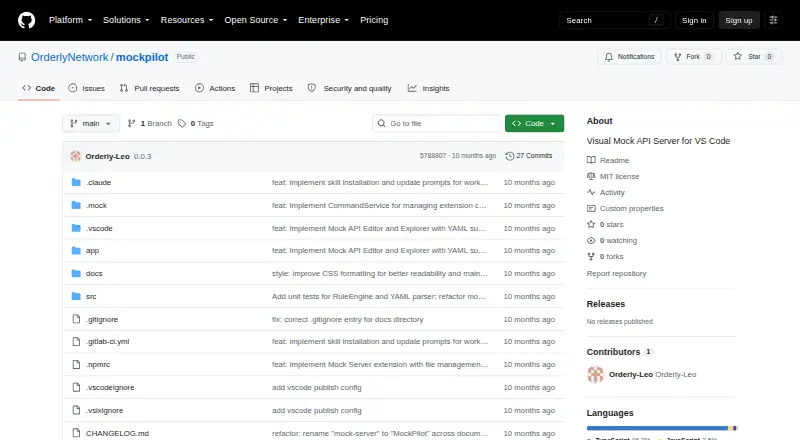
What MockPilot is
MockPilot is a free, open-source visual mock API server extension for VS Code. Developers define HTTP and REST endpoints in YAML, keep those definitions under version control, and edit them through a WebView visual editor. The extension lets users test endpoints directly in VS Code and start or stop the local server from the Status Bar or Command Palette. YAML files in the .mock directory trigger automatic reloads when created, changed, or deleted. A mock can contain multiple response rules for different scenarios, including status codes, headers, response bodies, and delays. Supported methods are GET, POST, PUT, DELETE, PATCH, HEAD, and OPTIONS. The README example serves locally at localhost:9527. Listed uses include frontend development, API testing, documentation, team collaboration, and offline development. MockPilot can work with GitHub Copilot, Cursor, and Claude; first activation automatically installs a Claude Skill for compatible YAML generation. Node.js 16 or later is required, with pnpm or npm recommended. The repository uses the MIT License.
Who it suits
It suits developers building or testing front ends and APIs inside VS Code, especially teams versioning YAML mocks or working offline. Node.js 16 or later is required.
What it does well
- Visual YAML editing inside VS Code
- Multiple response scenarios
- Automatic reload on YAML changes
- Direct endpoint testing
- MIT licensed and open source
What to know first
- Requires VS Code
- Requires Node.js 16 or later
- Local server example uses port 9527
- No built-in AI command
Limits
MockPilot requires VS Code and Node.js 16 or later. Its documented example runs locally at localhost:9527, and the project is provided as an extension rather than a hosted service.
Getting started
- Install Visual Studio Code
- Install Node.js version 16 or later
- Use pnpm or npm as recommended for setup
- Install the MockPilot extension from its project repository
- Create YAML mock definitions in the .mock directory
- Start the server from the Status Bar or Command Palette
- Test endpoints from the VS Code editor
Verdict
MockPilot keeps mock API creation, editing, testing, and local serving inside VS Code. Its YAML workflow supports version control and varied responses, while setup depends on the listed Node.js and package-manager requirements.
Questions
Is MockPilot free?
Yes. It is listed as free, open source, and MIT licensed.
Where does MockPilot run?
It runs as a Visual Studio Code extension with a local mock server.
Which methods are supported?
The documented YAML format supports GET, POST, PUT, DELETE, PATCH, HEAD, and OPTIONS.
Can teams version control mocks?
Yes. Mock API definitions use YAML and can be version controlled.
Does it work with AI tools?
The project says it works with GitHub Copilot, Cursor, and Claude. On first activation, it installs a Claude Skill for compatible YAML generation.
What setup does it require?
The README lists Node.js 16 or later and recommends pnpm or npm.
Facts from MockPilot's own pages
- AI integrations
- The project says MockPilot can work with IDE AI tools including GitHub Copilot, Cursor, and Claude, and automatically installs a Claude Skill for generating mock configurations. · github.com, 9 Oct 2026
- AI tools
- The README says MockPilot can be used with IDE AI tools such as GitHub Copilot, Cursor, and Claude; it does not provide a built-in AI command. · github.com, 4 Oct 2026
- API testing
- The README describes testing mock endpoints directly from VS Code and gives localhost:9527 as the example server address. · github.com, 9 Oct 2026
- Claude integration
- On first activation, MockPilot automatically installs a specialized Claude Skill for generating compatible YAML configurations. · github.com, 4 Oct 2026
- Configuration
- Mock API definitions use YAML files stored in a project’s .mock directory. · github.com, 9 Oct 2026
- Editing and testing
- MockPilot includes a WebView visual editor and lets users test APIs directly from the editor. · github.com, 4 Oct 2026
- Hot reload
- The server automatically reloads when YAML mock files are created, changed, or deleted in the .mock directory. · github.com, 9 Oct 2026
- HTTP methods
- The documented YAML format lists GET, POST, PUT, DELETE, PATCH, HEAD, and OPTIONS as supported methods. · github.com, 4 Oct 2026
- License
- The repository identifies MockPilot as MIT licensed. · github.com, 9 Oct 2026
- License and contributions
- The repository states that MockPilot uses the MIT License and welcomes issues and pull requests. · github.com, 4 Oct 2026
- Local server
- The README’s example serves a mock API at localhost on port 9527, the stated default port. · github.com, 4 Oct 2026
- Product
- MockPilot is a visual mock API server extension for VS Code that helps developers create, manage, and test mock APIs in their development environment. · github.com, 4 Oct 2026
- Purpose
- MockPilot is a Visual Mock API Server extension for VS Code for creating, managing, and testing mock APIs in the development environment. · github.com, 9 Oct 2026
- Requirements
- The README lists Node.js 16 or later and recommends pnpm or npm; package metadata specifies VS Code ^1.75.0. · github.com, 9 Oct 2026
- Response rules
- A mock API can define multiple response rules for different scenarios, with status codes, headers, response bodies, and delays. · github.com, 4 Oct 2026
- Response scenarios
- A mock definition can include multiple response rules with status codes, headers, response bodies, and delays. · github.com, 9 Oct 2026
- Server controls
- Users can start, stop, toggle, and reload the mock server from VS Code commands or the status bar. · github.com, 9 Oct 2026
- Support
- The README welcomes contributions and directs users to submit issues or pull requests. · github.com, 9 Oct 2026
- Use cases
- The project lists frontend development, API testing, documentation, team collaboration through version control, and offline development as use cases. · github.com, 9 Oct 2026
Where MockPilot stands on Freedom251
- API Mocking Tools#26 of 26