Freedom251 › Parental control apps
MobileTracking
What MobileTracking is
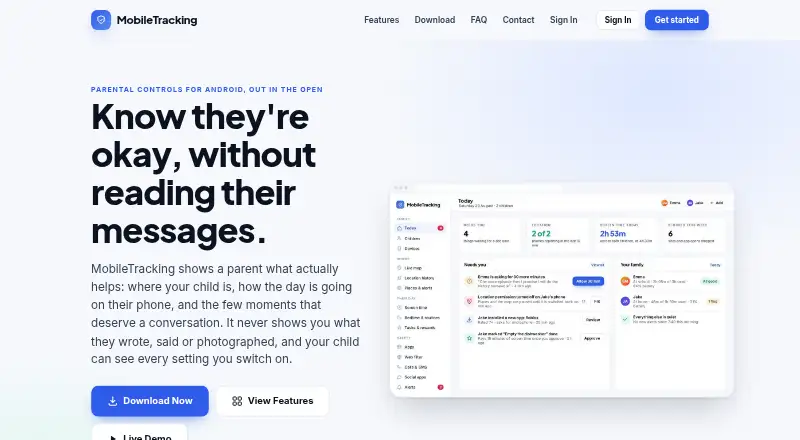
MobileTracking is a parental-control service for a child’s Android phone, paired with a parent panel that works in any browser. Parents can view a live map, recent location history, and arrival alerts for saved places. Screen-time tools set daily budgets with separate school-day and weekend schedules. On-device web filtering blocks categories over mobile data, enforces safe search, and supports an allow list. Parents can block apps and review activity reports. The child app remains visible and shows a “What’s shared” list of active features, places, limits, and rules. Keyword alerts match selected words in notification previews and report the word, app, and time, not message text. The service says it does not collect message contents, screenshots, keystrokes, photos, camera or microphone recordings, or call audio. Free accounts include basic pairing and features; some options require subscriptions.
Who it suits
MobileTracking is intended for parents or legal guardians monitoring their own child on a known Android device. The child app requires Android 8.0 or later, while the parent panel works in any browser.
What it does well
- Live location map and arrival alerts
- Separate school and weekend schedules
- On-device category filtering and safe search
- Visible child sharing information
- Free account with included features
What to know first
- Some features require a paid subscription
- Google Play build omits call and SMS logs
- Child device must run Android 8.0 or later
- Pairing requires the child’s phone
Verdict
MobileTracking combines location, screen-time, filtering, app blocking, and reports in one parental-control service. Its stated data limits and visible sharing screen provide clear boundaries for monitored children.
Facts from MobileTracking's own pages
- Account and demo
- A free account lets a parent add a child, pair a phone and use included features; a read-only demo is also available without an account. · mobiletracking.app, 12 Oct 2026
- Activity reports
- Yes · mobiletracking.app, 22 Sept 2026
- Android requirement
- The child app requires Android 8.0 or later; the parent panel works in any browser. · mobiletracking.app, 12 Oct 2026
- App blocking
- Yes · mobiletracking.app, 22 Sept 2026
- Audience
- The terms limit intended use to parents or guardians monitoring a minor child in their care, with the child's knowledge. · mobiletracking.app, 12 Oct 2026
- Build differences
- The Google Play build omits call and SMS logs, which are available in the direct APK build. · mobiletracking.app, 12 Oct 2026
- Business model
- The maker says subscriptions from parents are its business model and that it does not sell family data or put ads in the app or parent panel. · mobiletracking.app, 12 Oct 2026
- Call and SMS logs
- The direct-download build is the only build that includes call and SMS logs, showing metadata rather than message contents. · mobiletracking.app, 12 Oct 2026
- Child transparency
- The child app displays an up-to-date list of the features, places, limits and rules shared with the parent. · mobiletracking.app, 12 Oct 2026
- Child visibility
- The child app displays its own icon and a “What's shared” screen listing active features, places, limits, and rules. · mobiletracking.app, 12 Oct 2026
- Content filtering
- Yes · mobiletracking.app, 22 Sept 2026
- Data controls
- The maker says parents can delete a child's history by deleting the child, or remove all account data by closing the account. · mobiletracking.app, 12 Oct 2026
- Data handling
- The privacy policy says MobileTracking does not sell personal or family data and does not use children's data to build advertising profiles. · mobiletracking.app, 12 Oct 2026
- Data limits
- MobileTracking says it does not collect message contents, screenshots, keystrokes, camera or microphone recordings, or call audio. · mobiletracking.app, 12 Oct 2026
- Device platforms
- android · mobiletracking.app, 22 Sept 2026
- Free account
- A free account can add a child, pair a phone, open the panel, and use included features; some features require a paid subscription. · mobiletracking.app, 12 Oct 2026
- Intended users
- MobileTracking is made for parents or legal guardians monitoring their own children on a phone the child knows is monitored; it is not for monitoring another adult. · mobiletracking.app, 12 Oct 2026
- Keyword alerts
- Chosen words are matched against notification previews on the child's phone, and the parent receives the word, app, and time rather than message content. · mobiletracking.app, 12 Oct 2026
- Location
- Parents can view a live map, recent location history, and arrival alerts for saved places. · mobiletracking.app, 12 Oct 2026
- Location tracking
- Yes · mobiletracking.app, 22 Sept 2026
- Pairing
- Pairing uses a one-time six-character code that expires in about fifteen minutes and requires the child’s phone in hand. · mobiletracking.app, 12 Oct 2026
- Privacy limits
- The app says it does not collect message text, screenshots, keystrokes, call audio, photos, or camera and microphone recordings. · mobiletracking.app, 12 Oct 2026
- Purpose
- MobileTracking is a parental control app for a child's Android phone, with a parent panel accessible in any browser. · mobiletracking.app, 12 Oct 2026
- Screen time
- Parents can set daily screen time budgets, with separate schedules for school days and weekends. · mobiletracking.app, 12 Oct 2026
Where MobileTracking stands on Freedom251
- Parental control apps#53 of 107