Freedom251 › Low-Code Machine Learning Platforms Software
MLJAR Studio
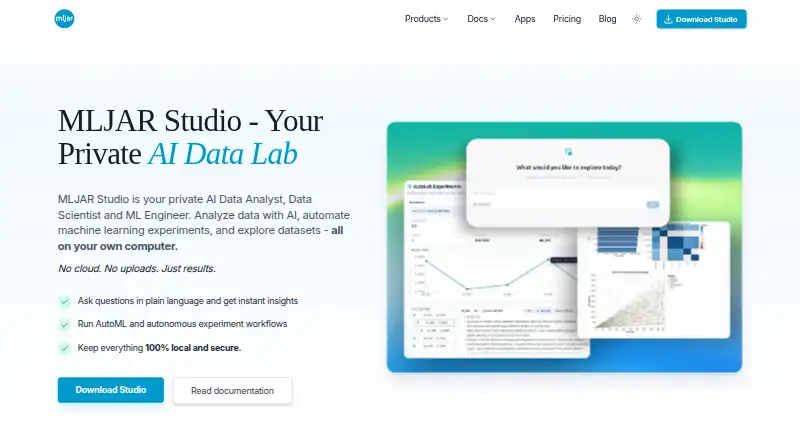
What MLJAR Studio is
MLJAR Studio is a local AI workspace for data analysis, machine-learning experiments, and Python notebooks, available for Linux, macOS, Windows, and self-hosted environments. Users can ask questions in plain language; Studio generates and runs Python analysis while keeping the code visible and editable. Its experiment agent can tune models, find useful features, compare models, track experiments, and create reports. It works with CSV, Excel, and Parquet files, plus SQL databases such as PostgreSQL, ClickHouse, and MySQL. Notebook projects can become interactive Mercury web apps hosted on the user's infrastructure. Data processing is local by default, but an external provider or MLJAR AI cloud add-on can involve external transmission. With OpenAI configured, prompts and relevant context may be sent according to the user's configuration and provider terms. Free includes 50 prompts per month and one public Mercury app. Pro costs $20 a month; Business costs $60 a month. The perpetual license costs $199, paid once and includes one year of updates.
Who it suits
Studio suits analysts, data scientists, and teams working with data who want Python analysis, experiments, or interactive notebooks. It is also aimed at beginners and experts, with local processing by default.
What it does well
- Keeps generated Python code visible and editable
- Works with CSV, Excel, Parquet, and SQL databases
- Processes data locally by default
- Can publish Mercury apps on your infrastructure
What to know first
- Free tier has one public Mercury web app and no private apps
- External AI providers may receive prompts and context
- Perpetual license includes one year of updates
Limits
The Free plan costs nothing and includes 50 prompts per month, 10 published conversations, and one public Mercury web app, with no private Mercury web apps. Pro costs $20 a month and includes 500 prompts per month, 50 published conversations, three public apps, and one private app; Business costs $60 a month and includes 2,000 prompts per month, 200 published conversations, 10 public apps, and three private apps. The $199, paid once perpetual license includes one year of updates; newer releases after that require an update renewal.
Plans
| Plan | Billed and limits | Price |
|---|---|---|
| Free | 50 prompts / month · 10 published conversations · 1 public Mercury web app · core MLJAR Studio features | Free |
| Perpetual license | one payment · yours forever · Purchased version usable forever · 1 year of updates · required for local LLM workflows with Ollama and own provider API keys | $199, paid once |
| Pro | 500 prompts / month · 50 published conversations · 3 public Mercury web apps · 1 private Mercury web app | $20 a month |
| Business | 2,000 prompts / month · 200 published conversations · 10 public Mercury web apps · 3 private Mercury web apps | $60 a month |
As mljar.com lists them, read 3 Oct 2026. The maker's own page has the final word.
Getting started
- Visit the MLJAR Studio website.
- Choose a plan: Free, Pro, Business, or Perpetual license.
- Install or run Studio on Linux, macOS, Windows, or a self-hosted environment.
- Bring in supported files or connect to a supported SQL database.
- Choose an AI provider if you want AI-assisted analysis.
- Turn a notebook into a Mercury web app if you want to publish it.
Verdict
MLJAR Studio combines AI-assisted analysis, experiment management, and Python notebooks, with local processing as the default. Check the Free tier's public-app limit and the data handling implications of configured AI providers.
Questions
Is MLJAR Studio free?
Yes. The Free plan costs nothing and includes 50 prompts per month, 10 published conversations, and one public Mercury web app.
What do the paid plans cost?
Pro is $20 a month and Business is $60 a month. The perpetual license costs $199, paid once.
Which platforms does Studio support?
It supports Linux, macOS, Windows, and self-hosted environments.
Does Studio process data locally?
Data processing is local by default. If you configure an external provider or the MLJAR AI cloud add-on, data may be transmitted externally; with OpenAI, prompts and relevant context may be sent according to your configuration and provider terms.
Which AI providers are available?
Documented options include built-in MLJAR AI, OpenAI, Ollama local, and Ollama Cloud. The product page also names Anthropic and OpenAI-compatible providers.
What does the perpetual license include?
It costs $199, paid once and lets you use the purchased version forever. It includes one year of updates, and it is required for local LLM workflows with Ollama and your own provider API keys.
Facts from MLJAR Studio's own pages
- AI data analysis
- Users can ask questions in plain language and Studio generates and runs Python analysis while keeping the code visible and editable. · mljar.com, 3 Oct 2026
- AI providers
- Documented provider options include built-in MLJAR AI, OpenAI, Ollama local, and Ollama Cloud; the product page also names Anthropic and OpenAI-compatible providers. · mljar.com, 3 Oct 2026
- Audience
- The maker describes Studio as suitable for beginners and experts and says it serves analysts, data scientists, and teams working with data. · mljar.com, 3 Oct 2026
- AutoML
- Its experiment agent can tune models, discover useful features, compare models, track experiments, and generate reports. · mljar.com, 3 Oct 2026
- Cloud provider caveat
- When OpenAI is configured, prompts and relevant context may be sent to OpenAI according to the user's configuration and provider terms. · mljar.com, 3 Oct 2026
- Company
- MLJAR identifies its founders as Aleksandra Płońska and Piotr Płoński on its About page. · mljar.com, 3 Oct 2026
- Data sources
- The AI Data Analyst page says Studio works with CSV, Excel, and Parquet files, plus SQL databases including PostgreSQL, ClickHouse, and MySQL. · mljar.com, 3 Oct 2026
- License updates
- The perpetual license includes one year of updates, and newer releases after that period require an update renewal. · mljar.com, 3 Oct 2026
- Notebook apps
- Studio can turn notebooks into interactive web apps powered by Mercury and host them on the user's own infrastructure. · mljar.com, 3 Oct 2026
- Platforms
- The download page offers installers for Windows, macOS, and Linux. · mljar.com, 3 Oct 2026
- Privacy
- Studio is designed for local, offline-first use; its AI policy says data processing is local by default and no data is transmitted externally unless an external provider or MLJAR AI cloud add-on is configured. · mljar.com, 3 Oct 2026
- Publishing limits
- The Free tier includes one public Mercury web app and no private Mercury web apps; Pro includes one private app and Business includes three. · mljar.com, 3 Oct 2026
- Purpose
- MLJAR Studio is a local AI data workspace for data analysis, machine learning experiments, and Python notebooks. · mljar.com, 3 Oct 2026