Freedom251 › Terminal Emulators
mintty
What mintty is
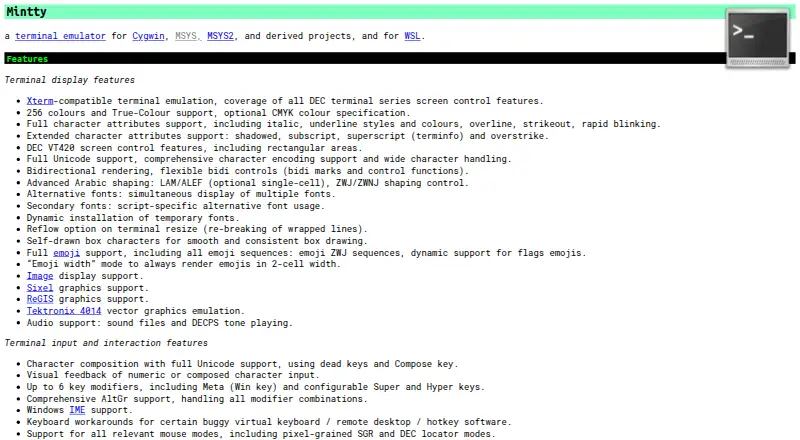
mintty is a free terminal emulator for Windows, designed for Cygwin, MSYS, MSYS2, related projects, and WSL. It provides xterm-compatible terminal emulation with DEC screen controls and supports 256 colours, True Colour, Unicode, bidirectional text, Arabic shaping, emoji, and image display. Its graphics emulation includes Sixel, ReGIS, and Tektronix 4014 vector graphics.
For interaction, mintty offers configurable shortcuts and key modifiers, Unicode character composition, mouse modes, selection, copy and paste, and drag and drop. Ctrl-click can open files and URLs. Window controls include virtual tabs, session switching, fullscreen and transparency options, multiple-monitor support, and high DPI. Settings can be supplied as command-line options or kept in a text configuration file, without registry entries. mintty is the default Cygwin Terminal, comes installed by default with MSYS2, and is included in Git for Windows as Git Bash. It can host WSL, but does not include PuTTY's networking functionality; the project points to packages such as OpenSSH and inetutils for networking. The project links to source code, releases, documentation, and support channels.
Who it suits
mintty suits Windows users who need a terminal for Cygwin, MSYS, MSYS2, related projects, or WSL. Its display options and configurable controls may be useful for people who want to adjust terminal interaction and window behavior.
What it does well
- Supports xterm-compatible emulation and DEC screen controls.
- Renders Unicode, bidirectional text, Arabic shaping, and emoji.
- Offers virtual tabs, session switching, fullscreen, and transparency.
- Settings can be stored in a text file without registry entries.
- Available by default in Cygwin and MSYS2, and included with Git for Windows.
What to know first
- Does not include PuTTY's networking functionality.
- Pseudo-terminal mode can have Windows console input/output interworking problems.
- Available for Windows only.
Limits
The free Mintty plan costs nothing. It does not include PuTTY's networking functionality; the project points to packages such as OpenSSH and inetutils for that. Windows console input and output can have interworking problems in pseudo-terminal mode, with Cygwin 3.1.0 compensating through the Windows 10 ConPTY API.
Plans
| Plan | Billed and limits | Price |
|---|---|---|
| Mintty | Terminal emulator for Cygwin, MSYS, MSYS2, derived projects, and WSL | Free |
As mintty.github.io lists them, read 10 Oct 2026. The maker's own page has the final word.
Getting started
- Visit the mintty website for releases or a current snapshot download.
- Use the default Cygwin Terminal or the mintty included with MSYS2 or Git for Windows.
- Configure settings with command-line options or a text configuration file.
- Consult the included manual page or project wiki for usage guidance.
Verdict
Choose mintty if you need a Windows terminal for Cygwin, MSYS, MSYS2, related projects, or WSL, with broad text, graphics, and window options. Look elsewhere if you need PuTTY-style networking built into the terminal or require a platform other than Windows.
Questions
How much does mintty cost?
The Mintty plan is free, and a free plan is available.
Which platforms does mintty support?
The listed platform is Windows. mintty is intended for Cygwin, MSYS, MSYS2, related projects, and WSL.
Does mintty include SSH or networking support?
No. It leaves out PuTTY's networking functionality; the project points to packages such as OpenSSH and inetutils.
Where can I get mintty?
The website links to source code, releases, a release archive, and a current snapshot download. mintty is also installed by default in Cygwin and MSYS2, and included with Git for Windows as Git Bash.
How is mintty configured?
Settings can be provided as command-line options or in a configuration file. Options are stored in a text file without registry entries.
Facts from mintty's own pages
- Clipboard and links
- It supports text selection, copy and paste, drag and drop, and opening files or URLs with Ctrl+click. · mintty.github.io, 10 Oct 2026
- Color and text
- It supports 256 colors, True Color, Unicode, bidirectional rendering, and Arabic shaping. · mintty.github.io, 10 Oct 2026
- Compatibility caveat
- The site notes that Windows console input and output can have interworking problems with pseudo-terminal mode; it says Cygwin 3.1.0 compensates through the Windows 10 ConPTY API. · mintty.github.io, 9 Oct 2026
- Compatibility limit
- The site notes that native Windows console input and output can have interworking problems in pseudo-terminal mode, with Cygwin 3.1.0 compensating through the Windows 10 ConPTY API. · mintty.github.io, 10 Oct 2026
- Configuration
- Settings can be supplied on the command line or in a configuration file, and options are stored in a text file without registry entries. · mintty.github.io, 10 Oct 2026
- Display
- It supports 256 colours, True Colour, Unicode, bidirectional text, emoji, image display, Sixel, ReGIS, and Tektronix 4014 vector graphics emulation. · mintty.github.io, 9 Oct 2026
- Documentation
- The Cygwin package includes a mintty manual page, and the site links to a wiki for keycodes, control sequences, and other hints. · mintty.github.io, 9 Oct 2026
- Downloads
- The homepage links to the source repository, latest releases, a release archive, and a current snapshot download. · mintty.github.io, 10 Oct 2026
- Free plan
- Yes · mintty.github.io, 22 Sept 2026
- Graphics
- It supports image display, Sixel graphics, ReGIS graphics, and Tektronix 4014 vector graphics emulation. · mintty.github.io, 10 Oct 2026
- Input
- Input features include Unicode character composition, configurable key modifiers, AltGr, Windows IME, and multiple mouse modes. · mintty.github.io, 10 Oct 2026
- Input and interaction
- Features include configurable keyboard shortcuts, mouse selection, copy and paste, drag and drop, and Ctrl-click opening of files and URLs. · mintty.github.io, 9 Oct 2026
- Integrations
- Mintty is installed as the default Cygwin Terminal, comes with MSYS2, and is installed by default in Git for Windows as Git Bash. · mintty.github.io, 10 Oct 2026
- Latest release shown
- The releases page lists version 3.8.3 as the latest release. · github.com, 9 Oct 2026
- Networking
- Mintty leaves out PuTTY's networking functionality, which the homepage says is provided by packages such as OpenSSH and inetutils. · mintty.github.io, 10 Oct 2026
- Platforms
- The site says mintty works on Windows versions from Windows XP onwards and can host WSL. · mintty.github.io, 9 Oct 2026
- Purpose
- Mintty is a terminal emulator for Cygwin, MSYS, MSYS2, derived projects, and WSL. · mintty.github.io, 10 Oct 2026
- Scripting API
- Yes · mintty.github.io, 22 Sept 2026
- Security
- The manual says mintty prompts for confirmation before pasting multiline clipboard contents when line-ending controls are not filtered, as a measure against malicious command-line pastes. · mintty.github.io, 10 Oct 2026
- Security information
- The project page links to its source code repository; the pages reviewed do not state security certifications or compliance claims. · mintty.github.io, 9 Oct 2026
- Split panes
- No · mintty.github.io, 22 Sept 2026
- SSH support
- No · mintty.github.io, 22 Sept 2026
- Support
- The project directs bug reports and enhancement suggestions to its GitHub issue tracker and general Cygwin questions to the Cygwin mailing list. · mintty.github.io, 10 Oct 2026
- Supported platforms
- Windows · mintty.github.io, 22 Sept 2026
Where mintty stands on Freedom251
- Terminal Emulators#21 of 40
- Terminal apps#35 of 41