Freedom251 › Minecraft Shape Generators
MinecraftMaps Pixel Circle Generator
Visit MinecraftMaps Pixel Circle Generator Alternatives Pricing
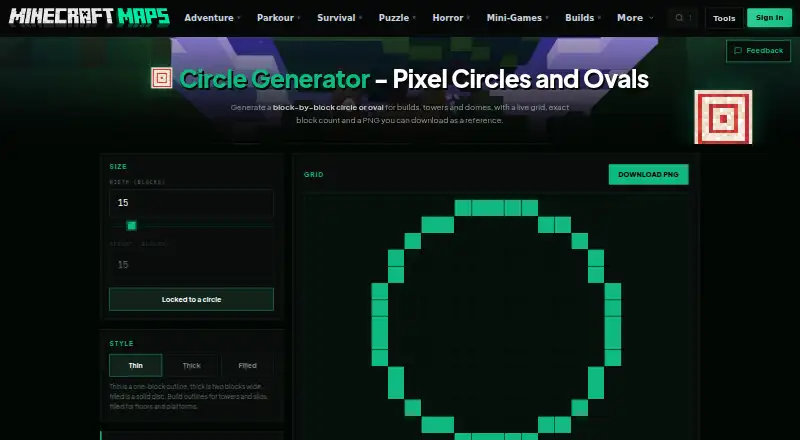
What MinecraftMaps Pixel Circle Generator is
MinecraftMaps Pixel Circle Generator creates block-by-block plans for circular and oval Minecraft builds. A live grid changes as you choose the dimensions and select a thin outline, thick ring, or filled disc. Thin uses a one-block outline; thick makes a ring two blocks wide. Turn off the force-circle lock to set different widths and heights for an oval. The page shows the block count and its equivalent number of stacks of 64, and you can download the grid as a PNG reference image.
The generator fills a block when the center of its square falls inside the circle or oval; outline styles remove the inner blocks. Its building guidance recommends making one quadrant from the center, then mirroring it across the other three quarters. Thin outlines can guide tower walls, silos, and pond rims, while filled discs can map floors, ceilings, and platforms. The web tool is free. MinecraftMaps.com was founded in November 2011 as a project to share custom maps with friends. The site offers a contact page and a Discord community for help with map installation, and states that it is not affiliated with Mojang or Microsoft.
Who it suits
This tool suits Minecraft builders who want a block layout and count before making a circle, oval, or ellipse. It is useful for planning symmetrical walls, rims, floors, ceilings, and platforms, with a PNG reference to consult while building.
What it does well
- Live grid updates with the chosen size and style.
- Shows block totals and equivalent stacks of 64.
- Supports circle, oval, and ellipse layouts.
- Downloads the current grid as a PNG.
What to know first
- Available on web only.
- There is no layer-by-layer view or 3D preview.
Plans
| Plan | Billed and limits | Price |
|---|---|---|
| Pixel Circle Generator | Circle and oval grids · thin, thick, and filled styles · downloadable PNG | Free |
As minecraftmaps.com lists them, read 7 Oct 2026. The maker's own page has the final word.
Getting started
- Open the Pixel Circle Generator webpage.
- Choose a size and style for the grid.
- Turn off the force-circle lock and set different widths and heights for an oval.
- Use the displayed block and stack counts to plan the build.
- Download the grid as a PNG reference if needed.
Verdict
Choose MinecraftMaps Pixel Circle Generator if you want free web-based layouts, block counts, and a PNG reference for circular or oval Minecraft builds. It is less suited to builders who need a layer-by-layer view or 3D preview.
Questions
How much does the generator cost?
The Pixel Circle Generator is free.
Which shapes and styles does it support?
It supports circles, ovals, and ellipses, with thin one-block outlines, thick two-block rings, and filled discs.
Can I use it to plan an oval?
Yes. Turn off the force-circle lock and set different widths and heights.
What can I export?
You can download the current grid as a PNG reference image.
Who makes MinecraftMaps.com?
MinecraftMaps.com says it was founded in November 2011 as a project to share custom maps with friends.
Does the site sell personal information?
Its privacy policy says it does not sell personal information to third parties.
Facts from MinecraftMaps Pixel Circle Generator's own pages
- Advertising and cookies
- The privacy policy says the site works with Mediavine for third-party interest-based advertising and uses cookies and similar tracking technologies. · minecraftmaps.com, 7 Oct 2026
- Block counting
- The page shows the exact block count and the equivalent number of stacks of 64. · minecraftmaps.com, 7 Oct 2026
- Build guidance
- The page recommends building one quadrant from the center and mirroring it across the other three quarters to keep the shape symmetrical. · minecraftmaps.com, 7 Oct 2026
- Founded
- 2011 · minecraftmaps.com, 28 Sept 2026
- How shapes are calculated
- A block is filled when the center of its square falls inside the circle or oval, and outlines are made by removing inner blocks. · minecraftmaps.com, 7 Oct 2026
- Live preview
- The generator displays a live grid and updates the block count for the chosen size and style. · minecraftmaps.com, 7 Oct 2026
- Maker and history
- MinecraftMaps.com says it was founded in November 2011 as a project to share custom maps with friends. · minecraftmaps.com, 7 Oct 2026
- Minecraft affiliation
- The site states that it is not affiliated with Mojang or Microsoft. · minecraftmaps.com, 7 Oct 2026
- Oval support
- Users can turn off the force-circle lock and set different widths and heights to make an oval. · minecraftmaps.com, 7 Oct 2026
- PNG export
- Users can download the current grid as a PNG reference image. · minecraftmaps.com, 7 Oct 2026
- Privacy and security
- The privacy policy says the site uses technical and organizational measures to protect personal information and does not sell personal information to third parties. · minecraftmaps.com, 7 Oct 2026
- Purpose
- Generates a block-by-block circle or oval for Minecraft builds, towers, and domes. · minecraftmaps.com, 7 Oct 2026
- Shape styles
- Thin is a one-block outline, thick is a two-block-wide ring, and filled is a solid disc. · minecraftmaps.com, 7 Oct 2026
- Suggested uses
- The page describes thin outlines for tower walls, silos, and pond rims, and filled discs for floors, ceilings, and platforms. · minecraftmaps.com, 7 Oct 2026
- Support
- The site provides a contact page for questions and feedback and a Discord community where users can get help with map installation. · minecraftmaps.com, 7 Oct 2026
Where MinecraftMaps Pixel Circle Generator stands on Freedom251
- Minecraft Shape Generators#15 of 39