Freedom251 › Minecraft Shape Generators
MinecraftDome
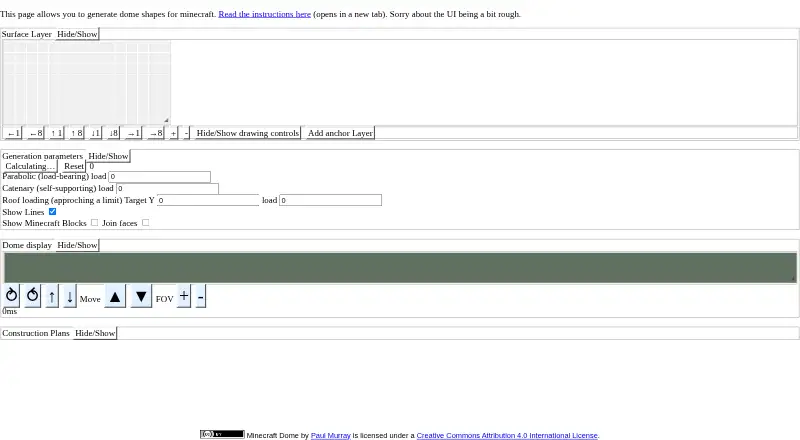
What MinecraftDome is
MinecraftDome is a free web app for shaping Minecraft domes and producing plans for building them. Start with a connected square mesh and choose a surface such as a circle, rectangle, ellipse, diamond, or hyperellipse. Anchors let you constrain the surface; within a layer, the app treats them as lying on a plane defined by three points. Shape generation includes parabolic load, catenary load, and roof load settings. Setting load values to zero creates a soap-bubble effect. A 3D display can show ideal blocks, a line grid, or Minecraft blocks, with an option to require neighboring blocks to meet along a face. When ready, generate a fixed-width plain-text construction plan to copy, paste, or print. The plan marks X and Z coordinates at 16-block intervals and Y at 8-block intervals; offset controls adjust chunk-boundary lines. The documented version has no save, restore, or undo function, and catenary calculations can run off to infinity. Paul Murray is identified as the maker, and the project is licensed under Creative Commons Attribution 4.0 International.
Who it suits
Minecraft builders who want to shape dome-like surfaces and turn them into coordinate-marked construction plans may find MinecraftDome useful. It suits people comfortable working with mesh surfaces, anchors, and load settings in a web app.
What it does well
- Supports circles, rectangles, ellipses, diamonds, and hyperellipses.
- Anchors can constrain the surface; within one layer, they are treated as lying on a plane defined by three points.
- Displays ideal blocks, a line grid, or Minecraft blocks.
- Produces printable or copyable fixed-width text plans.
- Shows coordinates and adjustable chunk-boundary lines.
- Free to use under a Creative Commons license.
What to know first
- The documented version has no save, restore, or undo.
- Catenary calculations can run off to infinity.
- The maker says results may vary by browser and device.
Limits
The free app has no save, restore, or undo function. Catenary calculations can run off to infinity.
Plans
| Plan | Billed and limits | Price |
|---|---|---|
| MinecraftDome | Free to use · optional PayPal donations | Free |
As paulmurraycbr.github.io lists them, read 8 Oct 2026. The maker's own page has the final word.
Getting started
- Open the MinecraftDome website in a web browser.
- Draw a connected square-mesh surface using a supported shape.
- Add anchors and adjust the surface and load settings.
- Choose how the shape is displayed and whether adjacent blocks must connect by a face.
- Generate the plain-text plan and copy, paste, or print it.
Verdict
Choose MinecraftDome if you want to shape a Minecraft dome in a browser and get a text plan with coordinate and chunk markings. Its lack of save and undo functions may be a drawback if you need to preserve or revise a design later.
Questions
How much does MinecraftDome cost?
The plan is listed as free. Optional PayPal donations are suggested.
What shapes can I make?
Supported shapes are circle, rectangle, ellipse, diamond, and hyperellipse.
What does the construction plan include?
It is fixed-width plain text with X and Z marked every 16 blocks and Y every 8 blocks. Offset controls adjust chunk-boundary lines.
Can I save or undo a design?
The documented version has no save, restore, or undo function.
Who made MinecraftDome?
The pages identify Paul Murray as the maker.
What license does it use?
The project is licensed under Creative Commons Attribution 4.0 International.
Facts from MinecraftDome's own pages
- Anchors
- Users can place anchors to constrain the surface, and anchors in one layer are treated as lying on a plane defined by three points. · paulmurraycbr.github.io, 8 Oct 2026
- Calculation limits
- Catenary calculations can run off to infinity, and the instructions advise keeping the reset button nearby. · paulmurraycbr.github.io, 8 Oct 2026
- Chunk alignment
- Construction plans mark X and Z every 16 blocks and Y every 8 blocks, with offset controls for chunk-boundary lines. · paulmurraycbr.github.io, 8 Oct 2026
- Compatibility
- The maker says the app worked for him in Firefox 54.0.1 on a six-year-old MacBook Pro and notes that results may vary. · paulmurraycbr.github.io, 8 Oct 2026
- Construction plans
- The app generates fixed-width plain-text plans that users can copy, paste, or print. · paulmurraycbr.github.io, 8 Oct 2026
- Display
- The display can show ideal blocks, a grid of lines, and Minecraft blocks, with an option to require adjacent blocks to connect by a face. · paulmurraycbr.github.io, 8 Oct 2026
- License
- The project is licensed under Creative Commons Attribution 4.0 International. · paulmurraycbr.github.io, 8 Oct 2026
- Maker
- The pages identify Paul Murray as the maker and suggest optional PayPal donations; they state no headquarters or founding date. · paulmurraycbr.github.io, 8 Oct 2026
- Purpose
- MinecraftDome generates dome shapes for Minecraft. · paulmurraycbr.github.io, 8 Oct 2026
- Save and undo
- The documented version has no save, restore, or undo function. · paulmurraycbr.github.io, 8 Oct 2026
- Shape calculations
- Generation parameters include parabolic load, catenary load, and roof load; zero load values produce a soap-bubble effect. · paulmurraycbr.github.io, 8 Oct 2026
- Support
- The maker lists [email protected] for email and asks users to put “MinecraftDome” in the subject. · paulmurraycbr.github.io, 8 Oct 2026
- Surface design
- Users can draw connected square-mesh surfaces, including circles, rectangles, diamonds, and hyperellipses. · paulmurraycbr.github.io, 8 Oct 2026
Where MinecraftDome stands on Freedom251
- Minecraft Shape Generators#14 of 39