Freedom251 › Game Memory Editors
Memory Scanner
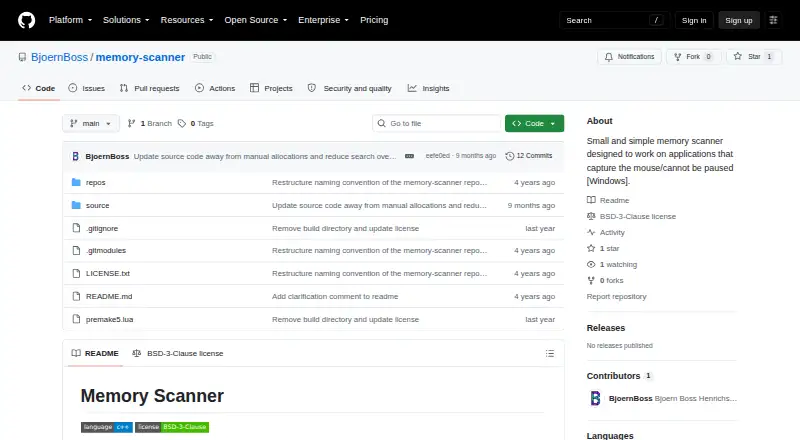
What Memory Scanner is
Memory Scanner is a free, open-source Windows utility for scanning applications that capture the mouse or cannot be paused, such as games. It reads a running program’s memory from outside the target binary using Windows process access functions; it does not inject code or attach a debugger. The scanner supports both 32-bit and 64-bit binaries and can inspect static memory, volatile memory, or both. It reads committed pages with specified read or write permissions, excluding guarded or inaccessible pages. Supported values include signed and unsigned integers from 8 to 64 bits, floats, doubles, booleans, strings up to 64 characters, and 2D or 3D float structures. Results can be compared with earlier values or user input using changed, unchanged, equality, inequality, and ordering comparisons. Found values can be stored and overwritten once or repeatedly several times per second. The console menu supports keyboard input, including Ctrl+NumPad. The project uses premake5 and documents generating a Visual Studio 2019 solution; a Visual Studio 2022 solution is also included. Scans exceeding available allocatable memory can cause a segmentation fault because the program does not check scan-buffer allocation failures.
Who it suits
Memory Scanner suits Windows users who need to inspect memory in applications that cannot be paused or capture the mouse. It supports both 32-bit and 64-bit binaries and a range of value types.
What it does well
- Scans 32-bit and 64-bit binaries
- Does not inject code or attach a debugger
- Supports multiple numeric, text, and structure types
- Found values can be overwritten repeatedly
What to know first
- Excessive scans can cause a segmentation fault
- Repository lists no releases or packages
Limits
The program does not check scan-buffer allocation failures, so a scan larger than available allocatable memory can cause a segmentation fault. The listed platform is Windows.
Getting started
- Open the project website on GitHub.
- Use the project’s premake5 build system.
- Generate a Visual Studio 2019 solution using the documented process, or use the included Visual Studio 2022 solution.
- Build for Windows and scan a supported 32-bit or 64-bit binary.
Verdict
Memory Scanner offers value comparisons and editing through a console interface, without injecting code or attaching a debugger. Be aware that scans exceeding available allocatable memory can crash the program.
Questions
Is Memory Scanner free?
Yes. Its pricing model is free, and it is open source under the BSD-3-Clause license.
Which operating systems does it support?
Windows is the listed platform.
Does it attach a debugger or inject code?
No. It reads and writes the running process from outside the target binary without injecting code or attaching a debugger.
What kinds of values can it scan?
It supports signed and unsigned integers from 8 to 64 bits, float, double, bool, strings up to 64 characters, and 2D and 3D float structures.
How can I build the project?
The project uses premake5 and documents generating a Visual Studio 2019 solution. A Visual Studio 2022 solution is also provided.
Facts from Memory Scanner's own pages
- Binary support
- The scanner works with 32-bit and 64-bit binaries. · github.com, 8 Oct 2026
- Build requirements
- The project uses premake5 and documents generating a Visual Studio 2019 solution; it also says a plain Visual Studio 2022 solution is included. · github.com, 8 Oct 2026
- Build system
- The project uses premake5 and documents generating a Visual Studio 2019 solution, with a Visual Studio 2022 solution also provided. · github.com, 8 Oct 2026
- Console controls
- It uses console-menu for keyboard control, including Ctrl+NumPad input. · github.com, 8 Oct 2026
- Data types
- Supported types include signed and unsigned integers from 8 to 64 bits, float, double, bool, strings up to 64 characters, and 2D and 3D float structures. · github.com, 8 Oct 2026
- Distribution
- The repository page lists no releases or packages. · github.com, 8 Oct 2026
- Extensibility
- New data types can be added by implementing the Datatype interface and registering the type in MenuInstance::init(). · github.com, 8 Oct 2026
- External operation
- It scans from outside the target binary using OpenProcess, ReadProcessMemory, and WriteProcessMemory, without injecting code or attaching a debugger. · github.com, 8 Oct 2026
- How it works
- It scans from outside the target binary, reads the executable file, and uses OpenProcess, ReadProcessMemory, and WriteProcessMemory on the running process. · github.com, 8 Oct 2026
- Interface controls
- The console interface can be controlled normally or with CTRL + NumPad using the console-menu component. · github.com, 8 Oct 2026
- Known limitation
- The program does not check scan-buffer allocation failures, so scans exceeding available allocatable memory can cause a segmentation fault. · github.com, 8 Oct 2026
- License
- The repository identifies its license as BSD-3-Clause. · github.com, 8 Oct 2026
- Memory page filtering
- The scanner reads committed pages marked PAGE_READWRITE or PAGE_EXECUTE_READWRITE, excluding pages marked PAGE_GUARD or PAGE_NOACCESS. · github.com, 8 Oct 2026
- Memory selection
- It can scan static memory, volatile memory, or both, and reads only committed pages with specified read/write permissions that are not guarded or inaccessible. · github.com, 8 Oct 2026
- No injection or debugger
- The project says it does not inject source code or attach a debugger. · github.com, 8 Oct 2026
- Overwrite values
- Found values can be stored and overwritten once or repeatedly several times per second. · github.com, 8 Oct 2026
- Purpose
- Memory Scanner is a small utility for scanning applications that capture the mouse or cannot be paused, such as games. · github.com, 8 Oct 2026
- Supported data
- Supported types include signed and unsigned integers from 8 to 64 bits, float, double, bool, strings up to 64 characters, and 2D and 3D float structures. · github.com, 8 Oct 2026
- Value comparisons
- Found values can be compared with their prior values or user input using changed, unchanged, equal, unequal, and ordering comparisons. · github.com, 8 Oct 2026
- Value editing
- Found values can be stored and overwritten once or repeatedly several times per second. · github.com, 8 Oct 2026
Where Memory Scanner stands on Freedom251
- Game Memory Editors#15 of 23