Freedom251 › Word Processing Software

Mellel
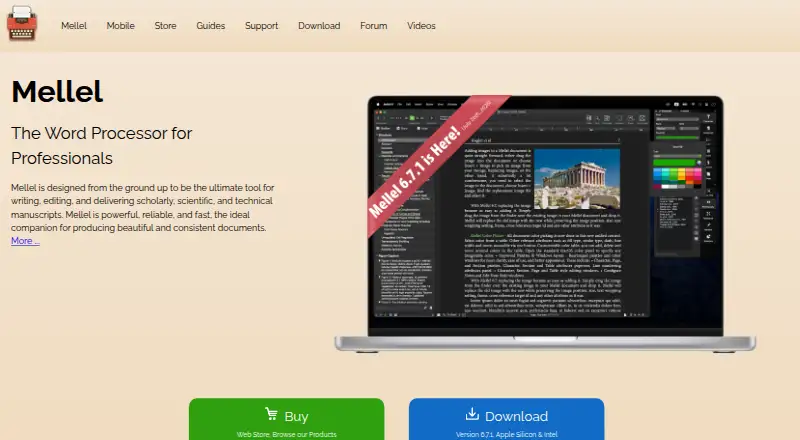
What Mellel is
Mellel is a word processor for scholarly, scientific, and technical writing, with tools for shaping structured manuscripts. Auto-titles and outlines support multilevel chapter titles and image or table captions, and help users navigate document structure. Styles control character, paragraph, page, note, table, and section formatting, while style sets can be reused across documents. The app supports multiple footnote and endnote streams and integrates with Bookends for citations and bibliographies. Documents can combine languages, scripts, and writing directions, including right-to-left Arabic, Hebrew, and Syriac. The Mac app imports DOCX, RTF, OPML, and plain text, and exports PDF, DOCX, RTF, OPML, and ePUB. Mellel for Mac costs $69, paid once and includes free updates for two years; its license permits installation on up to five machines. Mellel Mobile is free with in-app purchases and lets users create, edit, and format documents on iPad, using iCloud or local storage. Some Mac editing options are unavailable on iPad. Mac compatibility is listed as macOS 10.13 or later.
Who it suits
Mellel is designed for academics, scholars, scientists, postgraduate students, and others producing structured documents. It may suit writers who need detailed document styles, extensive notes, or support for multiple scripts and writing directions.
What it does well
- Outlines and auto-titles support structured documents.
- Multiple footnote and endnote streams are supported.
- Works with Bookends for citations and bibliographies.
- Mac app exports to PDF, DOCX, RTF, OPML, and ePUB.
What to know first
- Some Mac editing options are unavailable on iPad.
- Mac compatibility requires macOS 10.13 or later.
- Bookends is required for bibliography scanning on iPad.
Limits
The free Mellel Mobile plan includes in-app purchases, and some editing options are unavailable on iPad. Bibliography scanning on iPad requires Bookends for iOS and a Premium subscription.
Plans
| Plan | Billed and limits | Price |
|---|---|---|
| Mellel Mobile | Free with in-app purchases · Some editing options unavailable on iPad · Bibliography scanning requires Bookends for iOS and a Premium subscription | Free |
| Mellel + Bookends Bundle | Bundle of Mellel and Bookends for Mac | $114, paid once |
| Mellel Upgrade | Any license eligible · Free upgrades for two years | $44, paid once |
| Nisus to Mellel Crossgrade | Discounted Mellel for Mac license for Nisus users · Free updates for two years | $51, paid once |
| Mellel for Mac | Free updates for two years | $69, paid once |
As mellel.com lists them, read 11 Oct 2026. The maker's own page has the final word.
Getting started
- Visit the Mellel website.
- Choose the Mac app or Mellel Mobile for iPad.
- For Mac, select Start Trial during installation or purchase a listed license.
- Install the Mac app on up to five machines under its license.
- On iPad, choose iCloud or local on-device storage.
Verdict
Mellel's structure, style, and note tools are geared toward long-form academic and technical documents. Choose between the Mac app and iPad version with the mobile editing limitations in mind.
Questions
What does Mellel for Mac cost?
Mellel for Mac is listed at $69, paid once, with free updates for two years. A bundle with Bookends for Mac is listed at $114, paid once.
Is there a free version or trial?
Mellel Mobile is free with in-app purchases, and the product is listed as offering a free trial. The installation FAQ describes a Start Trial option but gives no trial duration.
Which platforms does Mellel support?
Mellel is available for macOS and iOS. Mellel for Mac is listed for macOS 10.13 (High Sierra) or later.
What file formats can the Mac app use?
It imports DOCX, RTF, OPML, and plain text, and exports PDF, DOCX, RTF, OPML, and ePUB.
Does Mellel support citations and bibliographies?
Mellel integrates with Bookends for citations and bibliographies. Bibliography scanning on iPad requires Bookends for iOS and a Premium subscription.
Who makes Mellel?
Mellel says it was founded in 2002 by Eyal and Ori Redler.
Facts from Mellel's own pages
- Company history
- Mellel says it was founded in 2002 by Eyal and Ori Redler. · mellel.com, 11 Oct 2026
- Document structure
- Auto-titles and outlines support multilevel chapter titles and image or table captions, and let users navigate and manipulate document structure. · mellel.com, 11 Oct 2026
- File formats
- The Mac app exports to PDF, DOCX, RTF, OPML, and ePUB, and imports DOCX, RTF, OPML, and plain text. · mellel.com, 11 Oct 2026
- Founded
- 2002 · mellel.com, 28 Sept 2026
- Intended users
- The maker describes Mellel as designed for academics, scholars, scientists, postgraduate students, and others who produce structured documents. · mellel.com, 11 Oct 2026
- Languages
- Mellel supports multiple languages, scripts, and writing directions in the same document, including right-to-left Arabic, Hebrew, and Syriac. · mellel.com, 11 Oct 2026
- Mac compatibility
- The maker lists compatibility with macOS 10.13 (High Sierra) or later and says the license allows installation on up to five machines. · mellel.com, 11 Oct 2026
- Mobile app
- Mellel Mobile lets users create, edit, and format Mellel documents on iPad and supports iCloud or local on-device storage. · mellel.com, 11 Oct 2026
- Mobile limitations
- The maker says some Mac editing options are not available on iPad. · mellel.com, 11 Oct 2026
- Notes and citations
- Mellel supports multiple footnote and endnote streams and integrates with Bookends for citations and bibliographies. · mellel.com, 11 Oct 2026
- Privacy and security
- The privacy policy says the company uses physical, technical, and administrative security measures, seeks to minimize server-stored data, and may process personal information in the United States or other countries. · mellel.com, 11 Oct 2026
- Purpose
- Mellel is a word processor for writing, editing, and delivering scholarly, scientific, and technical manuscripts. · mellel.com, 11 Oct 2026
- Styles
- Styles can control document elements including character, paragraph, page, note, table, and section formatting, and style sets can be used across documents. · mellel.com, 11 Oct 2026
- Support
- Mellel offers support through a form and provides a user guide, FAQ, forum, and instructional videos. · mellel.com, 11 Oct 2026
- Trial
- The FAQ describes a Start Trial option during installation but does not state the trial duration. · mellel.com, 11 Oct 2026
Where Mellel stands on Freedom251
- Word Processing Software#19 of 45