Freedom251 › Video Downloaders
MediaGo
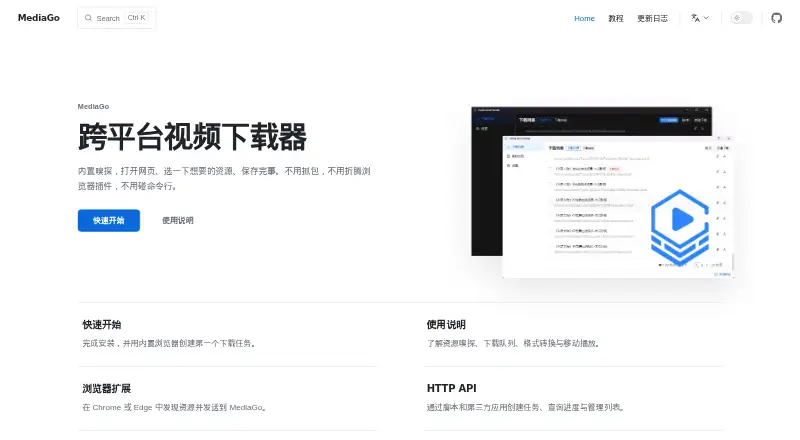
What MediaGo is
MediaGo is a free cross-platform video downloader with built-in resource detection. Open a page, choose a detected resource, and save it from sources including YouTube, Bilibili, Twitter/X, Instagram, Reddit, M3U8/HLS, and more than 1,000 other video sites. Batch downloads are supported, with the guide allowing one to 10 simultaneous videos. Desktop downloads cover Windows, macOS on Apple Silicon or Intel, and Linux. MediaGo can run in Docker on a server or NAS, providing a browser-based interface. Its Chrome and Edge extension detects HLS/m3u8 streams and direct media files, then sends selections to MediaGo; installation requires loading it unpacked rather than using the Chrome Web Store. An HTTP API lets scripts create tasks, start or stop downloads, and query progress. Desktop API requests need no authentication, while Docker deployments can use an API key. Completed downloads can be converted to another format or quality. Privacy Mode prevents browsing history from being saved. The project also provides an OpenClaw Skill for downloading through AI coding assistants.
Who it suits
MediaGo suits users who download from many video sites and want desktop, browser-extension, API, or self-hosted options. It also fits scripted workflows and server or NAS deployments.
What it does well
- Supports more than 1,000 video sites
- Runs on Windows, macOS, and Linux
- Allows up to 10 simultaneous downloads
- Provides HTTP API task controls
- Offers Docker self-hosting
What to know first
- Extension must be loaded unpacked
- Windows 7 support was dropped after version 2.0.0
- 32-bit systems are not supported by default
- Maximum simultaneous downloads is 10
Limits
The guide permits from one to 10 simultaneous video downloads. The browser extension is not distributed through the Chrome Web Store, and older Windows 7 and 32-bit systems have compatibility limits.
Plans
| Plan | Billed and limits | Price |
|---|---|---|
| MediaGo | No pricing or usage limits stated | Free |
As downloader.caorushizi.cn lists them, read 12 Oct 2026. The maker's own page has the final word.
Getting started
- Open the MediaGo website
- Install the desktop version for Windows, macOS or Linux
- For self-hosting, run MediaGo in Docker on a server or NAS
- Install the Chrome or Edge extension by loading it unpacked
- Open a page, select a detected resource and save it
- Use the HTTP API to create and control download tasks
Verdict
MediaGo combines broad source support with desktop, extension, API, and Docker options at no listed cost. Extension installation and legacy operating-system limits are the main constraints to check.
Questions
Is MediaGo free?
Yes. MediaGo has a free plan priced at $0, with no pricing or usage limits stated.
Which sources does it support?
Supported sources include YouTube, Bilibili, Twitter/X, Instagram, Reddit, M3U8/HLS and more than 1,000 other video sites.
What platforms are available?
Desktop downloads are listed for Windows, macOS on Apple Silicon or Intel, and Linux. It also offers an API, browser extension and Docker self-hosting.
Does the API require authentication?
Desktop requests need no authentication. Docker deployments can enable authentication with an API key.
Can it download in batches?
Yes. The user guide allows between one and 10 simultaneous video downloads.
Facts from MediaGo's own pages
- AI assistant integration
- The project provides an OpenClaw Skill for downloading videos through AI coding assistants. · github.com, 12 Oct 2026
- Authentication
- The API documentation says desktop requests need no authentication, while Docker deployments can enable authentication with an API key. · downloader.caorushizi.cn, 12 Oct 2026
- Batch downloads
- Yes · github.com, 21 Sept 2026
- Browser extension
- Its Chrome and Edge extension detects HLS/m3u8 streams and direct media files, and can send selected resources to MediaGo. · downloader.caorushizi.cn, 12 Oct 2026
- Browser extension limitation
- The maker says the extension is not listed in the Chrome Web Store and must be installed by loading it unpacked. · downloader.caorushizi.cn, 12 Oct 2026
- Conversion
- The maker describes in-app conversion to another format or quality after a download completes. · github.com, 12 Oct 2026
- Desktop support
- The maker lists Windows, macOS for Apple Silicon and Intel, and Linux downloads. · downloader.caorushizi.cn, 12 Oct 2026
- Device platforms
- Windows,macOS,Linux · github.com, 21 Sept 2026
- Download limit
- The user guide sets the maximum simultaneous video downloads to 10 and the minimum to 1. · downloader.caorushizi.cn, 12 Oct 2026
- Free plan
- Yes · github.com, 21 Sept 2026
- Integrations
- Scripts and other applications can use the HTTP API to create tasks, start or stop downloads, and query progress. · downloader.caorushizi.cn, 12 Oct 2026
- Legacy OS limitation
- The FAQ says versions after 2.0.0 dropped Windows 7 support and that 32-bit systems are not supported by default. · downloader.caorushizi.cn, 12 Oct 2026
- Privacy setting
- The user guide says Privacy Mode prevents the software from saving browsing history. · downloader.caorushizi.cn, 12 Oct 2026
- Purpose
- MediaGo is a cross-platform video downloader with built-in resource detection: open a page, select a resource, and save it. · downloader.caorushizi.cn, 12 Oct 2026
- Self-hosting
- MediaGo can run in Docker on a server or NAS, with a web interface accessed from a browser. · downloader.caorushizi.cn, 12 Oct 2026
- Support
- The quick-start page lists a MediaGo QQ feedback group for questions and feedback. · downloader.caorushizi.cn, 12 Oct 2026
- Supported services
- The HTTP API lists m3u8, Bilibili, direct, YouTube, and MediaGo as download task types. · downloader.caorushizi.cn, 12 Oct 2026
- Supported sites
- The maker says YouTube and more than 1,000 video sites are supported through yt-dlp. · github.com, 12 Oct 2026
- Supported sources
- YouTube,Bilibili,Twitter/X,Instagram,Reddit,M3U8/HLS,1,000+ other video sites · github.com, 21 Sept 2026
Where MediaGo stands on Freedom251
- Video Downloaders#16 of 136