Freedom251 › Minecraft World Editors

MCWorldTools Single Player Editor
Visit MCWorldTools Single Player Editor Alternatives Pricing
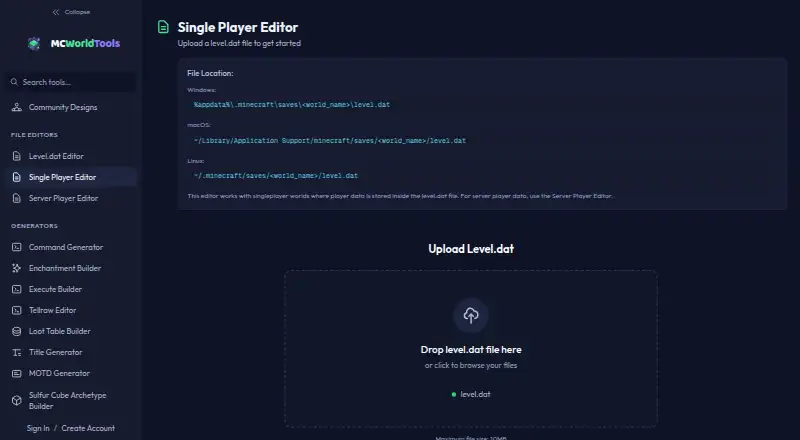
What MCWorldTools Single Player Editor is
MCWorldTools Single Player Editor is a free browser-based tool for editing player data in Minecraft Java Edition singleplayer worlds. It can change health, hunger, XP, inventory, armor, Ender Chest contents, and position in a level.dat file. The workflow is to edit the file in the browser, download the modified version, then manually replace the original with Minecraft closed. Files can be up to 10MB. The editor is for singleplayer worlds that keep player data in level.dat; server player data uses a separate editor. Position changes cover X, Y, and Z coordinates, but not rotation or dimension. Recovering items lost in hardcore requires a pre-death level.dat backup, although items can be added manually. Unknown NBT tags are preserved for modded player data. MCWorldTools says world files are processed in the browser and are not uploaded, stored, or accessible to the site. Its privacy policy says a player UUID is sent to show the associated username and skin, while save-file contents remain local. The tool runs in a browser without downloads and costs nothing.
Who it suits
This editor suits Minecraft Java Edition players who want to change player data in a singleplayer level.dat file. It is also relevant to modded worlds because unknown NBT tags are preserved.
What it does well
- Edits health, hunger, XP, and inventory
- Preserves unknown NBT tags
- Save-file contents remain local, according to the maker
- Runs in a browser without downloads
What to know first
- Accepts files only up to 10MB
- Does not edit rotation or dimension
- Hardcore item recovery requires a pre-death backup
Limits
The free plan accepts files up to 10MB and is for singleplayer worlds with player data in level.dat. Position editing does not include rotation or dimension; recovering hardcore-lost items requires a pre-death backup unless you add items manually.
Plans
| Plan | Billed and limits | Price |
|---|---|---|
| MCWorldTools Single Player Editor | Maximum file size: 10MB · For singleplayer worlds with player data in level.dat | Free |
As mcworldtools.com lists them, read 10 Oct 2026. The maker's own page has the final word.
Getting started
- Open the Single Player Editor in a browser; no download is required.
- Upload the level.dat file from a singleplayer world.
- Edit the player data fields you need.
- Download the modified file.
- With Minecraft closed, manually replace the original level.dat file.
Verdict
The editor covers several player-data fields and preserves unknown NBT tags, but works only with singleplayer data stored in level.dat. Its file workflow requires a manual replacement with Minecraft closed.
Questions
How much does the editor cost?
It is free.
Which Minecraft version or edition is supported?
MCWorldTools describes its file editors as working with any Minecraft version. This editor is for Minecraft Java Edition singleplayer worlds.
What files and data can it edit?
It edits player data in level.dat, including health, hunger, XP, inventory, armor, Ender Chest, and position. Files must be no larger than 10MB.
Are world files uploaded to the site?
MCWorldTools says world files are processed in the browser and are not uploaded, stored, or accessible to the site. Its privacy policy says a player UUID is sent to show the associated username and skin, while save-file contents remain local.
Can it edit server player data?
No. It is for singleplayer worlds with player data in level.dat; server player data uses the separate Server Player Editor.
Who makes MCWorldTools?
Its privacy policy describes MCWorldTools as a personal project.
Facts from MCWorldTools Single Player Editor's own pages
- Compatibility
- MCWorldTools describes itself as a collection of browser based tools for Minecraft Java Edition and says its file editors work with any Minecraft version. · mcworldtools.com, 10 Oct 2026
- File size limit
- The editor accepts level.dat files up to 10MB. · mcworldtools.com, 10 Oct 2026
- File workflow
- Users upload level.dat, edit player data, download the modified file, and manually replace the original with Minecraft closed. · mcworldtools.com, 10 Oct 2026
- Item recovery limit
- Recovering items lost in hardcore requires a pre-death level.dat backup, though users can add items back manually. · mcworldtools.com, 10 Oct 2026
- Local processing
- MCWorldTools says world files are processed in the browser and are not uploaded, stored, or accessible to the site. · mcworldtools.com, 10 Oct 2026
- Maker identity
- The privacy policy describes MCWorldTools as a personal project. · mcworldtools.com, 10 Oct 2026
- NBT preservation
- The editor preserves unknown NBT tags so modded player data can round-trip untouched. · mcworldtools.com, 10 Oct 2026
- Platform requirement
- The maker says the tools run in a browser with no downloads required. · mcworldtools.com, 10 Oct 2026
- Position editing
- Users can change X, Y, and Z coordinates, but cannot change rotation or dimension here. · mcworldtools.com, 10 Oct 2026
- Privacy detail
- The privacy policy says a player UUID from a save file is sent to the site to show the associated username and skin, while save-file contents remain local. · mcworldtools.com, 10 Oct 2026
- Purpose
- The browser based editor changes a singleplayer character’s health, hunger, XP, inventory, armor, Ender Chest, and position in a level.dat file. · mcworldtools.com, 10 Oct 2026
- Support
- The contact page says the team typically responds within 24–48 hours. · mcworldtools.com, 10 Oct 2026
- Supported files
- The tool is for singleplayer worlds where player data is stored inside level.dat; server player data uses the separate Server Player Editor. · mcworldtools.com, 10 Oct 2026
Where MCWorldTools Single Player Editor stands on Freedom251
- Minecraft World Editors#21 of 35