
Mathway
What Mathway is
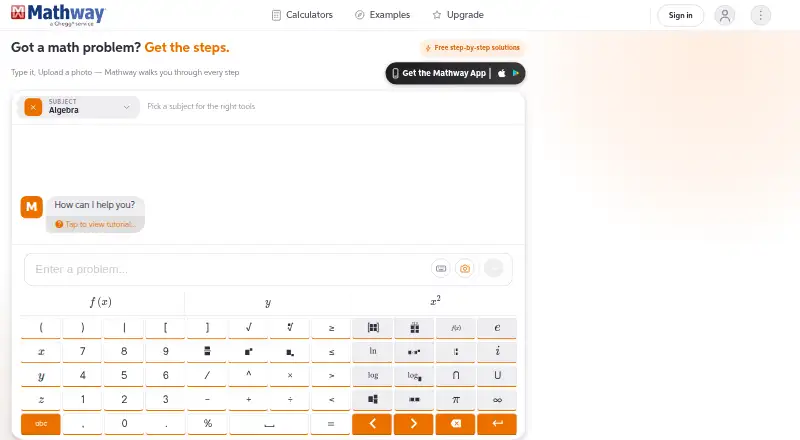
Mathway is an AI-powered math solver and calculator for students, available on Android, iOS, web, and Windows. Users can type a problem or upload a photo of handwritten or printed work. Its subject coverage ranges from Basic Math and Pre-Algebra through Algebra, Trigonometry, Calculus, Statistics, Chemistry, and Physics. Dedicated calculators cover tasks such as equations, factoring, derivatives, graphing, and statistics. Mathway says its solver explains the method behind solutions, while Premium provides step-by-step access to the full work shown. The service can be used without signing up, and free access is available. Step-by-Step Access costs $9.99 a month, and a 7-day trial is listed. Premium subscriptions automatically renew at the end of each billing period unless canceled. Mathway describes the service as a problem-solving resource for students, parents, and teachers.
Who it suits
Mathway suits students, parents, and teachers looking for help with problems across its listed math and science subjects. It accepts typed problems and photos of handwritten or printed work.
What it does well
- Accepts typed problems and uploaded photos
- Covers math, chemistry, and physics subjects
- Available on Android, iOS, web, and Windows
- Can be used without signing up
What to know first
- Step-by-step access requires a subscription
- Subscriptions automatically renew unless canceled
- Mobile purchases are billed through the relevant app store
Limits
The free plan provides access to the solver and calculators, while the full work shown for each step requires an optional subscription. Step-by-Step Access is listed at $9.99 a month and limits advertisements; its subscription renews automatically unless canceled.
Plans
| Plan | Billed and limits | Price |
|---|---|---|
| Step-by-Step Access | billed monthly · Access to step-by-step solutions · Limits advertisements | $9.99 a month |
| Step-by-Step Access | billed annually · Access to step-by-step solutions · Limits advertisements | $39.99 a year |
| Free | Basic problem answers; account not required; full work shown requires subscription | Free |
| Step-by-Step Access yearly | Automatically renewing annual subscription · Step-by-step solutions · reduced advertisements | $39.99 a year |
| Step-by-Step Access monthly | Automatically renewing monthly subscription · Step-by-step solutions · reduced advertisements | $9.99 a month |
| Mathway Premium | Automatically renews for the subscription period selected; current rate is shown at signup. · Step-by-step solutions; subscription rates vary by subscription period and purchase channel | On request |
As mathway.com lists them, read 19 Sept 2026. The maker's own page has the final word.
Getting started
- Visit the Mathway website or open its Android or iOS app.
- Use the solver without signing up, or type a problem or submit a photo.
- Choose the Free plan or Step-by-Step Access at $9.99 a month.
- Use the listed 7-day trial if selecting an eligible subscription offer.
- Cancel a subscription before its billing period ends to stop automatic renewal.
Overview
Mathway is a problem-solving app and calculator for students, with tools that can also help parents and teachers support coursework. It suits people who want to move between subjects and enter problems from either a keyboard or a page. Its main compromise is that the full working behind a solution requires paid access.
Key features
Problems can be typed or submitted as photos of handwritten or printed work. Photo input is a practical shortcut for worksheet questions, while typing offers a direct alternative when there is no image to capture. Mathway can be used without signing up, making it possible to try its solver and calculators before choosing a subscription.
Coverage ranges from Basic Math and Pre-Algebra through Algebra, Trigonometry, Precalculus, Calculus, Statistics, Finite Math, and Linear Algebra, with Chemistry and Physics included too. Dedicated calculators handle jobs such as equations, factoring, derivatives, graphing, and statistics. That range makes Mathway a useful general coursework companion; for someone who needs help with only one narrow topic, much of its breadth may go unused.
The solver explains the method behind answers, but Premium unlocks the full work shown for each step. That distinction matters to learners: free access can help check a result, whereas students who need to follow the complete reasoning should plan to pay. The optional subscription also limits advertisements.
Pricing
Mathway has a Free plan at no cost, with access to its solver and calculators. Step-by-step solutions are available, but an optional subscription unlocks the full work for each step. This is the sensible starting point for occasional checking; it is less suitable for regular study where following every stage is important.
Step-by-Step Access costs $9.99 a month, billed monthly. It provides step-by-step solutions and limits advertisements, making it the clearest fit for students who want complete working without committing to a longer stated billing period. A 7-day trial is offered, but the monthly subscription renews automatically unless canceled.
Mathway Premium has custom pricing. It includes step-by-step solutions, with rates varying by subscription period and purchase channel; the current rate is shown at signup. Its subscription automatically renews for the selected period unless canceled. Subscriptions bought in the mobile app are billed through the relevant app store, so buyers should manage them there.
Platforms
Mathway is available on Android, iOS, the web, and Windows. The iPhone and iPad app is a free download with in-app purchases, giving mobile users a way to start without paying upfront. Android users can request data deletion, and data is encrypted in transit.
Who it's for
Mathway is best for students moving among several levels or subjects who want one place to enter a problem and check its solution. Its photo input is particularly useful for working from printed or handwritten questions. Parents and teachers may also find it useful as a problem-solving resource. It is a weaker choice for learners who need complete explanations but are not prepared to subscribe, or for people whose needs are limited to one specialized area.
Pros and cons
- Pros: Typed and photo-based entry accommodates both newly written questions and existing worksheets.
- Pros: Coverage across math, Chemistry, and Physics, plus dedicated calculators, can serve students with varied coursework.
- Pros: No-sign-up access lets occasional users try the solver and calculators before subscribing.
- Cons: Full step-by-step work requires a subscription, limiting the free plan's usefulness for learning methods rather than checking answers.
- Cons: Paid subscriptions renew automatically unless canceled, so trial and subscription users need to keep track of renewal.
Alternatives
Cymath is worth considering if a lower-cost step-by-step option is the priority: it has a free plan with step-by-step math solutions and a Cymath Plus plan at $5 a month, which adds detailed sub-steps on most problems and removes ads.
Photomath may suit learners who want free step-by-step explanations on Android or iOS. Its Basic plan excludes custom visual aids and extra how-and-why tips, while Plus is $69.99 a year.
Maple Calculator is an option for mobile users focused on calculator work, but its free step-by-step solutions are limited to five per week and some aspects require internet access.
MathBuddy is a better fit for someone who wants full step-by-step explanations on a free account with a daily question allowance: it permits three questions a day after account creation, compared with one try without an account.
Mathos AI (MathGPTPro) is another freemium alternative, with limited video generation and image input, plus flashcards, quizzes, and auto-drawn graphs in its free plan.
SnapXam offers free one-time Solve API and Factor API plans for supported algebra, trigonometry, and calculus tasks, with step-by-step explanations on the Solve API.
MathPad may be preferable for people who want access across a wider range of platforms, including Linux, macOS, API, and browser extension, as well as mobile and web. Its free plan includes 10 daily credits and three AI Tutor trial messages per day.
GeoGebra is a freemium option across mobile, desktop, and web platforms.
For more choices, see Math Solver Apps and AI Homework Helpers.
Verdict
Mathway is a strong match for students who need a broad, cross-subject solver and value the choice of typed or photo-based input. Its biggest advantage is that range; its biggest drawback is the subscription gate on complete step-by-step work. Choose it if those capabilities justify the monthly cost, and look elsewhere if free explanations or a narrower, lower-cost tool matter more.
Verdict
Mathway offers a broad subject range, multiple ways to enter problems, and access across four platforms. Note that step-by-step access is subscription-based and subscriptions renew automatically unless canceled.
Questions
Is Mathway free?
Yes. Its Free plan is listed as free, and Mathway says it can be used without signing up.
How much does step-by-step access cost?
Step-by-Step Access is listed at $9.99 a month. A 7-day trial is also listed.
Which platforms can I use Mathway on?
Mathway is available on Android, iOS, the web and Windows. The iOS app is listed as a free download with in-app purchases.
Can I enter a problem as a photo?
Yes. Users can upload photos of handwritten or printed work, or type a problem.
What subjects does Mathway cover?
Listed subjects include Basic Math, Algebra, Trigonometry, Calculus, Statistics, Chemistry and Physics, among others.
How are mobile subscriptions billed?
Subscriptions purchased in a mobile app are billed through the relevant app store. Subscriptions automatically renew unless canceled.
Facts from Mathway's own pages
- Acquisition news
- Chegg announced on June 4, 2020 that it acquired Mathway for about $100 million in cash, with up to $15 million in potential additional payments. · investor.chegg.com, 19 Oct 2026
- Android app
- The Google Play listing says the app encrypts data in transit and lets users request deletion of their data. · play.google.com, 30 Sept 2026
- Audience
- Mathway describes its service as a problem-solving resource for students, parents, and teachers. · mathway.com, 30 Sept 2026
- Browser requirement
- The website states that JavaScript and a modern browser are required. · mathway.com, 19 Oct 2026
- Calculator library
- Mathway lists 59 free calculators spanning algebra, calculus, statistics, physics and other subjects. · mathway.com, 19 Oct 2026
- Calculators
- Mathway offers dedicated calculators for tasks including equations, factoring, derivatives, graphing, and statistics. · mathway.com, 30 Sept 2026
- Company
- Mathway Premium is provided by Mathway, LLC, a subsidiary of Chegg, Inc. · mathway.com, 30 Sept 2026
- Company founding discrepancy
- LinkedIn lists 2008 as the founding year, while Chegg's acquisition announcement says the founders started Mathway in 2002. · linkedin.com, 19 Oct 2026
- Company headquarters and size
- LinkedIn lists Mathway as a privately held software company headquartered in Center Valley, Pennsylvania with 11–50 employees. · linkedin.com, 19 Oct 2026
- Company legal entity
- The subscription terms identify Mathway, LLC as a Chegg subsidiary. · mathway.com, 19 Oct 2026
- Data safety on Google Play
- Google Play says the app shares no data with third parties, may collect location and personal information, encrypts data in transit and supports deletion requests. · play.google.com, 19 Oct 2026
- Developer documentation
- Mathway's public navigation exposes examples, glossary, help and subscription pages but no official API or SDK documentation link. · mathway.com, 19 Oct 2026
- Examples library
- Its examples area provides worked problems, chapter groupings, calculator links and formula references across subjects. · mathway.com, 19 Oct 2026
- Free access
- Mathway says it can be used without signing up, and an optional subscription unlocks the full work shown for each step. · mathway.com, 30 Sept 2026
- Historical product breadth
- Chegg's announcement described more than 400 math topics and an Ask an Expert Live feature in 2020. · investor.chegg.com, 19 Oct 2026
- International reach at acquisition
- Chegg said Mathway had subscribers in about 100 countries and localization in 13 languages at acquisition. · investor.chegg.com, 19 Oct 2026
- iOS app
- The App Store lists Mathway as a free download with in-app purchases for iPhone and iPad. · apps.apple.com, 30 Sept 2026
- License
- The reviewed Mathway pages do not state an open-source license or provide self-hosting instructions. · mathway.com, 19 Oct 2026
- Limit: cancellation and billing
- Trustpilot reports repeated complaints about difficult cancellation and unexpected subscription charges. · trustpilot.com, 19 Oct 2026
- Limit: coverage gaps
- Apple reviewers report that some advanced or seemingly basic problems are marked unsolvable and that word-problem handling is limited. · apps.apple.com, 19 Oct 2026
- Limit: reliability
- Google Play reviewers describe slow loading, photo scans that fail to load and calculation screens that become stuck. · play.google.com, 19 Oct 2026
- Limit: subscription value
- Trustpilot reviewers complain that step-by-step explanations are paywalled and that the product is not student friendly at the price. · trustpilot.com, 19 Oct 2026
- Mobile billing
- Subscriptions purchased in the mobile app are billed through the relevant app store. · mathway.com, 30 Sept 2026
- Ownership
- Crunchbase identifies Mathway as an active Chegg sub-organization founded by Frank Balcavage and Jake Kuehner. · crunchbase.com, 19 Oct 2026
Where Mathway stands on Freedom251
- Calculators#2 of 21
- AI Homework Helpers#6 of 30
- Math Solver Apps#25 of 68