Freedom251 › Color Palette Generators

MakeMyPalette
What MakeMyPalette is
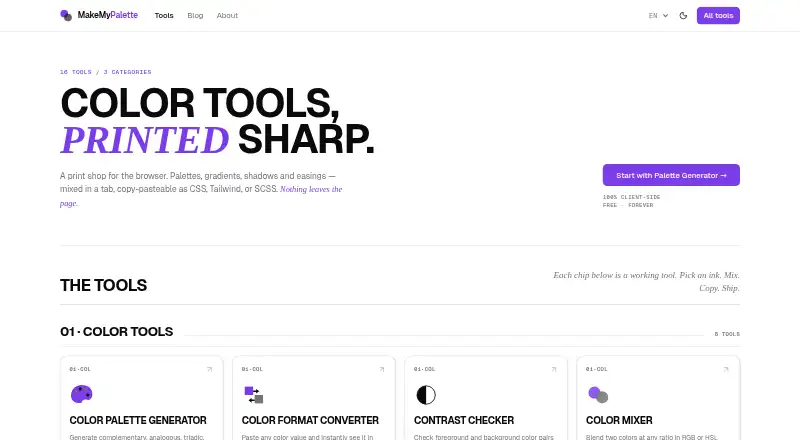
MakeMyPalette is a free browser-based collection of CSS and color tools for web designers and front-end developers. It runs its tools client-side, and users can access them without an account flow. The palette generator exports CSS variables, Tailwind config, SCSS, or JSON. An image palette tool extracts dominant colors from an uploaded image using median-cut quantization, with the same export choices. Other color tools handle format conversion, color mixing, colorblind simulation, color name lookup, and accessible palette generation. A contrast checker evaluates color pairs against WCAG 2.1 AA and AAA requirements for normal and large text. CSS generators cover gradients, box shadows, text shadows, filters, cubic-bezier easing, border radius, and clip paths. The favicon generator accepts an image upload or a letter-based icon and downloads PNG sizes for browsers and web manifests. The privacy policy says selected files and tool content are processed in the browser rather than transmitted to MakeMyPalette servers or third parties. It also says the current site shell loads no client-side analytics or advertising scripts and sets no tracking or advertising cookies. The Free plan costs nothing and includes 16 tools across three categories.
Who it suits
MakeMyPalette suits web designers and front-end developers who need color, palette, accessibility, CSS generation, or favicon tools in a browser. It is also suited to people who want to use image palettes and export them into CSS variables, Tailwind config, SCSS, or JSON without an account flow.
What it does well
- Free browser-based access without an account flow
- Palette exports include CSS variables, Tailwind, SCSS, and JSON
- Image palette tool extracts dominant colors from uploads
- Contrast checker covers WCAG 2.1 AA and AAA
- CSS generators cover gradients, shadows, filters, and shapes
- Selected files and tool content are processed in-browser
What to know first
- Saved palettes are not available
- A brand color library is not available
- Print color support is not available
Plans
| Plan | Billed and limits | Price |
|---|---|---|
| Free | 16 tools · 3 categories | Free |
As makemypalette.com lists them, read 7 Oct 2026. The maker's own page has the final word.
Getting started
- Open https://www.makemypalette.com/ in a browser
- Choose a color, palette, image, accessibility, CSS, or favicon tool
- Use the tool without an account flow
- For image palettes or favicons, upload an image; the favicon tool also accepts a letter-based icon
- Export palette results as CSS variables, Tailwind config, SCSS, or JSON
Verdict
Choose MakeMyPalette for browser-based color and CSS work, especially if you need palette exports, image color extraction, or contrast checks. The Free plan includes 16 tools across three categories. Look elsewhere if saved palettes, a brand color library, or print color support is required.
Questions
How much does MakeMyPalette cost?
The Free plan costs nothing and includes 16 tools across three categories.
Does MakeMyPalette require an account or offer a free trial?
The tools can be used without an account flow. There is no free trial.
Which platforms does it support?
MakeMyPalette is browser-based, and its tools run client-side.
What formats can I export palettes in?
The palette and image palette tools support CSS variables, Tailwind config, SCSS, and JSON.
Are uploaded files sent to MakeMyPalette servers?
Its privacy policy says selected files and tool content are processed in the browser and are not transmitted to MakeMyPalette servers or third parties.
Can I save palettes or use print color support?
Saved palettes and print color support are not available.
Facts from MakeMyPalette's own pages
- Accessibility
- The contrast checker evaluates color pairs against WCAG 2.1 AA and AAA requirements for normal and large text. · makemypalette.com, 7 Oct 2026
- Account requirement
- The about page says users can use the tools without an account flow. · makemypalette.com, 7 Oct 2026
- Browser based
- The tools run in the browser, and the site describes them as 100% client-side. · makemypalette.com, 7 Oct 2026
- Color tools
- The collection includes color format conversion, color mixing, colorblind simulation, color name lookup, and accessible palette generation. · makemypalette.com, 7 Oct 2026
- CSS tools
- CSS generators cover gradients, box shadows, text shadows, filters, cubic-bezier easing, border radius, and clip paths. · makemypalette.com, 7 Oct 2026
- Favicon generator
- The favicon tool can use an uploaded image or a letter-based icon and downloads PNG sizes for browsers and web manifests. · makemypalette.com, 7 Oct 2026
- Image palettes
- Palette from Image extracts dominant colors from an uploaded image using median-cut quantization and supports CSS, Tailwind, SCSS, and JSON exports. · makemypalette.com, 7 Oct 2026
- Local processing
- The privacy policy says selected files and tool content are processed in the browser and are not transmitted to MakeMyPalette servers or third parties. · makemypalette.com, 7 Oct 2026
- Palette exports
- The color palette generator exports palettes as CSS variables, Tailwind config, SCSS, or JSON. · makemypalette.com, 7 Oct 2026
- Purpose
- MakeMyPalette is a collection of CSS and color tools for web designers and front-end developers. · makemypalette.com, 7 Oct 2026
- Support
- The about page invites users to send bug reports and feature requests using the site's contact details. · makemypalette.com, 7 Oct 2026
- Tracking
- The privacy policy says the current site shell loads no client-side analytics or advertising scripts and sets no tracking or advertising cookies. · makemypalette.com, 7 Oct 2026
Where MakeMyPalette stands on Freedom251
- Color Palette Generators#20 of 34