Freedom251 › Email Cleanup Software

MailMop
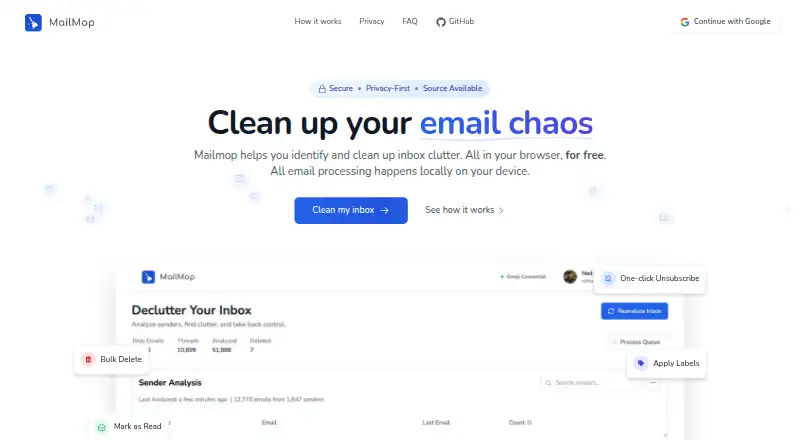
What MailMop is
MailMop analyzes Gmail inboxes to help identify clutter and manage messages in bulk. It groups messages by sender and shows each sender's message count; users can delete, block senders, unsubscribe, mark messages as read, apply labels, and create filters. MailMop uses the Gmail API to analyze headers. When message content is needed to locate unsubscribe links, that processing happens in the browser rather than being sent to MailMop servers. The maker says the service handles inboxes up to 500,000 emails, while its FAQ says there is no processing limit. MailMop works with one inbox at a time, though one Pro subscription covers all of a user's inboxes. The free Basic plan includes inbox analysis, sender statistics, unsubscribe, export, and Gmail links. Pro costs $1.89/mo (annual) and adds one-click bulk actions, bulk deletion, advanced filtering and labels, and sender blocking. MailMop is available on the web or can be self-hosted for free, with source code linked on GitHub. It says it passed Google's CASA 2 security verification and assessment. The service stores account identifiers, login dates, action analytics, subscription data when applicable, and aggregated usage statistics; raw analytics logs are deleted or anonymized after 30 days.
Who it suits
MailMop suits Gmail users looking to find sender-based clutter and manage messages in bulk. It may also suit people who want to self-host an inbox-cleaning tool.
What it does well
- Free Basic plan includes sender statistics and export.
- Unsubscribe tools are included.
- Email content is processed locally when finding unsubscribe links.
- One Pro subscription covers all of a user's inboxes.
- Self-hosting is available for free.
What to know first
- Supports Gmail only.
- Works with one inbox at a time.
- Pro is billed annually at $22.68/year.
- Stores account identifiers and usage-related data.
Limits
Basic does not include bulk delete or archive, one-click bulk actions, advanced filtering and labels, or sender blocking. The service works with one inbox at a time, although one Pro subscription covers all of a user’s inboxes.
Plans
| Plan | Billed and limits | Price |
|---|---|---|
| Basic | Free forever · Unlimited inbox analysis · detailed sender statistics · unsubscribe · export data · Gmail links | Free |
| Pro | Billed annually at $22.68/year · One-click bulk actions · bulk delete · advanced filtering and labels · block senders · one subscription covers all inboxes | $22.68 a year |
As mailmop.com lists them, read 7 Oct 2026. The maker's own page has the final word.
Getting started
- Open https://mailmop.com/ in a web browser.
- Connect a Gmail inbox using the Gmail API.
- Use the free Basic plan for inbox analysis, sender statistics, unsubscribe tools, data export, and Gmail links.
- Choose Pro for one-click bulk actions, bulk deletion, advanced filtering and labels, and sender blocking.
- Self-host MailMop for free using the source code linked on GitHub, if preferred.
Verdict
MailMop combines sender-level inbox analysis with cleanup actions and offers a free Basic plan. Review its Gmail-only support, one-inbox-at-a-time workflow, and listed data handling before choosing it.
Questions
Is MailMop free?
Yes. Basic is free forever and includes unlimited inbox analysis, detailed sender statistics, unsubscribe tools, data export, and Gmail links.
How much does Pro cost?
The pricing note lists paid plans from $1.89/mo (annual). Pro is billed annually at $22.68/year.
Which email providers does MailMop support?
MailMop supports Gmail and uses the Gmail API.
Which platforms are available?
MailMop is available on the web and can be self-hosted.
Does MailMop send email content to its servers?
Email content is processed locally in the browser when MailMop looks for unsubscribe links. It uses the Gmail API to analyze headers.
Can I use MailMop with several inboxes?
MailMop works with one inbox at a time. One Pro subscription covers all of a user’s inboxes.
Facts from MailMop's own pages
- Actions
- Users can delete, block senders, unsubscribe, mark messages as read, apply labels, and create filters. · mailmop.com, 7 Oct 2026
- Capacity
- The homepage says MailMop handles inboxes up to 500,000 emails and its FAQ says there is no processing limit. · mailmop.com, 7 Oct 2026
- Connected services
- The privacy policy names Supabase, Vercel, and Stripe as service providers; MailMop uses Google's Gmail API. · mailmop.com, 7 Oct 2026
- Data collected
- The service stores account identifiers, login dates, action analytics, subscription data when applicable, and aggregated usage statistics. · mailmop.com, 7 Oct 2026
- Data retention
- MailMop says raw analytics logs are automatically deleted or anonymized after 30 days. · mailmop.com, 7 Oct 2026
- Email access
- MailMop uses the Gmail API and accesses headers for analysis and message content locally when finding unsubscribe links. · mailmop.com, 7 Oct 2026
- Intended users
- MailMop is a Gmail inbox-cleaning tool for people seeking to identify clutter and manage email in bulk. · mailmop.com, 7 Oct 2026
- Local processing
- Email analysis and content processing happens in the browser, and email content is not sent to MailMop servers. · mailmop.com, 7 Oct 2026
- Multiple inboxes
- MailMop works with one inbox at a time, and one Pro subscription covers all of a user's inboxes. · mailmop.com, 7 Oct 2026
- Purpose
- MailMop analyzes Gmail inboxes to identify clutter and help users clean it up. · mailmop.com, 7 Oct 2026
- Security
- MailMop says it passed Google's CASA 2 security verification and assessment. · mailmop.com, 7 Oct 2026
- Self-hosting
- The maker says MailMop can be self-hosted for free and links to its source code on GitHub. · mailmop.com, 7 Oct 2026
- Sender insights
- MailMop groups inbox clutter by sender and shows how many messages come from each sender. · mailmop.com, 7 Oct 2026
- Support
- The site lists [email protected] and [email protected] as contact addresses. · mailmop.com, 7 Oct 2026
Where MailMop stands on Freedom251
- Email Cleanup Software#16 of 31